Most teams adopt Kubernetes for the runtime benefits — self-healing pods, horizontal scaling, declarative configuration — but then bolt on a CI/CD tool as an afterthought. The result is a fragile pipeline that can deploy to one environment but cannot manage canary rollouts, automated rollbacks, or multi-cluster promotion with any confidence. Jenkins and Spinnaker solve different halves of that problem, and together they form one of the most mature, production-tested delivery stacks available for Kubernetes in 2026.
In this article we walk through how both tools fit into a Kubernetes delivery workflow, what each one is actually responsible for, how to connect them, and how to set up the deployment strategies that make Kubernetes deployments genuinely safe. Along the way we will look at real configuration, a worked integration example, and the trade-offs worth knowing before you commit to this stack.
The Core Idea: CI Hands Off to CD
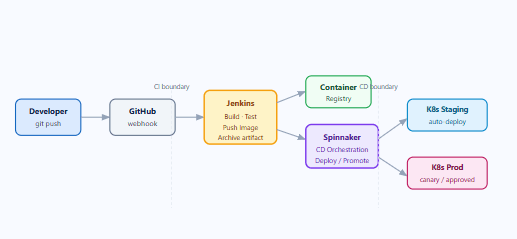
Before diving into either tool, it helps to be precise about the division of responsibilities. Continuous Integration and Continuous Delivery are distinct concerns, and conflating them is the root cause of most pipeline complexity.
Jenkins handles the CI side: it watches your source repositories, runs tests, builds container images, and publishes them to a registry. Its job is to answer the question: is this code safe to promote?
Spinnaker handles the CD side: it watches for new image versions, orchestrates deployments across environments, runs deployment strategy logic (canary, blue/green), and can trigger automated rollbacks if health checks fail. Its job is to answer the question: how do we get this image safely into production?
The handoff between them is a simple artifact — typically a trigger.properties file or a Docker image tag — that Jenkins publishes when a build succeeds and Spinnaker consumes as a pipeline trigger. This clean boundary is what makes the stack scalable as organisations grow.
Understanding the Spinnaker Architecture
Spinnaker is not a monolith — it is a collection of independent microservices, each responsible for a specific concern. Understanding what each one does saves a lot of debugging time when things go wrong.
| Service | Role |
|---|---|
| Deck | The browser-based UI. All pipeline visualisation and manual approval gates live here. |
| Gate | The API gateway. All external communication — including from Jenkins — goes through Gate. |
| Orca | The orchestration engine. Manages pipeline execution, stage dependencies, and retries. |
| Clouddriver | The cloud abstraction layer. Handles all calls to Kubernetes, AWS, GCP, Azure, and other providers. Also indexes and caches deployed resources. |
| Echo | The event bus. Handles incoming webhooks (including from Jenkins) and outgoing notifications (Slack, email, PagerDuty). |
| Igor | The CI integration service. Polls Jenkins and other CI systems; translates build events into Spinnaker pipeline triggers. |
| Front50 | The metadata store. Persists pipeline definitions, application configs, and notification settings. |
| Rosco | The image bakery. Used primarily for VM image baking (AMIs, GCE images); less relevant for pure Kubernetes deployments. |
In practice, Igor and Echo are the services you interact with most when integrating Jenkins. Igor polls Jenkins for build completions, while Echo receives webhook payloads and routes them to the correct pipeline trigger.
Setting Up the Jenkins Side
The Jenkins configuration for Kubernetes-targeted CI pipelines follows a well-established pattern. The key insight is that Jenkins should treat the container image tag as the primary deployable artifact — not a JAR, not a ZIP. Everything downstream in Spinnaker is keyed off that image reference.
The Declarative Jenkinsfile Pattern
A minimal but production-ready Jenkinsfile for a Kubernetes delivery pipeline looks like this. Note the build.properties file at the end — this is the artifact Spinnaker will consume to identify which image version to deploy.
pipeline {
  agent {
    kubernetes {
      yaml """
apiVersion: v1
kind: Pod
spec:
  containers:
  - name: maven
    image: maven:3.9-eclipse-temurin-21
    command: ['sleep', '9999']
  - name: kaniko
    image: gcr.io/kaniko-project/executor:latest
    command: ['sleep', '9999']
"""
    }
  }

  environment {
    REGISTRY      = 'registry.example.com'
    IMAGE_NAME    = 'myapp'
    IMAGE_TAG     = "${env.GIT_COMMIT[0..6]}"
    FULL_IMAGE    = "${REGISTRY}/${IMAGE_NAME}:${IMAGE_TAG}"
  }

  stages {
    stage('Build & Test') {
      steps {
        container('maven') {
          sh 'mvn -B clean verify'
        }
      }
    }

    stage('Build & Push Image') {
      steps {
        container('kaniko') {
          sh """
            /kaniko/executor \
              --context=dir://. \
              --destination=${FULL_IMAGE} \
              --cache=true
          """
        }
      }
    }

    stage('Archive Trigger Artifact') {
      steps {
        sh "echo 'IMAGE_TAG=${IMAGE_TAG}' > build.properties"
        archiveArtifacts artifacts: 'build.properties', fingerprint: true
      }
    }
  }
}
Why Kaniko? Running Docker-in-Docker inside a Kubernetes pod requires privileged mode, which is a significant security concern. Kaniko builds container images from a Dockerfile without requiring root access or a Docker daemon — making it the recommended approach for Kubernetes-native CI.
Connecting Jenkins to Spinnaker
Once Jenkins is producing builds, you need to tell Spinnaker where to find them. This configuration goes into Spinnaker’s Halyard setup (or the equivalent Operator-based config if you are using the Spinnaker Operator for Kubernetes).
# Add Jenkins as a CI master in Spinnaker
hal config ci jenkins enable

hal config ci jenkins master add my-jenkins \
  --address https://jenkins.example.com \
  --username spinnaker-svc \
  --password  # prompts for API token

hal deploy apply
Service account tip: Create a dedicated Jenkins service account for Spinnaker with read access to jobs and build artifacts. Avoid using personal credentials — they break when engineers leave the team. Store the API token in a secrets manager (Vault, AWS Secrets Manager, or Kubernetes Secrets) rather than in Halyard config files directly.
Configuring the Spinnaker Pipeline
With Jenkins registered as a CI master, you can now build a Spinnaker pipeline that triggers automatically on each successful Jenkins build. The pipeline shown below covers a two-stage promotion: automatic deployment to a staging environment, followed by a gated canary deployment to production.
Stage 1 — Jenkins Trigger
In the Spinnaker UI (Deck), navigate to your application, create a new pipeline, and in the Configuration stage add a Jenkins trigger. Select your master (my-jenkins), choose the job name, and specify build.properties as the property file. Spinnaker will parse this file and make ${trigger.properties['IMAGE_TAG']} available to all downstream stages.
Stage 2 — Deploy to Staging
Add a Deploy (Manifest) stage targeting your staging cluster. A typical manifest stage references the image dynamically using the trigger property:
apiVersion: apps/v1
kind: Deployment
metadata:
  name: myapp
  namespace: staging
spec:
  replicas: 2
  selector:
    matchLabels:
      app: myapp
  template:
    metadata:
      labels:
        app: myapp
    spec:
      containers:
      - name: myapp
        image: registry.example.com/myapp:${trigger.properties['IMAGE_TAG']}
        ports:
        - containerPort: 8080
        readinessProbe:
          httpGet:
            path: /actuator/health
            port: 8080
          initialDelaySeconds: 15
          periodSeconds: 10
Stage 3 — Manual Judgment Gate
After the staging deployment, add a Manual Judgment stage. This is one of Spinnaker’s most underrated features — it inserts a human approval step directly into the pipeline, with Slack or email notifications sent automatically via Echo. Only after an authorised team member approves does the pipeline continue to the production deployment.
Deployment Strategies: Where Spinnaker Earns Its Keep
Anyone can write a kubectl apply in a shell script. Spinnaker’s value is in the deployment strategies it manages natively — and this is where the platform genuinely earns its complexity cost.
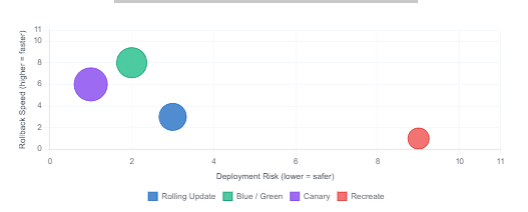
Deployment Strategy Comparison — Risk vs Rollback Speed
Blue/Green Deployments
In a blue/green setup, Spinnaker maintains two identical environments — blue (live) and green (idle). When a new version is ready, Spinnaker deploys it to the idle environment, runs health checks, and then switches traffic by updating the Kubernetes Service selector. The old environment stays intact and can be instantly reinstated if anything goes wrong. The result is zero-downtime deployments with the fastest possible rollback — a single selector change.
The trade-off is cost: you are running double the infrastructure during the switch. For stateful services with large memory footprints, this can be significant. For stateless microservices, however, it is generally the right default.
Canary Deployments
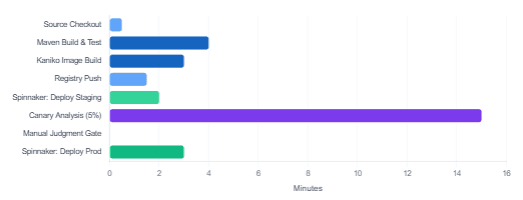
Canary analysis is where Spinnaker’s depth is most visible. Rather than switching all traffic to a new version at once, Spinnaker routes a small percentage — say, 5% — to the new pods while the remaining 95% continues hitting the stable version. Spinnaker then queries your metrics provider (Datadog, Prometheus, New Relic, or Stackdriver) and compares key indicators — latency, error rate, saturation — between the canary and the baseline.
If the canary passes the analysis thresholds, Spinnaker promotes it to 100%. If it fails, the canary pods are terminated automatically and the pipeline is marked as failed — with no manual intervention required. This automated feedback loop is the reason organisations running at scale choose Spinnaker over simpler CD tools.
Canary prerequisite: Automated canary analysis requires that your application emits standard observability signals — request rate, error rate, and latency (the RED method). If your services do not yet expose Prometheus metrics or equivalent, set up instrumentation before adopting canary deployments. Spring Boot applications get this almost for free via Spring Boot Actuator and a Micrometer Prometheus registry dependency.
Typical Pipeline Stage Durations — Jenkins + Spinnaker (minutes)
Jenkins Kubernetes Plugin: Ephemeral Build Agents
One of the most important Jenkins optimisations for Kubernetes environments is the Kubernetes plugin, which replaces static build agents with ephemeral pods. Instead of maintaining a fleet of always-on Jenkins agents, each build spins up a dedicated pod, runs the pipeline, and is destroyed on completion. The benefits compound quickly:
| Traditional Static Agents | Kubernetes Ephemeral Agents |
|---|---|
| Always consuming resources | Pods exist only during builds |
| Environment drift over time | Fresh environment every build |
| Manual scaling | Kubernetes scheduler handles scale-out |
| Fixed tool versions | Per-pipeline container image selection |
| SSH access required | Communicates via Kubernetes API |
The Jenkinsfile shown earlier already uses this pattern via the agent { kubernetes { ... } } block. In it, you define the pod template as inline YAML, selecting exactly the containers your pipeline needs — in that case, a Maven container and a Kaniko container. No other tools are installed, no state leaks between runs.
Key Integration Patterns to Know
Beyond the basic trigger-and-deploy flow, there are three integration patterns worth understanding as your pipeline matures.
Pattern 1 — Image Tag as the Contract
The most robust pipelines treat the image tag as the sole handoff between Jenkins and Spinnaker. Jenkins determines the tag (typically the short Git commit SHA), pushes the image, and records the tag in build.properties. Spinnaker reads the tag, never re-derives it. This makes the pipeline reproducible: given any build.properties artifact from history, you can re-trigger an identical deployment.
Pattern 2 — Registry Polling vs Webhook Trigger
Spinnaker can trigger pipelines in two ways when a new image arrives: by polling the container registry on a schedule, or by receiving a webhook from Jenkins after the push. Webhook triggering via Echo is strictly preferable — it eliminates polling latency (typically 2–5 minutes), reduces API calls to your registry, and gives you an immediate audit trail in the Spinnaker execution history. Configure the Jenkins post-build step to POST to https://<spinnaker-gate>:8084/webhooks/webhook/<pipeline-name> on success.
Pattern 3 — Parameterised Pipelines for Multi-Service Repos
If your repository contains multiple services, avoid creating one Spinnaker pipeline per service by hand. Instead, define a single parameterised pipeline that accepts SERVICE_NAME and IMAGE_TAG as inputs, and have Jenkins POST those values as webhook payload parameters. A single pipeline template then handles deployments for any service in the repo — dramatically reducing pipeline maintenance overhead as the service count grows.
Practical Rollback: What Happens When a Canary Fails
One of the questions teams ask most often is: what exactly happens when a canary analysis fails in Spinnaker? The answer is reassuringly automatic. Spinnaker’s Orca service marks the canary stage as failed, which triggers the configured failure behaviour on that stage. With Automatic Rollback enabled (the recommended setting), Orca instructs Clouddriver to delete the canary ReplicaSet and restore the previous stable Deployment version — which was never removed during the canary rollout, only scaled down.
The entire process — detection, decision, rollback — happens without any human action. Notifications go out via Echo to the configured channels (Slack, email, PagerDuty), and the failed execution is recorded in Front50 with full stage-by-stage logs. Your on-call engineer wakes up to a Slack message and a link to the Spinnaker execution, not a production outage.
Common mistake: Teams sometimes configure canary analysis with thresholds that are too tight for normal traffic variance, resulting in false-positive failures on low-traffic services. Start with loose thresholds (e.g., error rate increase < 5%, p99 latency increase < 20%) and tighten them once you have established a baseline over several successful canary cycles.
Jenkins vs Spinnaker: Knowing the Boundary
A recurring source of confusion for teams adopting this stack is deciding what belongs in Jenkins and what belongs in Spinnaker. The following table provides a practical guide:
| Concern | Belongs In | Why |
|---|---|---|
| Unit and integration tests | Jenkins | Code-centric, needs build toolchain |
| Static analysis / SAST | Jenkins | Runs against source, not deployed artifact |
| Container image build | Jenkins | Needs Docker/Kaniko and source context |
| Image vulnerability scan | Jenkins | Pre-publication gate, before registry push |
| Kubernetes manifest deploy | Spinnaker | Needs cloud provider context and strategy logic |
| Canary / blue-green logic | Spinnaker | Core Spinnaker capability; complex in Jenkins |
| Environment promotion gates | Spinnaker | Multi-env orchestration is Spinnaker’s domain |
| Rollback orchestration | Spinnaker | Requires cloud state awareness; Clouddriver |
| Slack / PagerDuty alerts | Spinnaker (Echo) | Delivery-scoped notifications belong in CD |
When in doubt, ask: does this concern require knowledge of what is currently running in the cluster? If yes, it belongs in Spinnaker. If it only requires knowledge of the source code or build output, it belongs in Jenkins.
When This Stack Makes Sense — and When It Doesn’t
Jenkins and Spinnaker together are genuinely powerful, but the stack carries a meaningful operational cost. Spinnaker’s microservice architecture means you are running eight services at minimum, which requires Kubernetes expertise to operate, monitor, and upgrade. For teams that are already fluent in Kubernetes and running multiple services across multiple environments, that cost is justified and the platform pays for itself quickly in deployment safety and engineering confidence.
For smaller teams with a single cluster and a handful of services, however, the combination may be overkill. In that scenario, GitHub Actions or GitLab CI combined with Argo CD provides a far simpler operational surface with most of the same delivery guarantees. The right question is not “is Spinnaker good?” but “is Spinnaker the right size for our problem?”
What We Learned
In this article, we walked through how Jenkins and Spinnaker divide the CI/CD problem at a natural boundary — Jenkins owns the build and image publication; Spinnaker owns multi-stage, strategy-aware delivery to Kubernetes. We covered Spinnaker’s microservice architecture and the role each service plays, built a practical Jenkinsfile using the Kubernetes plugin with Kaniko for secure in-cluster image builds, and set up the trigger.properties handoff that connects the two systems.
We then explored Spinnaker’s deployment strategies — particularly canary analysis and blue/green switching — and clarified which concerns belong in each tool. The result is a pipeline that is not just automated, but genuinely safe: capable of detecting a failing canary, rolling it back without human intervention, and notifying the right people — all before a single real user hits a broken endpoint.