For several years now, Streamlit has been the go-to choice for Python developers who need a web app fast — no HTML, no JavaScript, no frontend build toolchain. And for small dashboards and quick prototypes it still delivers remarkably well. But the moment an application grows beyond a few screens, Streamlit starts showing its cracks: every state change re-runs the entire script, customisation is limited, and reusing UI components is awkward at best.
Enter Solara. It is a relatively new Python framework that brings React-style component architecture and fine-grained reactive state management to the Python world — without requiring you to write a single line of JavaScript. It runs in Jupyter Notebooks, as a standalone server, and can even be mounted inside a FastAPI application. The question worth asking is whether it is genuinely ready to replace Streamlit in production, or whether it is still a tool looking for its moment. This article gives you the honest picture.
What Solara Actually Is Under the Hood
Solara is built on top of Reacton, a pure-Python implementation of React’s reconciliation model. Instead of running in the browser, Reacton drives ipywidgets — the same widget toolkit that powers interactive controls in Jupyter. Solara wraps this with a higher-level API that feels like writing components, and its built-in server is powered by Starlette and FastAPI, which means it is production-grade from day one.
The key mental model is this: in Solara, your UI is a tree of components. Each component is a plain Python function decorated with @solara.component. When a reactive variable changes, Solara re-renders only the components that depend on that variable — not the whole page. That distinction is, in essence, the core of what separates Solara from Streamlit architecturally.
Platform coverage: Solara apps run on JupyterLab, Jupyter Notebook, Voilà, Google Colab, Databricks, JetBrains Datalore, and as standalone web servers. That single codebase covers virtually every environment a data scientist or engineer is likely to work in.
Getting Started in Three Commands
Installation is straightforward. Solara is available on PyPI and installs cleanly into any Python 3.8+ virtual environment.
# 1. Install Solara
pip install solara

# 2. Create your app file (sol.py) and run it
solara run sol.py

# The dev server starts with hot-reload at http://localhost:8765
# Changes to sol.py are picked up automatically — no restart needed
The development server supports hot code reloading out of the box. As soon as you save your file, the browser updates automatically. This alone makes the development loop noticeably faster than Streamlit’s page-wide reruns during active development.
Core Concepts: Components and Reactive State
Before looking at a real example, it is worth understanding the two building blocks that everything else in Solara rests on.
Components
A Solara component is a Python function decorated with @solara.component. It can accept arguments, compose other components, and maintain its own local state. Crucially, components are reusable — you can call the same component multiple times in a page and each instance manages its own state independently. This is something Streamlit simply cannot do cleanly.
Reactive Variables
Solara offers two kinds of state. Global state is created with solara.reactive() at the module level and is shared across all components that reference it. Local state, scoped to a single component instance, is created with solara.use_state() or solara.use_reactive() inside the component function. When a reactive variable’s .value changes, Solara re-executes only the components that read that variable — nothing more.
Use
solara.reactive()for data shared across multiple components (filters, selected items, fetched data). Usesolara.use_state()for UI state that belongs to a single widget, like whether a dropdown is open.
A Real Example: Interactive Sales Dashboard
The following example builds a small sales dashboard. It demonstrates global reactive state, a reusable component, and Solara’s built-in chart and data-table widgets — all in under 60 lines of Python.
# sol.py — run with: solara run sol.py
import solara
import pandas as pd
import plotly.express as px

# ── Global reactive state ─────────────────────────────────────────────────
selected_region = solara.reactive("All")

# ── Sample data ───────────────────────────────────────────────────────────
df = pd.DataFrame({
    "region":  ["North", "North", "South", "South", "East", "East"],
    "month":   ["Jan", "Feb", "Jan", "Feb", "Jan", "Feb"],
    "revenue": [42000, 51000, 33000, 37000, 58000, 62000],
})

# ── Reusable summary card component ──────────────────────────────────────
@solara.component
def SummaryCard(label: str, value: str):
    with solara.Card(margin=4):
        solara.Text(label, style={"color": "#64748b", "fontSize": "13px"})
        solara.Text(value, style={"fontSize": "24px", "fontWeight": "700"})

# ── Main page component ────────────────────────────────────────────────────
@solara.component
def Page():
    # Filter data based on selected region
    filtered = (
        df if selected_region.value == "All"
        else df[df["region"] == selected_region.value]
    )
    total_revenue = filtered["revenue"].sum()

    solara.Title("Sales Dashboard")

    # Region selector — updates the global reactive variable
    solara.Select(
        label="Filter by region",
        values=["All", "North", "South", "East"],
        value=selected_region,
    )

    # Summary card using the reusable component defined above
    SummaryCard(label="Total Revenue", value=f"${total_revenue:,.0f}")

    # Revenue bar chart
    fig = px.bar(
        filtered, x="month", y="revenue", color="region",
        title="Revenue by Month", barmode="group",
    )
    solara.FigurePlotly(fig)

    # Data table
    solara.DataFrame(filtered)
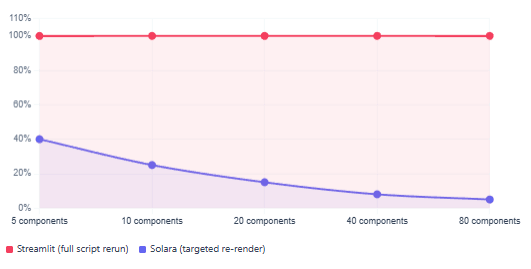
Notice that when the user picks a different region from the dropdown, Solara re-executes only the Page component — not the entire script file. For a small example like this the difference is invisible, but as the application grows and components become more numerous and expensive to render, the performance gap versus Streamlit becomes very real.
State Management: Where Solara Pulls Clearly Ahead
The most practical difference between the two frameworks is in how they handle state changes. Streamlit re-runs the entire script from top to bottom on every interaction. For a ten-line prototype this is fine. For an app with database queries, API calls, or heavy data transformations, it means every button click potentially re-executes all of that work — even the parts that have nothing to do with what the user just changed.
Solara’s reactive model targets re-execution precisely. Only the components that subscribe to a changed reactive variable are re-run. Everything else stays exactly as it was. Furthermore, because state is explicit — you declare it at the top of your file or inside a component — it is easy to reason about, test, and pass between components without relying on Streamlit’s session state dictionary, which can become difficult to manage as an app grows.
Re-render scope on a single state change
Deploying to Production With FastAPI
One of the more compelling features of Solara is how naturally it integrates with FastAPI. Because Solara’s server is built on Starlette — the same foundation that FastAPI uses — you can mount a Solara app directly inside an existing FastAPI application. This means you can serve REST API endpoints and your Solara UI from the same process, with shared authentication middleware and a single deployment unit.
# main.py — Solara mounted inside a FastAPI app
from fastapi import FastAPI
import solara.server.fastapi

app = FastAPI(title="My Data Platform")

# Your existing REST endpoints
@app.get("/api/health")
def health():
    return {"status": "ok"}

# Mount the Solara app at /dashboard
app.mount("/dashboard", app=solara.server.fastapi.app)

# Run with:
# SOLARA_APP=sol.py uvicorn main:app --host 0.0.0.0 --p
For Streamlit, achieving this kind of API-plus-UI colocation requires running two separate processes and wiring them together with a reverse proxy. Solara gives you both in one, which simplifies infrastructure considerably — especially in containerised deployments.
Threading note: Solara uses WebSockets to push reactive updates to the browser. When deploying with uvicorn or gunicorn, ensure you allow at least one thread per concurrent user. For multi-worker deployments, refer to the Solara self-hosted deployment guide on handling shared state across workers.
CSS Customisation — A Real Limitation Solved
Streamlit’s default components look clean out of the box, but customising them beyond a narrow set of theme variables is notoriously painful. Solara takes a different approach: every component accepts a style dictionary, and you can pass CSS properties directly as Python dictionaries. This means your Solara app can look exactly the way your organisation’s design system requires, without injecting raw CSS strings through workarounds.
@solara.component
def StyledHeader(title: str):
    solara.Text(
        title,
        style={
            "fontSize":    "28px",
            "fontWeight":  "800",
            "color":       "#3730a3",
            "marginBottom":"16px",
            "fontFamily":  "'Segoe UI', sans-serif",
        }
    )
Additionally, because Solara’s built-in components are backed by Vuetify under the hood, they support a Material Design component library without any additional dependencies. You get cards, dialogs, data tables, sliders, and navigation drawers — all from pure Python.
Solara vs Streamlit — Head to Head
By now the picture should be fairly clear, but it helps to see the comparison laid out explicitly. Both frameworks genuinely excel in different scenarios, and the right choice depends on what you are building.
Feature capability comparison — Solara vs Streamlit
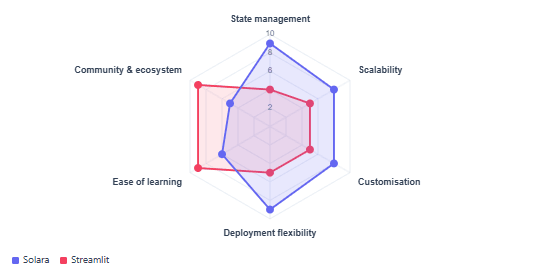
| Dimension | Solara | Streamlit |
|---|---|---|
| Learning curve | Moderate — React concepts required | Very gentle — works like a script |
| State management | Fine-grained reactive, explicit | Full rerun on every change |
| Component reuse | First-class — @solara.component | Awkward — requires functions and workarounds |
| CSS / styling | Full CSS via style dicts + Vuetify | Limited — workarounds with st.markdown |
| Jupyter support | Native — same code runs in notebook and browser | Separate tools (Streamlit ≠ Jupyter) |
| FastAPI integration | Native mount via solara.server.fastapi | Separate process + reverse proxy needed |
| Scalability | Designed for large, complex apps | Performance degrades at scale |
| Community & ecosystem | Growing but smaller | Large, mature, many third-party components |
| Default component polish | Good, but fewer ready-made widgets | Visually refined out of the box |
| Production deployment | Built-in Starlette/FastAPI server | Dedicated server, straightforward but separate |
When to Choose Solara, and When to Stick With Streamlit
Streamlit remains the right tool when speed of delivery matters more than anything else. A data analyst who needs a shareable dashboard by end of day, a researcher publishing a quick interactive figure, or a team prototyping an ML demo for stakeholders — these are all Streamlit’s home turf. The framework handles that use case with very little friction.
Solara, on the other hand, earns its place when the application grows beyond the prototype stage. If you are building something with multiple pages, complex shared state, reusable branded components, real-time updates over WebSockets, or an API that lives alongside the UI, Solara’s architecture pays dividends that Streamlit simply cannot match. It is also the superior choice whenever the same code needs to run both inside a Jupyter Notebook and as a deployed web app — a common situation in data science teams.
Furthermore, if your team is already familiar with React’s component-based mental model — which is increasingly common given how widespread JavaScript frontend development has become — Solara will feel natural almost immediately. The learning curve is moderate rather than steep, and the payoff in application maintainability is significant.
What We Learned
Solara is a React-style Python web framework built on Reacton and ipywidgets, with a production-ready server powered by Starlette and FastAPI. We explored its two core primitives — @solara.component for reusable UI building blocks and solara.reactive() for explicit state that triggers targeted re-renders rather than full-page reruns. We built a working interactive sales dashboard, saw how to mount Solara inside an existing FastAPI application with a single app.mount() call, and compared the two frameworks across ten practical dimensions.
The conclusion is nuanced but clear: Streamlit remains the fastest path from zero to a working prototype, while Solara is the more architecturally sound choice for applications that need to scale, be maintained by a team, or live alongside a REST API. The answer to whether Solara is a “Streamlit killer” is that it does not need to be — it serves a different point on the complexity curve, and for production-grade Python web apps, it is currently the strongest pure-Python option available.