
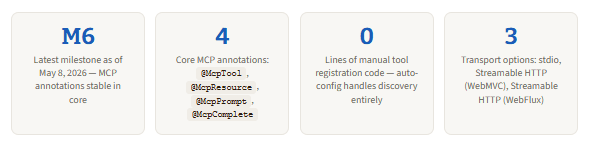
Spring AI 2.0-M6, shipped May 8, 2026, is the milestone where building an MCP tool-calling agent in Java stops feeling like plumbing. The annotation-based API — @McpTool, @McpToolParam, McpSyncRequestContext — is now in Spring AI core, not in a community incubator. This walkthrough skips the theory and goes straight to annotated, runnable code: server setup, tool registration, async progress reporting, the error surface that bites almost every team the first time, and the three transport options explained in one table. No boilerplate; just the 50 lines that matter.
What actually changed in M6
Spring AI has supported MCP since the community donated the MCP Java SDK to Anthropic in late 2024. But for most of its early life, the annotation layer lived in a separate incubating project — spring-ai-community/mcp-annotations — with its own package namespace (org.springaicommunity.mcp), its own release cycle, and a different import path from the main Spring AI starters. Teams building MCP servers had to wire up two separate dependency trees and reconcile version mismatches manually.
Spring AI 2.0-M3 started the consolidation by moving MCP annotations into org.springframework.ai.mcp.annotation. M6, released May 8, 2026, completed it: the annotations are stable, the transport auto-configuration is unified, and the older ToolCallback imperative API is still present but no longer the recommended path. According to the InfoQ Java roundup, M6 is the sixth milestone and the last significant API-shaping release before the GA candidate. If you are starting a project today, this is the API to use.
Step 1 — project setup and the one dependency that matters
Start at start.spring.io with Spring Boot 4.0.x, Java 21+, and Maven. The only Spring AI dependency you need for an MCP server with HTTP transport is spring-ai-starter-mcp-server-webmvc. Everything else — annotation scanning, JSON schema generation, transport wiring, server lifecycle — is handled by auto-configuration once this starter is on the classpath.
pom.xml — BOM + MCP server starter
<dependencyManagement>
  <dependencies>
    <dependency>
      <groupId>org.springframework.ai</groupId>
      <artifactId>spring-ai-bom</artifactId>
      <version>2.0.0-M6</version>   <!-- always pin to the BOM, never individual starters -->
      <type>pom</type>
      <scope>import</scope>
    </dependency>
  </dependencies>
</dependencyManagement>

<dependencies>
  <!-- Streamable HTTP transport (WebMVC / blocking).
       Use spring-ai-starter-mcp-server-webflux for reactive,
       or spring-ai-starter-mcp-server for stdio only. -->
  <dependency>
    <groupId>org.springframework.ai</groupId>
    <artifactId>spring-ai-starter-mcp-server-webmvc</artifactId>
  </dependency>
  <dependency>
    <groupId>org.springframework.boot</groupId>
    <artifactId>spring-boot-starter-web</artifactId>
  </dependency>
</dependencies>

<!-- M-series releases are in Spring's milestone repo, not Maven Central -->
<repositories>
  <repository>
    <id>spring-milestones</id>
    <url>https://repo.spring.io/milestone</url>
  </repository>
</repositories>
M-series builds live in the Spring milestone repositoryMaven Central does not carry milestone releases. If you omit the
spring-milestonesrepository,mvn dependency:resolvewill fail with a 404 for every Spring AI artifact. This is the most common first-time setup error.
Step 2 — application.properties: four lines to configure the server
The auto-configuration does the heavy lifting, but four properties control the most important runtime decisions: server name (visible to MCP clients in tool discovery), version, transport protocol, and the HTTP endpoint path.
src/main/resources/application.properties
# Server identity — shown to MCP clients during capability negotiation
spring.ai.mcp.server.name=order-tools
spring.ai.mcp.server.version=1.0.0

# STREAMABLE = Streamable HTTP (MCP spec 2025-03-26+)
# SSE is kept for backward compatibility but deprecated for new servers
spring.ai.mcp.server.protocol=STREAMABLE

# The MCP endpoint path — clients connect to POST /mcp and GET /mcp
# Default is /mcp if omitted; set explicitly for clarity
spring.ai.mcp.server.streamable-http.mcp-endpo
That is genuinely all the configuration a production Streamable HTTP server needs. Notice there is no bean declaration, no @EnableMcp annotation, and no transport factory to instantiate — Spring Boot’s auto-configuration picks up every @McpTool-annotated method in the context at startup and registers them without further instruction.
Step 3 — the tool class: 25 lines, three tools, zero ceremony
The tool class is a standard Spring @Component. Every method annotated with @McpTool becomes a callable tool. Spring AI reads the method signature, generates a JSON schema from the parameter types and @McpToolParam descriptions, and registers everything at application startup. The LLM uses the description fields — not the parameter names — to decide when and how to call each tool, so treat them as documentation for the model, not for humans.
OrderTools.java — three annotated tools, auto-registered at startup
package com.example.mcp.tools;

import org.springframework.ai.mcp.annotation.McpTool;
import org.springframework.ai.mcp.annotation.McpToolParam;
import org.springframework.stereotype.Component;
import java.util.List;

@Component
public class OrderTools {

    @McpTool(
        name        = "get_order_status",
        description = "Returns the current status of an order. Use this when the user asks " +
                      "about an order's state, delivery progress, or shipment tracking."
    )
    public OrderStatus getOrderStatus(
        @McpToolParam(description = "The order ID to look up, e.g. ORD-00123", required = true)
        String orderId
    ) {
        // real implementation queries your order service / database
        return new OrderStatus(orderId, "SHIPPED", "2026-06-04");
    }

    @McpTool(
        name        = "list_recent_orders",
        description = "Returns the most recent orders for a customer. Use when the user asks " +
                      "to see their order history or recent purchases."
    )
    public List<OrderSummary> listRecentOrders(
        @McpToolParam(description = "Customer ID", required = true)
        String customerId,
        @McpToolParam(description = "Maximum number of orders to return, 1-50", required = false)
        Integer limit
    ) {
        int effectiveLimit = (limit != null && limit > 0) ? Math.min(limit, 50) : 10;
        return orderService.findRecentByCustomer(customerId, effectiveLimit);
    }

    @McpTool(
        name        = "cancel_order",
        description = "Cancels an order that has not yet shipped. Returns a confirmation or " +
                      "an error message if cancellation is not possible."
    )
    public String cancelOrder(
        @McpToolParam(description = "Order ID to cancel", required = true)  String orderId,
        @McpToolParam(description = "Reason for cancellation", required = false) String reason
    ) {
        return orderService.cancel(orderId, reason);
    }

    // Return types are serialised to JSON automatically via Jackson 3.
    // Use Java records or POJOs with public getters — both work.
    public record OrderStatus(String orderId, String status, String estimatedDelivery) {}
    public record OrderSummary(String orderId, String date, double total) {}
}
A few things worth noting in this snippet. First, @McpToolParam on an optional parameter sets required = false — Spring AI omits a required constraint from the generated JSON schema for that parameter, which means the model can call the tool without supplying it. Second, Java records work directly as return types: Spring AI serialises them to JSON via Jackson 3 (Spring AI 2.0 migrated from com.fasterxml.jackson to tools.jackson in M3). Third, the @Component annotation is all that is needed for registration — no explicit @Bean factory method, no List<ToolSpecification> to build.
Step 4 — progress reporting and logging with McpSyncRequestContext
For tools that do meaningful work — a database export, a file transformation, a multi-step API chain — the MCP protocol supports progress notifications that the client can surface to the user in real time. McpSyncRequestContext is the injection point for this. When you add it as the first parameter of an @McpTool method, Spring AI injects the live session context automatically. Critically, it is excluded from the generated JSON schema: the LLM never sees it and cannot pass a value for it.
ExportTools.java — progress notifications + structured logging via McpSyncRequestContext
import org.springframework.ai.mcp.annotation.McpTool;
import org.springframework.ai.mcp.annotation.McpToolParam;
import org.springframework.ai.mcp.server.McpSyncRequestContext;
import org.springframework.stereotype.Component;

@Component
public class ExportTools {

    @McpTool(
        name        = "export_orders_csv",
        description = "Exports all orders for a date range to a CSV file and returns the download URL."
    )
    public String exportOrdersCsv(
        McpSyncRequestContext context,       // injected by Spring AI; NOT in the JSON schema
        @McpToolParam(description = "ISO start date, e.g. 2026-01-01", required = true)  String from,
        @McpToolParam(description = "ISO end date, e.g. 2026-03-31", required = true)    String to
    ) {
        context.info("Starting CSV export for range: " + from + " ? " + to);

        List<Order> orders = orderRepo.findByDateRange(from, to);
        context.progress(p -> p.progress(0.3).total(1.0).message("Fetched " + orders.size() + " orders"));

        String csv = csvWriter.write(orders);
        context.progress(p -> p.progress(0.7).total(1.0).message("CSV serialisation complete"));

        String url = fileStore.upload(csv, "orders-export.csv");
        context.progress(p -> p.progress(1.0).total(1.0).message("Upload complete"));
        context.info("Export ready at: " + url);

        return url;
    }
}
The context.info() call sends a log message back to the MCP client at INFO level — visible in Claude Code’s output pane and in any client that surfaces MCP logging events. context.progress() sends a structured progress notification. The progress and total fields are floating-point fractions (0.0–1.0); the message string is optional but strongly recommended for any multi-step tool because it is what the user actually reads while waiting.
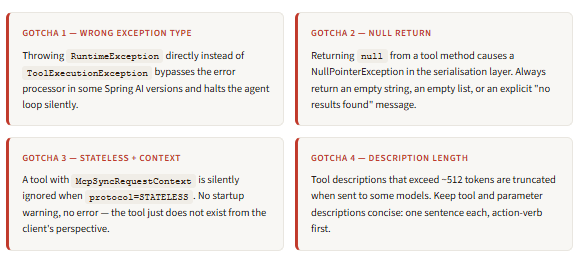
McpSyncRequestContext is stateful — stateless mode silently drops itIf you configure spring.ai.mcp.server.protocol=STATELESS, any tool method with a McpSyncRequestContext parameter is silently ignored at startup — the tool is never registered and never called. This is a known issue in M6. Only use McpSyncRequestContext with STREAMABLE (stateful) transport. For stateless deployments, omit the context parameter entirely.
Step 5 — async tool calls with Mono and McpAsyncRequestContext
For tools that call external services asynchronously — HTTP APIs, reactive database queries, non-blocking I/O — you can return Mono<T> or Flux<String> directly from an @McpTool method. Spring AI detects the reactive return type and switches the tool to async execution automatically. The async context equivalent is McpAsyncRequestContext, which provides the same progress and logging API but returns Mono<Void> from notification calls.
AsyncSearchTools.java — reactive tool with Mono return and async progress
import org.springframework.ai.mcp.server.McpAsyncRequestContext;
import reactor.core.publisher.Mono;
import reactor.core.scheduler.Schedulers;

@Component
public class AsyncSearchTools {

    @McpTool(
        name        = "semantic_search",
        description = "Runs a semantic search over the product catalogue and returns ranked results."
    )
    public Mono<SearchResult> semanticSearch(
        McpAsyncRequestContext context,      // async equivalent of McpSyncRequestContext
        @McpToolParam(description = "Natural language search query", required = true) String query,
        @McpToolParam(description = "Maximum results to return (default 10)", required = false) Integer topK
    ) {
        return context.info("Searching for: " + query)
            .then(vectorStore.similaritySearch(query, topK != null ? topK : 10))
            .flatMap(results ->
                context.progress(p -> p.progress(1.0).total(1.0).message("Found " + results.size() + " results"))
                       .thenReturn(new SearchResult(query, results))
            )
            .subscribeOn(Schedulers.boundedElastic()); // offload blocking I/O from the event loop
    }

    public record SearchResult(String query, List<String> hits) {}
}
The subscribeOn(Schedulers.boundedElastic()) call is important. If your reactive chain ultimately calls a blocking API — most JDBC drivers, most file I/O — you must offload it to a scheduler that has blocking capacity. Omitting this in a WebFlux-based server blocks the Netty event loop and causes latency spikes on every subsequent request.
The error surface that bites almost everyone
This is the section most tutorials skip. When a tool method throws an exception, the behaviour depends on where in the stack the exception originates, and it has changed between Spring AI versions in ways that caused real production incidents.
The original bug: unchecked exceptions terminated the agent loop
In early Spring AI 1.0 milestones, if a tool threw any exception that was not a ToolExecutionException, the SyncMcpToolCallback caught a CallToolResult with isError = true and re-threw it as an IllegalStateException. That exception propagated up through the DefaultToolCallingManager, bypassed the error processor, and terminated the entire agent loop. The model never received an error message; the chat just hung. This was tracked as GitHub issue #2857 and fixed in subsequent milestones.
In M6, the correct contract is: throw a ToolExecutionException for expected tool failures. The framework catches it, calls the ToolExecutionExceptionProcessor, serialises the message into the tool result content, and sends it back to the model as a structured error. The model can then reason about the error and either retry, ask the user for clarification, or surface a human-readable message.
OrderTools.java — correct error handling: ToolExecutionException for expected failures
import org.springframework.ai.tool.execution.ToolExecutionException;

@McpTool(
    name        = "cancel_order",
    description = "Cancels an order that has not yet shipped."
)
public String cancelOrder(
    McpSyncRequestContext context,
    @McpToolParam(description = "Order ID to cancel", required = true)  String orderId,
    @McpToolParam(description = "Reason for cancellation", required = false) String reason
) {
    Order order = orderRepo.findById(orderId)
        .orElseThrow(() -> new ToolExecutionException(
            "Order not found: " + orderId + ". Verify the order ID and try again."
        ));

    if ("SHIPPED".equals(order.status())) {
        // This message is returned to the model as tool result content,
        // NOT as a Java exception that would break the agent loop.
        throw new ToolExecutionException(
            "Cannot cancel order " + orderId + ": it has already shipped. " +
            "Consider requesting a return instead."
        );
    }

    context.info("Cancelling order: " + orderId);
    orderService.cancel(orderId, reason);
    return "Order " + orderId + " has been cancelled successfully.";
}
The model receives the ToolExecutionException message as a structured tool result. A well-written message — actionable, specific, suggesting next steps — allows the agent to respond sensibly rather than halting. Avoid stack trace fragments in the message: they are noise to the model and may expose internal implementation details.
Transport options: picking the right one
Transport selection is a one-time architectural decision that is harder to change later than it looks. The three choices map cleanly to deployment scenarios, and the M6 documentation is explicit: SSE is a legacy path for backward compatibility; new servers should start with Streamable HTTP or stdio depending on their scope.
| Transport | Starter | Protocol property | Best for | Avoid when |
|---|---|---|---|---|
| stdio | spring-ai-starter-mcp-server | N/A — default | Local tooling, Claude Code desktop integration, single-user developer tools | Multi-user, networked, or containerised deployments — no HTTP |
| Streamable HTTP (WebMVC) | spring-ai-starter-mcp-server-webmvc | STREAMABLE | Standard production servers; blocking Spring MVC stack; most enterprise Java services | Stateless horizontal scaling — use STATELESS variant; or when reactive is required |
| Streamable HTTP (WebFlux) | spring-ai-starter-mcp-server-webflux | STREAMABLE | High-concurrency reactive workloads; services already on WebFlux; virtual-thread-heavy deployments | Teams unfamiliar with reactive programming — debugging is harder |
| SSE | spring-ai-starter-mcp-server-webmvc | SSE | Connecting to legacy MCP clients that predate the Streamable HTTP spec | New servers — SSE is deprecated in MCP spec 2025-03-26+ |
Connecting the client side in three lines
The server side is done. On the client side — a Spring Boot application that wants to call your tools via a language model — the setup is equally concise. Declare the server connection in application.yml, and Spring AI auto-provisions a ToolCallbackProvider bean that you pass to ChatClient.
application.yml — MCP client: register the remote server connection
spring:
  ai:
    mcp:
      client:
        streamable-http:
          connections:
            order-tools:           # logical name — used in logs and metrics
              url: http://localhost:8081/mcp
    openai:                        # or anthropic, ollama, vertexai, etc.
      api-key: ${OPENAI_API_KEY}
      chat:
        options:
          model: gpt-4o
AgentService.java — ChatClient with MCP tools injected automatically
import org.springframework.ai.chat.client.ChatClient;
import org.springframework.ai.mcp.client.McpToolCallbackProvider;
import org.springframework.stereotype.Service;

@Service
public class AgentService {

    private final ChatClient chatClient;

    public AgentService(ChatClient.Builder builder,
                        McpToolCallbackProvider toolProvider) {
        // toolProvider is auto-configured — it holds all tools from all registered MCP servers
        this.chatClient = builder
            .defaultTools(toolProvider)  // tools available on every call — no per-call injection needed
            .build();
    }

    public String ask(String userMessage) {
        return chatClient.prompt()
            .user(userMessage)
            .call()
            .content();
        // ChatClient handles the full tool-call loop:
        // 1. sends message to model
        // 2. model returns a tool call request
        // 3. ChatClient executes the tool via MCP
        // 4. sends tool result back to model
        // 5. returns final model response to your code
    }
}
The full tool-calling loop — model requests a tool, client executes it, result goes back to the model, model produces a final answer — is handled entirely by ChatClient. Your application code calls chatClient.prompt().user(message).call().content() and receives the final answer. The intermediate tool calls are invisible to your code unless you explicitly subscribe to them via the Advisors API.
Registering with Claude Code (stdio path)
For local development, the fastest way to test your server is to register it with Claude Code using the stdio transport. Build a runnable JAR, add a stdio configuration block, and Claude Code spawns your server as a child process on demand.
Shell — package and register with Claude Code (stdio transport)
# 1. Build the runnable JAR
./mvnw clean package -DskipTests

# 2. Register with Claude Code (HTTP transport — server must already be running)
claude mcp add --transport http order-tools http://localhost:8081/mcp

# OR for stdio transport (Claude Code spawns the JAR directly):
# Claude Code config file: ~/.claude/claude_desktop_config.json
{
  "mcpServers": {
    "order-tools": {
      "command": "java",
      "args": [
        "-Dspring.ai.mcp.server.stdio=true",
        "-Dspring.main.web-application-type=none",
        "-Dlogging.pattern.console=",    // silence console logs — MCP uses stdout
        "-jar", "/absolute/path/to/order-tools.jar"
      ]
    }
  }
}
Silence console logging for stdio transportstdio MCP uses
stdoutfor the protocol framing. Any log output from Spring Boot that goes tostdoutcorrupts the transport layer and causes parse errors on the client side. The-Dlogging.pattern.console=flag disables console logging entirely. Route logs to a file instead with-Dlogging.file.name=/tmp/mcp-server.logto preserve them for debugging.
What we learned
Spring AI 2.0-M6 brings MCP tool-calling from plumbing to product. The annotations — @McpTool, @McpToolParam, McpSyncRequestContext — are now in org.springframework.ai.mcp.annotation in Spring AI core, not in a community incubator. Auto-configuration handles tool discovery, JSON schema generation from method signatures, and transport lifecycle with no manual bean declarations. A working MCP server genuinely fits in 50 lines of application code: four properties, a @Component, and annotated methods.
The areas that require deliberate attention are the error surface and transport selection. Throwing plain RuntimeException from a tool method bypassed the error processor in early milestones and halted the agent loop; the correct contract is ToolExecutionException with a model-readable message. McpSyncRequestContext — the gateway to progress reporting and structured logging — is silently ignored in STATELESS protocol mode, a known issue in M6. Transport selection is a one-time decision: stdio for local tooling,
Streamable HTTP (WebMVC) for standard production services, Streamable HTTP (WebFlux) for reactive stacks. SSE is deprecated and should not be chosen for new servers. On the client side, declaring the server URL in application.yml and passing the auto-configured McpToolCallbackProvider to ChatClient is sufficient for the full agentic tool-calling loop.






