Software development is entering a new phase driven by Large Language Models (LLMs). These models allow developers to move beyond deterministic, rule-based systems and build applications that can interpret natural language, perform reasoning tasks, and generate structured outputs.
However, LLMs alone are not sufficient for production systems. Real-world AI applications are composed of multiple layers, including orchestration, data access, tool integration, and protocol-driven communication. This is where concepts like MCP (Model Context Protocol) and tools like LangChain come in.
This article examines how AI systems actually work in practice. It moves from foundational concepts to real implementation, showing how LLMs, MCP, and LangChain fit together.
1. What Are Large Language Models?
A Large Language Model (LLM) is a system that predicts the next word (or token) in a sentence based on what came before it. It is built using a transformer architecture, which helps the model understand how words relate to each other in context. Instead of storing facts like a database, it learns patterns from large amounts of text.
When you give an LLM a prompt, it first breaks the text into smaller pieces called tokens. These tokens are turned into numbers and passed through several layers in the model. LLMs are trained on massive datasets that include books, websites, and code. During training, the model learns grammar, meaning, and even some reasoning patterns. This is why it can answer questions, write code, and explain concepts.
However, LLMs have limits. They do not truly “know” facts—they generate answers based on probability, which means they can sometimes be wrong or make things up. They also do not have real-time knowledge unless connected to external systems.
Another important point is that LLMs do not remember past interactions unless you include that context again. Each request is handled on its own.
Because of these limits, LLMs are best used as a core engine. To build useful applications, they need to be combined with tools, memory, and orchestration layers—this is where things like MCP and LangChain come in.
2. Why LLMs Require External Tools
When moving from experimentation to production, the limitations of LLMs become clear. While they are powerful for generating text and reasoning over inputs, they are not complete systems on their own. In real applications, you begin to notice gaps around consistency, state management, and integration with external systems.
One major limitation is that LLMs are stateless. They do not remember past interactions unless we explicitly pass that context every time, which makes multi-step workflows harder to manage. They also lack real-time knowledge, meaning anything outside their training data must be fetched from external sources. On top of that, LLMs are not deterministic. The same input can produce different outputs, which can introduce unpredictability in production environments.
Most importantly, LLMs cannot take action by themselves. They cannot query a database, call APIs, or interact with our backend systems unless we connect them to those capabilities. This is why building real applications requires more than just an LLM. It requires tools, orchestration, and structured ways to extend what the model can do.
3. The Role of MCP in Tool Integration
As AI systems become more complex, simply connecting tools to models is no longer enough. What is needed is a consistent and structured way for models to interact with tools, data, and context. Without this structure, applications quickly become difficult to scale and maintain.
This is where the Model Context Protocol, or MCP, comes in. MCP provides a clear and standardized approach for passing context to models, describing the tools they can use, and defining how those tools are invoked. It also helps manage how inputs and outputs move between different parts of the system, making the overall flow more predictable.
Instead of tightly coupling your application logic to a specific model or framework, MCP introduces a protocol layer that separates these concerns. This makes it easier to swap models, reuse components, and evolve your system over time without major rewrites.
MCP becomes especially important when you consider the challenges of building without it. Tool integration tends to be inconsistent, context handling varies across components, and systems often become tightly coupled. With MCP in place, tools become easier to discover and use, context flows are more structured, and interoperability across systems improves.
In many ways, MCP acts like an API contract between LLMs and the external world, allowing agents to operate in a more reliable and extensible environment.
4. Orchestration Layer: What LangChain Actually Does
If MCP defines how components communicate, LangChain focuses on how they are orchestrated within an application. It provides abstractions that help developers build structured AI workflows and manage interactions between models, tools, and data. Rather than replacing the LLM, LangChain organizes how the model is used so that complex tasks can be handled in a more controlled and scalable way.
Some Responsibilities of LangChain include:
- Prompt Management: LangChain formalizes prompts into templates, making them reusable and easier to maintain.
- Chains (Deterministic Workflows): Chains let you define step-by-step pipelines in which each stage has a clear responsibility.
- Tool Integration: LangChain enables models to call external tools in a structured way, often aligned with protocols like MCP.
- Memory Management: It provides mechanisms for persisting and managing context across interactions.
- Agents (Dynamic Execution): Agents introduce decision-making, allowing the system to choose tools and actions at runtime.
The big picture is that MCP standardizes how components communicate, LangChain orchestrates how tasks are executed, and LLMs provide the reasoning capability, and together they form the foundation of modern AI systems.
5. Putting It Together: System Architecture Overview
A production-ready AI system typically includes:
- Interface Layer: Handles user input through REST APIs, chat interfaces, or web and mobile UIs, and is responsible for request formatting and response delivery
- Application Layer: Validates incoming data, enforces business rules, manages routing logic, and controls how requests flow through the system
- Orchestration Layer (LangChain): Defines workflows, chains, and agents, coordinating multi-step tasks and managing how the LLM interacts with tools and context
- Protocol Layer (MCP): Standardizes how tools are accessed, how context is passed, and how different components communicate in a consistent and structured way
- LLM Layer: Provides reasoning, natural language understanding, and text generation capabilities, forming the core intelligence of the system
- Data and Tool Layer: Includes databases, APIs, vector stores, and external services that supply real-time data and enable the system to take actions
- Safety Layer: Applies deterministic rules, validation checks, and guardrails to ensure outputs are safe, compliant, and aligned with expected behavior
Each layer is responsible for a specific concern, and the system only works effectively when all layers are properly integrated.
6. A Practical Walkthrough: Quarkus + LangChain + MCP
To understand how these pieces come together in a real system, let’s build a simple AI service using Quarkus, LangChain4j, and MCP concepts. In this example, we will create a customer support assistant that can answer general questions and also call tools to fetch live information such as order status and system time. The goal is to show how an LLM is combined with orchestration and structured tool access to form a working application.
We start by setting up dependencies and configuration. Quarkus provides a clean runtime for building Java services, while LangChain4j integrates LLM capabilities directly into the application.
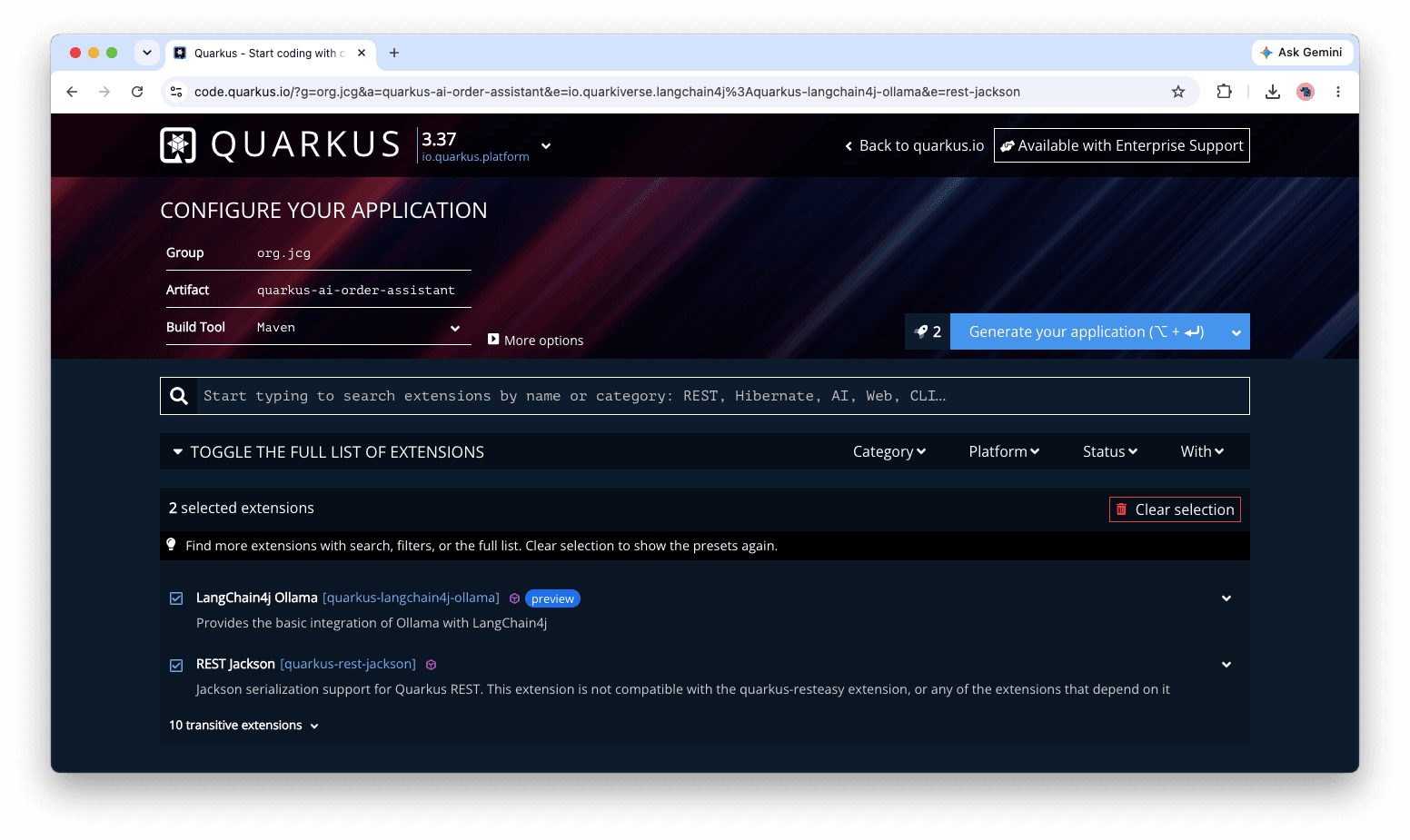
        <dependency>
            <groupId>io.quarkus</groupId>
            <artifactId>quarkus-rest</artifactId>
        </dependency>
        <dependency>
            <groupId>io.quarkus</groupId>
            <artifactId>quarkus-rest-jackson</artifactId>
        </dependency>
        <dependency>
            <groupId>io.quarkiverse.langchain4j</groupId>
            <artifactId>quarkus-langchain4j-ollama</artifactId>
        </dependency>
        <dependency>
            <groupId>io.quarkus</groupId>
            <artifactId>quarkus-arc</artifactId>
        </dependency>
You can choose a provider such as OpenAI, Ollama for local models, or Azure OpenAI depending on your environment. The configuration defines which model is used and how the application connects to it.
application.properties
quarkus.langchain4j.log-requests=true
quarkus.langchain4j.log-responses=true
quarkus.langchain4j.chat-model.provider=ollama

quarkus.langchain4j.ollama.tool-use.chat-model.model-id=mistral
quarkus.langchain4j.ollama.tool-use.chat-model.temperature=0
quarkus.langchain4j.ollama.tool-use.timeout=240s
These properties configure how the Quarkus application interacts with the LLM through LangChain4j when using a local provider like Ollama. The first two settings, quarkus.langchain4j.log-requests=true and quarkus.langchain4j.log-responses=true, enable detailed logging of all requests sent to the model and the responses returned. This is useful during development and debugging, as it allows us to trace how prompts are constructed and how the model behaves.
The property quarkus.langchain4j.chat-model.provider=ollama specifies that the application should use Ollama as the LLM provider instead of a cloud-based service. This means the model runs locally and also requires that the model is available and running on your machine.
The remaining properties configure the specific model and its behavior when tools are involved. The setting quarkus.langchain4j.ollama.tool-use.chat-model.model-id=qwen2.5:7b selects the exact model to use. The temperature=0 ensures deterministic outputs and quarkus.langchain4j.ollama.tool-use.timeout=240s defines how long the system will wait for a response from the model before timing out, which is useful for handling longer or more complex requests.
With this setup, the LLM layer is ready. Next, we define a simple AI service that handles user queries.
Creating the AI Support Assistant
We define an interface that represents our AI service. LangChain4j generates the implementation at runtime.
import dev.langchain4j.service.SystemMessage;
import dev.langchain4j.service.UserMessage;
import io.quarkiverse.langchain4j.RegisterAiService;


@RegisterAiService
public interface SupportAssistant {

    @SystemMessage("""
        You are a helpful customer support assistant.
        Provide clear and accurate answers.
        If the request involves account or order data, suggest using available tools.
        """)
    String respond(@UserMessage String message);
}
We expose this through a REST endpoint so users can interact with it.
@Path("/support")
public class SupportResource {

    @Inject
    SupportAssistant assistant;

    @POST
    @Consumes(MediaType.APPLICATION_JSON)
    @Produces(MediaType.APPLICATION_JSON)
    public Map<String, String> handle(Map<String, String> payload) {
        String userQuery = payload.getOrDefault("userQuery", "");
        return Map.of("response", assistant.respond(userQuery));
    }
}
To test and run the application, start Quarkus in development mode using ./mvnw quarkus:dev. Once the application is running, you can send a test request to your endpoint using a tool like curl. For example, execute a POST request to http://localhost:8080/support with a JSON payload:
curl -X POST http://localhost:8080/support \
  -H "Content-Type: application/json" \
  -d '{"userQuery":"I placed an order last week but haven’t received it yet. Can you help me check the status?"}'
The service will process the input, pass it to the assistant, and return a JSON response containing the generated reply, allowing us to quickly verify that our endpoint and LLM integration are working as expected.
At this stage, the LLM can answer general questions, but it still cannot perform real actions. This is where tools come in.
Adding Tools for Real Capabilities
We now define a set of tools that the model can call. These simulate real backend operations such as checking an order or retrieving the current time. This is where MCP concepts start to appear, as tools are described in a structured way and exposed to the model.
@ApplicationScoped
public class SupportTools {

    private static final Map<String, String> ORDERS = Map.of(
            "A100", "SHIPPED",
            "B200", "PROCESSING",
            "C300", "DELIVERED"
    );

    @Tool("Get the current system time")
    public String currentTime() {
        return LocalDateTime.now().toString();
    }

    @Tool("Find order status using order ID")
    public OrderResponse getOrderStatus(String orderId) {
        String status = ORDERS.getOrDefault(orderId, "NOT_FOUND");

        return new OrderResponse(
                orderId,
                status,
                status.equals("NOT_FOUND")
                ? "No order found for this ID"
                : "Order " + orderId + " is currently " + status
        );
    }
}
Next, we create a tool-aware assistant that can use these capabilities.
@RegisterAiService(tools = SupportTools.class)
public interface OrderAssistant {

    @SystemMessage("""
        You are an order support assistant.
        If an orderId is provided, always call the order status tool.
        Use tools for real time or system specific data.
        Return structured responses using the OrderResponse format.
        """)
    OrderResponse assist(@UserMessage OrderQuery request);
}
We expose this through another endpoint.
@Path("/orders")
public class OrderResource {

    @Inject
    OrderAssistant assistant;

    @POST
    @Consumes(MediaType.APPLICATION_JSON)
    @Produces(MediaType.APPLICATION_JSON)
    public OrderResponse handle(OrderQuery request) {

        return assistant.assist(request);
    }
}

public record OrderQuery(String orderId, String question) {

}
Now the system can reason and act. For example, a request like “What is the status of order A100 and what time is it?” will trigger tool calls behind the scenes. To run and verify the system, first start the application using ./mvnw quarkus:dev, then proceed to test it with a query:
curl -X POST http://localhost:8080/orders \
-H "Content-Type: application/json" \
-d '{
  "orderId": "A100",
  "question": "What is the status of my order?"
}'
Where MCP Fits in This Flow
As the system evolves, defining tools directly inside the application becomes restrictive. We need a standardized way for models to discover and invoke external capabilities. This is where the Model Context Protocol becomes essential. MCP establishes a clear contract between the LLM and external tools, enabling capabilities to be exposed in a structured, discoverable, and reusable way.
Instead of tightly coupling tool logic to your application, MCP allows us to externalize those functions into a dedicated server that the model can query dynamically.
In this architecture, the orchestration layer still manages how requests flow through the system, but tool execution is delegated to an MCP server. The LLM interacts with this server to discover available tools, understand their input and output schemas, and invoke them when needed.
This separation improves modularity, enables reuse across multiple applications or agents, and creates a more scalable and maintainable design.
Extending the Example with an MCP Server
To extend the previous example, we move the getOrderStatus function into a dedicated MCP server and expose it as a tool that the LLM can discover and call.
Add Required Dependencies
For the MCP server, add:
        <dependency>
            <groupId>io.quarkus</groupId>
            <artifactId>quarkus-rest-jackson</artifactId>
        </dependency>
        <dependency>
            <groupId>io.quarkiverse.mcp</groupId>
            <artifactId>quarkus-mcp-server-sse</artifactId>
        </dependency>
For the MCP client and LLM integration, add:
        <dependency>
            <groupId>io.quarkus</groupId>
            <artifactId>quarkus-rest-jackson</artifactId>
        </dependency>
        <dependency>
            <groupId>io.quarkiverse.langchain4j</groupId>
            <artifactId>quarkus-langchain4j-ollama</artifactId>
        </dependency>
        <dependency>
            <groupId>io.quarkiverse.langchain4j</groupId>
            <artifactId>quarkus-langchain4j-mcp</artifactId>
        </dependency>
Define the MCP Tool
Expose the business logic as an MCP tool on the server:
@ApplicationScoped
public class OrderMcpServer {

    private static final Map<String, String> ORDERS = Map.of(
        "A100", "SHIPPED",
        "B200", "PROCESSING",
        "C300", "DELIVERED"
    );

    @Tool(name = "getOrderStatus", description = "Retrieve the status of an order by ID")
    public Map<String, String> getOrderStatus(String orderId) {
        String status = ORDERS.getOrDefault(orderId, "NOT_FOUND");

        return Map.of(
            "orderId", orderId,
            "status", status
        );
    }
}
Configure LangChain4j + MCP Client
On the client side, configure the application to use MCP SSE as the standard endpoint:
quarkus.langchain4j.mcp.order-service.transport-type=http
quarkus.langchain4j.mcp.order-service.url=http://localhost:9000/mcp/sse
quarkus.langchain4j.mcp.order-service.log-requests = true
quarkus.langchain4j.mcp.order-service.log-responses = true

quarkus.langchain4j.chat-model.provider=ollama
quarkus.langchain4j.ollama.chat-model.model-id=mistral
quarkus.langchain4j.log-requests=true
quarkus.langchain4j.log-responses=true

quarkus.langchain4j.timeout=300s
Keep the Assistant Decoupled
On the client side, the assistant remains focused on orchestration and does not directly reference tools:
@ApplicationScoped
@RegisterAiService
public interface OrderAssistant {

    @SystemMessage("""
        You are a helpful assistant that helps users track and understand their orders.
        Use available tools whenever real-time or backend data is required.
        Keep responses concise and user-friendly.
    """)

    @UserMessage(" What is the status of order {orderId}? ")
    @McpToolBox("order-service")
    String getOrderStatus(String orderId);

}
At runtime, the flow is:
- The user sends a request
- The LLM determines a tool is required
- It discovers
getOrderStatusvia MCP - Calls the MCP server
- Returns a structured response
By introducing MCP, we decouple tool execution from our core application and standardize how tools are exposed and consumed.
The key benefit of this approach is that the assistant remains purely declarative. It does not need to know where the data comes from. Instead, it simply expresses intent, while the MCP server is responsible for exposing and executing the actual implementation behind the scenes.
This clear separation of concerns makes the system highly flexible, as backends can be changed without modifying the assistant, and easily scalable, since new tools can be added with minimal effort. It also aligns naturally with MCP architecture, where capabilities are exposed as external, structured tools that the assistant can invoke when needed.
7. Conclusion
In this article, we explored how AI applications move beyond standalone LLMs by integrating tools through LangChain and the Model Context Protocol (MCP). We showed how an LLM can reason about a user’s request, decide when external data is needed, and call structured tools to produce accurate responses. By exposing application functionality through MCP and keeping the assistant decoupled using interfaces and annotations, the system becomes more modular, maintainable, and scalable.
8. Download the Source Code
You can download the full source code of this example here: from llms to langchain understanding how modern ai applications work