As announced in my last post I asked my colleague Tillman if I’m allowed to post his nice extension for the zshell (as you may have concluded he gives his OK! ).
And here it is:
# Required to have the colour names
autoload colors zsh/terminfo
if [[ "$terminfo[colors]" -ge 8 ]]; then
  colors
fi
for color in RED GREEN YELLOW BLUE MAGENTA CYAN WHITE; do
  eval PR_$color='%{$terminfo[bold]$fg[${(L)color}]%}'
  eval PR_LIGHT_$color='%{$fg[${(L)color}]%}'
  (( count = $count + 1 ))
done
PR_NO_COLOUR="%{$terminfo[sgr0]%}"

# Thanks Tillman
function get_color(){
BRANCH=`git rev-parse --abbrev-ref HEAD`
case "$BRANCH" in
*master*) COLOR=${PR_RED} ;;
*hotfix*) COLOR=${PR_MAGENTA} ;;
*release-candidate*) COLOR=${PR_YELLOW} ;;
*release*) COLOR=${PR_YELLOW} ;;
*bugfix*) COLOR=${PR_CYAN} ;;
*develop*) COLOR=${PR_BLUE} ;;
*) COLOR=${PR_GREEN} ;;
esac
echo $COLOR
}
The color mapping is the same as in these graphic
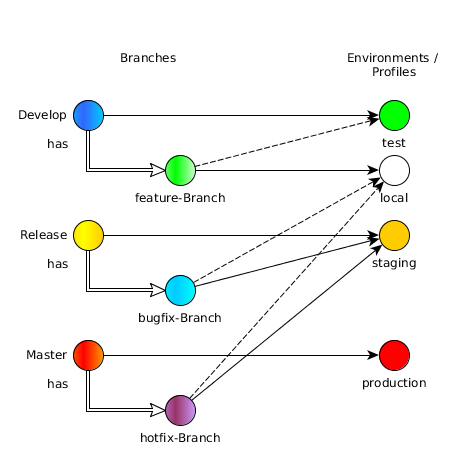
Branch to Environment / Profile mapping
Applying can be done, for example, when adding this git status helper and refine it with the get_color function.
function git_status () {
  local output
  gs=$(git status 2> /dev/null)
  if [[ $? == 128 ]]; then
    return
  fi
  ref=$(git symbolic-ref HEAD 2> /dev/null) || return
  output=${$(get_color)}" "${ref#refs/heads/}
  if echo "$gs" | grep -q "Changes to be committed"; then
    output=${output}${PR_GREEN}+
  fi
  if echo "$gs" | grep -Eq "(Changes not staged for commit|Changed but not updated)"; then
    output=${output}${PR_RED}!
  fi
  if echo "$gs" | grep -q "Untracked files"; then
    output=${output}${PR_RED}?
  fi
  echo "${output}${PR_NO_COLOUR}"
}

PROMPT=$'%(?,${PR_GREEN}+,${PR_RED}-)${PR_NO_COLOUR} %(4c,./%1~,%~) $(git_status) %(!.${PR_RED}#${PR_NO_COLOUR} .%% )'
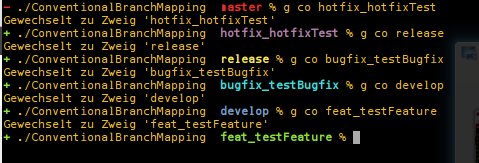
At least some examples:
Reference: GIT & ZShell : Colorize your shell depending on your branch from our JCG partner Peter Daum at the Coders Kitchen blog.