Most infrastructure problems that teams blame on tooling are actually repository problems. The structure of your infrastructure repo determines how quickly engineers can find what they need, how safely a change in staging can be promoted to production, and whether your GitOps controller degrades under load six months from now. Getting the layout right from the start saves far more time than it takes — and retrofitting it later is painful. This article walks through the structural decisions that matter most in 2026.
The good news is that the industry has largely converged on a set of proven patterns. The challenge is that every tutorial demonstrates a slightly different layout, and it is not always clear which choices are intentional design decisions and which are just habits. So rather than prescribing a single canonical structure, this article explains the reasoning behind each decision — so you can apply it to your specific team size, deployment target, and organisational topology.
The First Decision: What Belongs in This Repository at All
Before discussing folder structure, it is worth being clear about what an infrastructure repository is and is not. This repo holds the desired state of your infrastructure — the declarative definitions that tell your GitOps controller (Argo CD, Flux, or equivalent) what should be running where. It does not hold application source code. It does not hold CI pipeline definitions for building your services. And it absolutely does not hold secrets in plain text.
The separation between application source code and deployment manifests matters more than it might seem at first. Application code and infrastructure configuration have independent lifecycles, allowing separate evolution, testing, and deployment cycles — which reduces overhead and accelerates delivery. In practice, this means a backend engineer can merge a new feature without touching the infra repo, and a platform engineer can update a network policy without triggering an application build. The two concerns evolve at different speeds and are owned by different people.
Common starting mistake: Teams often store their Kubernetes manifests alongside their application source in the same repository because it is convenient early on. This creates problems as soon as you have more than two environments or more than one team — access control, review workflows, and GitOps controller performance all suffer. Move manifests to a dedicated infra repo before you have more than a handful of services.
Monorepo vs Polyrepo: A Practical Decision Framework
The monorepo vs polyrepo debate is one of the most discussed topics in GitOps circles, and the honest answer is that neither is universally better. The right choice depends on your team size, trust model, and how many environments you are managing. That said, the environment-per-folder approach within a monorepo is a very good way to organise your GitOps applications — not only is it simple to implement and maintain, but it is also the optimal method for promoting releases between different environments.
Monorepo vs Polyrepo — Trade-off Radar
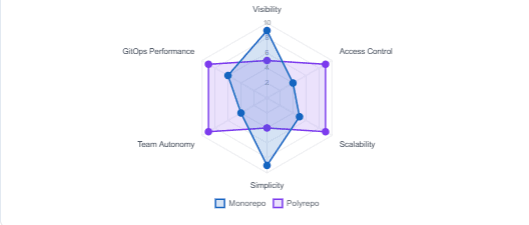
As the chart shows, neither approach dominates across all dimensions. A monorepo offers centralized visibility where all configuration changes are in one accessible place, simplifying tracking, review, and understanding of infrastructure state. However, multi-repo gives each service or team its own repository, prioritising autonomy and isolation — meaning one team cannot accidentally break another team’s configuration. It is the right choice for large organisations with independent teams that need granular access control.
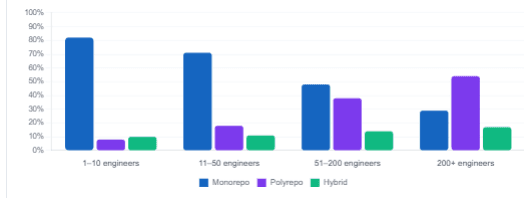
In practice, most teams under about 50 engineers do well with a monorepo. Larger organisations or those with strict regulatory separation between environments often find that polyrepo scales better. If you are using Team Topologies, stream-aligned teams typically prefer multi-repo for autonomy, while platform teams often prefer mono-repo for managing shared infrastructure.
| Factor | Monorepo | Polyrepo |
|---|---|---|
| Team size | Works well up to ~50 engineers | Better for large, independent teams |
| Visibility | All changes in one place, easy to audit | Scattered; harder to get the full picture |
| Access control | Limited — Git has no per-folder permissions | Fine-grained per-repo CODEOWNERS and branch rules |
| GitOps performance | Can degrade with very large repos | Each controller watches a smaller surface |
| Promotion workflow | Simple PR from staging/ to production/ folder | Requires cross-repo automation |
| Onboarding | One clone, one map to understand | Multiple repos to navigate |
The Recommended Monorepo Layout
For the majority of teams — especially those running Kubernetes with Argo CD or Flux — the following structure has proven itself in production across organisations of varying sizes. It separates three concerns into their own top-level directories: application manifests, platform-level cluster resources, and the GitOps controller configuration itself.
infra-repo/
├── apps/                        # Per-service Kubernetes manifests
│   ├── frontend/
│   │   ├── base/               # Shared across all environments
│   │   │   ├── deployment.yaml
│   │   │   ├── service.yaml
│   │   │   └── kustomization.yaml
│   │   └── overlays/
│   │       ├── dev/
│   │       │   └── kustomization.yaml
│   │       ├── staging/
│   │       │   └── kustomization.yaml
│   │       └── production/
│   │           └── kustomization.yaml
│   └── backend-api/
│       ├── base/
│       └── overlays/
│           ├── dev/
│           ├── staging/
│           └── production/
│
├── platform/                    # Cluster-level shared resources
│   ├── namespaces/
│   ├── rbac/
│   ├── network-policies/
│   ├── monitoring/             # Prometheus, Grafana, alerting
│   └── ingress/                # Ingress controller, cert-manager
│
├── clusters/                    # Entry points per cluster
│   ├── dev/
│   │   └── kustomization.yaml  # References apps/ and platform/ for dev
│   ├── staging/
│   │   └── kustomization.yaml
│   └── production/
│       └── kustomization.yaml
│
└── applicationsets/             # Argo CD ApplicationSet definitions
    └── services.yaml
This layout follows a key principle worth highlighting explicitly: the separation between apps and infrastructure makes it possible to define the order in which a cluster is reconciled — for example, first the cluster add-ons and other Kubernetes controllers, then the applications. In practice this means platform resources (ingress, monitoring, cert-manager) are always applied before the services that depend on them — eliminating a whole class of race-condition failures during cluster bootstrapping.
The Environment-per-Folder Pattern (and Why Branches Are the Wrong Answer)
One of the most persistent anti-patterns in infrastructure repositories is using Git branches to represent environments. It feels natural — you already have a main branch, so why not add staging and production branches? The answer is that branch-based environment management creates merge conflicts, makes it hard to see what is deployed where, and violates trunk-based development principles.
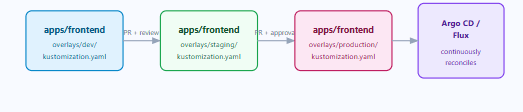
Instead, environments live as directories on the same branch. Promotion from staging to production is a pull request that copies or patches a Kustomize overlay — not a branch merge. This means your entire desired state is visible in a single view of the repository, diffs are clean and reviewable, and your GitOps controller never has to reconcile conflicting branch states.
Anti-pattern: AVOID Branch-per-environment (e.g.,
branch: staging,branch: production). Cherry-picking between branches leads to configuration drift, merge conflicts on shared files, and non-obvious differences between what each environment actually runs. The Flux and Argo CD teams both explicitly recommend against this pattern.
All environments live as folders on main — one branch, one source of truth
Using Kustomize Overlays to Eliminate Duplication
Once you have committed to the environment-per-folder pattern, the next question is how to avoid copying the same YAML across three environment folders. The answer is Kustomize — specifically the base/overlays pattern. The base/ folder holds the canonical, environment-agnostic definition of a service. Each environment’s overlays/ folder then patches only what differs — usually the image tag, replica count, resource limits, and any environment-specific ConfigMap values.
apps/frontend/overlays/production/kustomization.yaml
apiVersion: kustomize.config.k8s.io/v1beta1
kind: Kustomization

resources:
  - ../../base

images:
  - name: registry.example.com/frontend
    newTag: "a3f91c2"

replicas:
  - name: frontend
    count: 6

patches:
  - path: resource-limits-patch.yaml
    target:
      kind: Deployment
      name: frontend
The staging overlay might set count: 2 and a different tag. The dev overlay might set count: 1 and disable certain probes. In all cases, the base deployment.yaml is never duplicated — only the differences are expressed. This means a change to a shared label, a port number, or an annotation needs editing in exactly one place.
Managing the Platform Layer
The platform/ directory is where your cluster-level resources live — the things that exist independently of any individual application. This typically includes namespaces, RBAC roles and bindings, network policies, monitoring stack (Prometheus, Grafana, alert rules), ingress controller configuration, and certificate management. Keeping these strictly separate from apps/ has two important effects.
First, it enforces a clear ownership boundary: platform engineers own platform/, product teams own apps/. Code review and merge permissions can be scoped accordingly via CODEOWNERS files. Second, it allows your GitOps controller to apply platform resources with higher priority and before application resources during cluster bootstrapping — which prevents a common failure mode where a service starts before its required namespace or network policy exists.
clusters/production/kustomization.yaml
apiVersion: kustomize.config.k8s.io/v1beta1
kind: Kustomization

resources:
  # Platform layer applied first
  - ../../platform/namespaces
  - ../../platform/rbac
  - ../../platform/network-policies
  - ../../platform/monitoring
  - ../../platform/ingress
  # Application layer applied after
  - ../../apps/frontend/overlays/production
  - ../../apps/backend-api/overlays/production
Automating with Argo CD ApplicationSets
As your service count grows, manually maintaining one Argo CD Application object per service per environment becomes unsustainable. Argo CD ApplicationSets solve this elegantly: a single ApplicationSet definition uses a matrix generator to discover all services in your apps/ directory and automatically create the corresponding Application objects for each environment.
applicationsets/services.yaml
apiVersion: argoproj.io/v1alpha1
kind: ApplicationSet
metadata:
  name: all-services
  namespace: argocd
spec:
  generators:
    - matrix:
        generators:
          - git:
              repoURL: https://github.com/myorg/infra-repo
              revision: main
              directories:
                - path: apps/*
          - list:
              elements:
                - environment: staging
                  cluster: https://staging.k8s.example.com
                  namespace: staging
                - environment: production
                  cluster: https://prod.k8s.example.com
                  namespace: production
  template:
    metadata:
      name: "{{path.basename}}-{{environment}}"
    spec:
      project: "{{environment}}"
      source:
        repoURL: https://github.com/myorg/infra-repo
        targetRevision: main
        path: "apps/{{path.basename}}/overlays/{{environment}}"
      destination:
        server: "{{cluster}}"
        namespace: "{{namespace}}"
      syncPolicy:
        automated:
          prune: true
          selfHeal: true
With this in place, adding a new service to your platform requires nothing more than creating a new folder under apps/ with the correct structure. Argo CD discovers it on the next reconciliation cycle and creates the corresponding Application objects automatically — for every environment, without any manual registration.
Recommended Repository Strategy by Organisation Size (2026)
Secrets: The One Thing You Must Get Right
Repository structure decisions are largely reversible — you can restructure folders, rename overlays, and reorganise platform resources with a bit of effort. Secrets handling is not reversible in the same way. Committing a secret to a Git repository, even briefly and even in a private repo, should be treated as a full credential rotation event. This is non-negotiable.
In 2026, two patterns dominate for secrets in GitOps repositories:
Option A — Sealed Secrets (everything stays in Git)
Sealed Secrets uses asymmetric encryption. You encrypt a secret locally using a public key. The encrypted SealedSecret resource is safe to commit to Git. Only the controller running in your cluster holds the private key to decrypt it. This pattern works well for teams that want to keep all cluster state — including secrets — fully represented in Git. The downside is that key rotation and cross-cluster sharing require careful management.
Option B — External Secrets Operator (references only in Git)
External Secrets Operator acts as an API bridge. You store a reference (ExternalSecret) in Git that points to a secret in an external provider such as AWS Secrets Manager, HashiCorp Vault, or Azure Key Vault. At runtime, the operator fetches the actual secret value and creates a Kubernetes Secret. Use this approach if you already have a secrets management platform, or if your security requirements prohibit any form of encrypted data being committed to Git.
| Sealed Secrets | External Secrets Operator | |
|---|---|---|
| Secrets stored in Git? | Yes (encrypted) | No (references only) |
| Requires external system | No | Yes (Vault, AWS SM, etc.) |
| Key rotation complexity | Moderate | Handled by provider |
| Audit trail | Git history | External provider logs |
| Best for | Self-contained clusters, smaller teams | Enterprises with existing secrets infra |
Good practice: DO Whichever approach you choose, add a .gitignore entry for *.secret.yaml and *.env pattern files, and configure a pre-commit hook (e.g., via pre-commit with detect-secrets or gitleaks) to block accidental secret commits before they reach the remote.
The Four Anti-Patterns Worth Avoiding
Theory aside, the following anti-patterns appear regularly in real infrastructure repositories and cause the most friction as teams scale:
| Anti-Pattern | Why It Hurts | What to Do Instead |
|---|---|---|
| Branch-per-environment | Configuration drift, merge conflicts, hard to audit what is actually deployed | Folder-per-environment on main |
| Manifests in the app source repo | Couples deployment lifecycle to build lifecycle; hard to audit infra changes separately | Dedicated infra repo with clear ownership |
| Copy-pasted YAML across environments | A change to a shared config must be applied in N places; drift is inevitable | Kustomize base/overlays or Helm + values files |
| Secrets in plain text | Immediate credential exposure; full rotation required; compliance violation | Sealed Secrets or External Secrets Operator |
When to Reach for Polyrepo
Even if you start with a monorepo — which is the right call for most teams — there are clear signals that it is time to split. Managed Git providers attach extra configuration, eventing, workflows, and access control to Git repositories. As your organisation grows, disciplines like application development and infrastructure tend to become more specialised — and this specialisation manifests in at least two dimensions: workflows and work management.
Concretely, consider moving to polyrepo when: your GitOps controller’s reconciliation time is noticeably degrading; different teams need true isolation (regulatory, security, or organisational); or your CODEOWNERS file has become a source of constant merge conflicts because too many teams share ownership of the same files. At that point, a library repository holding base definitions and per-environment repositories holding the cluster entry-points is a well-tested alternative. For most organisations, the monorepo with Kustomize overlays provides the best balance — but it is not the only valid answer at scale.
Flux or Argo CD? Both work well with the structure described in this article. Argo CD’s UI and ApplicationSet generator make it the more accessible choice for teams new to GitOps. Flux is the better fit for teams that want a fully declarative, Kubernetes-native operator with minimal UI dependency and strong Helm support. The repository structure is essentially identical for both — the difference is in the controller configuration, not the folder layout.
What We Learned
A well-structured infrastructure repository is the foundation that makes everything else in your platform engineering stack reliable and maintainable. In this article we worked through the core structural decisions: separating infrastructure manifests from application source code, choosing between monorepo and polyrepo based on team size and trust model, and adopting the environment-per-folder pattern instead of the branch-per-environment anti-pattern. We then looked at the recommended monorepo layout with its three top-level concerns — apps, platform, and clusters — and showed how Kustomize base/overlays eliminate YAML duplication across environments.
We covered Argo CD ApplicationSets for automated Application discovery as service counts grow, and walked through the two dominant secrets handling patterns — Sealed Secrets for self-contained clusters and External Secrets Operator for organisations with existing secrets infrastructure. Finally, we catalogued the four anti-patterns that cause the most pain at scale and the signals that suggest a monorepo has outgrown its usefulness. The structure you choose today shapes every deployment, review, and incident response your team will experience for years — it is worth getting right early.