The AI Coding Assistant Has Been on Your Team for a Year. What Did It Actually Change About How We Write Software?

GitHub Copilot, Cursor, and Claude Code now have 12–18 months of real production data. The honest post-adoption analysis — what improved, what got worse, and what the hype got wrong — is more valuable now than it was at launch.
Not long ago, the conversation around AI coding assistants was mostly theoretical. Demos looked impressive. Blog posts were breathless. Conference talks promised a revolution. Then, gradually, the tools landed in actual team environments — and stayed there.
Now, after 12 to 18 months of broad, real-world adoption, there is enough production data to ask a more uncomfortable question: did any of this actually make us better at building software?
The short answer is: yes, but not in the ways most people expected. And it also made some things measurably worse. Let us walk through both sides honestly.
1. The numbers that matter most
Before diving into the nuance, it helps to understand the scale of what happened. GitHub Copilot surpassed 20 million users by July 2025 — a 400% year-over-year increase. Meanwhile, Cursor grew from $1M in annual revenue in 2023 to $100M in 2024, picking up steam in enterprise environments fast enough to land a reported $10 billion valuation. And according to a 2025 study, 84% of professional developers are already using or actively planning to use AI tools in their workflow.
That is not a trend. That is a full platform shift. And it happened fast enough that most teams had little time to think carefully about what they were signing up for.

2. What genuinely improved
2.1 Speed on the tasks that used to feel like chores
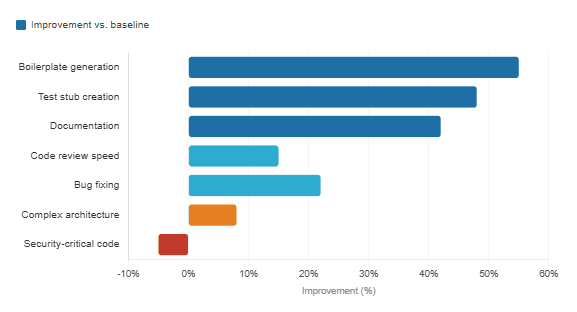
The most consistent finding across studies is that AI assistants are genuinely, meaningfully faster for a specific category of work: repetitive, boilerplate-heavy tasks. Writing CRUD operations, scaffolding new components, generating test stubs, filling out documentation. Things developers have always done but never loved.
GitHub’s research found that 87% of developers reported preserving mental effort during repetitive tasks when using Copilot, and 73% said it helped them stay in the flow. In controlled experiments with 95 professional developers, average task completion times dropped from 2 hours 41 minutes to 1 hour 11 minutes — with success rates also climbing from 70% to 78%.
That is a real gain. Not imaginary. Not marketing. And when you compound it across a large team over months, those hours add up to something meaningful.
2.2 Developer happiness, at least early on
There is a qualitative dimension that the productivity research keeps surfacing, and it is worth naming directly. Developers described the experience of offloading dull work to the AI as freeing — more time for the “fun stuff,” as one GitHub survey respondent put it. Cognitive load dropped on the parts of the job that were draining. Zoominfo’s enterprise deployment study across 400 developers found a developer satisfaction score of 72%, with an average suggestion acceptance rate of 33%.
“With Copilot, I have to think less, and when I have to think, it’s the fun stuff. It sets off a little spark that makes coding more fun and more efficient.”
— Developer survey respondent, GitHub Research
2.3 Faster onboarding and codebase navigation
One area that often goes underreported is how AI tools change the experience of joining a new project. Tools like Cursor and Claude Code index entire codebases and can answer questions about unfamiliar code in seconds. Enterprise data suggests 30% faster onboarding for new hires in teams that adopted these tools. That is a compounding benefit — it shortens ramp-up time, which has downstream effects on team throughput.
Productivity gains by task type — GitHub Copilot users
3. What got worse — and why nobody wanted to say it out loud
Here is where the honest post-adoption story gets complicated. Faster typing does not equal better software. And after a year of production use, the data on code quality is genuinely concerning.
3.1 Technical debt is accumulating faster than ever
A large-scale study of 304,362 AI-authored commits from 6,275 GitHub repositories found that more than 15% of commits from every major AI coding assistant introduced at least one quality issue. More troubling: 24.2% of those issues were still present in the latest version of the repository at the time of measurement. They were not caught. They were not fixed. They just stayed.
A separate academic study focusing specifically on Cursor’s impact across 807 real-world repositories found something even more striking: adoption produced substantial but transient velocity gains, alongside persistent increases in technical debt. In other words, teams moved faster for a while, then slowed down — because the debt they accumulated got in their way. As one researcher put it, Cursor adoption produces a self-reinforcing cycle where initial productivity surges give way to maintenance burdens.
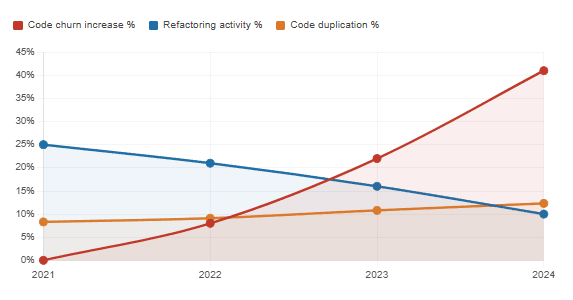
GitClear’s analysis of hundreds of millions of lines of code told a similar story: code duplication climbed from 8.3% to 12.3% of changed lines between 2021 and 2024, and refactoring activity collapsed from 25% to under 10% of changed lines in the same period.
3.2 Security is a genuine problem
This one is hard to overstate. Studies suggest that around 48% of AI-generated code contains potential security vulnerabilities. A SonarSource analysis from August 2025 found that every major model tested — across all providers — generated a meaningful proportion of vulnerabilities classified at the highest severity level. Apiiro’s research documented a 10-fold increase in security findings per month at Fortune 50 enterprises between December 2024 and June 2025, rising from roughly 1,000 to over 10,000 monthly issues.
The good news is that most development teams seem to understand this intuitively: 71% of developers say they do not merge AI-generated code without manual review. The bad news is that manual review only catches what reviewers know to look for — and subtle vulnerabilities often slip through.
3.3 The delivery paradox
Perhaps the most counterintuitive finding comes from Google’s 2024 DORA report: a 25% increase in AI tool adoption corresponded with a 7.2% decrease in delivery stability. Individual developers were committing more code more frequently, but the organization as a whole was shipping stable software less reliably.
The DORA researchers called this the “Vacuum Hypothesis” — the time saved by not writing boilerplate is immediately consumed by debugging AI errors, refactoring unidiomatic code, and figuring out what the generated code is actually doing. The productivity math does not add up as cleanly as the demos suggested.
AI adoption vs. code quality indicators (2021–2024)
4. A tool-by-tool view: Copilot, Cursor, and Claude Code
Not all AI coding tools are the same, and their differences matter in practice. Here is a quick comparison of what each does well and where each falls short, based on real production data and developer experience reports.
| Tool | Primary strength | Best use case | Notable limitation | Market position (2025) |
|---|---|---|---|---|
| GitHub Copilot | Inline autocomplete, deep IDE integration | Repetitive boilerplate, quick completions | Limited multi-file reasoning; 11-week ramp-up to full benefit | 42% market share, 20M+ users |
| Cursor | Full codebase context, multi-file editing | Complex refactoring, architectural changes | High RAM use; transient velocity gains, persistent tech debt | 18% market share, $10B valuation |
| Claude Code | Agentic multi-step execution, full project autonomy | Long-horizon tasks, PR creation, test suites | Terminal-native; steeper learning curve for non-CLI developers | Growing rapidly among senior engineers |
The key distinction between these tools is the level of autonomy they offer. Copilot is primarily a line-by-line autocomplete tool — it suggests, you decide. Cursor sits in between, offering codebase-wide context while you remain in the driver’s seat. Claude Code, on the other hand, is what Anthropic calls “agentic” — it can read your codebase, edit files, run commands, create pull requests, and carry out multi-step tasks with minimal hand-holding.
As the tools grow more autonomous, the stakes around human review grow accordingly. That is not a reason to avoid them — but it is a reason to think carefully about when and how you delegate.
5. What the hype got wrong
In hindsight, several assumptions that drove early enthusiasm did not survive contact with production environments.
The speed gains are front-loaded. Microsoft’s research found that it takes approximately 11 weeks for developers to fully realize productivity gains from AI tools. Most early assessments measured teams in the first week — a point at which they were experiencing only a fraction of the potential value, while still dealing with adjustment friction. Organizations that gave up before the three-month mark rarely saw the real benefit.
Junior developers are not the biggest winners. Early narratives around AI tools focused on how they would help newer developers move faster. In practice, the tools work best for people who already know enough to validate what the AI produces. Junior developers who accept suggestions uncritically tend to build up invisible debt — code that looks fine but is subtly wrong in ways they cannot yet spot.
More code is not better software. GitHub Copilot now generates an average of 46% of the code developers write, reaching 61% in Java projects. Generating more code faster sounds like progress. But software quality is not measured in lines — it is measured in reliability, maintainability, and how easy it is to change when requirements shift. On those dimensions, the picture is more mixed than the velocity numbers suggest.
6. How the best teams are actually using these tools
Despite the complications, plenty of teams are getting genuine, sustained value from AI coding assistants. What separates them from teams that ended up frustrated?
First, they treat AI-generated code the same way they treat any external dependency: with healthy skepticism and mandatory review. They do not assume correctness; they verify it. Secondly, they invest in training — not just on how to use the tool, but on how to prompt it well. The quality of what you get out correlates strongly with the specificity and clarity of what you put in.
Third, and perhaps most importantly, they have set up quality gates. Static analysis tools, automated testing pipelines, and code review standards apply just as rigorously to AI-generated code as to human-written code. In some cases, they apply even more rigorously — because the AI tends to produce code that looks clean on the surface while hiding issues underneath.
“I’ve watched companies go from ‘AI is accelerating our development’ to ‘we can’t ship features because we don’t understand our own systems’ in less than 18 months.”
— Enterprise AI governance advisor, quoted in InfoQ, 2025
That quote is a warning, but it is also a roadmap. The teams that avoided that fate were the ones who implemented visibility, alignment, and lifecycle policies early — before the debt compounded into something unmanageable.
7. What we have learned
A year of production data has given us something more valuable than launch-day enthusiasm: clarity. AI coding assistants are genuinely useful tools. They make repetitive work faster, reduce cognitive load on tedious tasks, and help developers stay in flow. GitHub Copilot alone is now responsible for nearly half the code some developers write, and the productivity gains in controlled settings are real and consistent.
At the same time, the data has surfaced a pattern that the demos could not show us: speed at the individual level does not automatically translate to health at the system level. Technical debt is accumulating faster than most teams expected. Security vulnerabilities in AI-generated code are a documented, measurable problem. And the DORA research’s “Vacuum Hypothesis” — that time saved on generation gets immediately consumed by validation and debugging — explains why so many teams feel productive but not necessarily more effective.
The honest conclusion is that these tools work best as a pair-programmer, not an autopilot. They lower the floor on grunt work. They do not raise the ceiling on engineering judgment. The organizations getting sustained value are the ones who understood that distinction early and built their workflows accordingly — with strong review practices, clear quality standards, and realistic expectations about the 11-week ramp-up before genuine gains appear.
The revolution happened. It just came with a maintenance contract.