
Spring AI introduces first-class support for the Model Context Protocol (MCP), enabling AI models to discover tools, data, and prompts exposed by your Spring Boot applications. MCP annotations make this integration declarative, type-safe, and easy to reason about. Let us delve into understanding spring AI MCP annotations.
1. Understanding MCP Annotations in Spring AI
MCP (Model Context Protocol) standardizes how AI clients—such as desktop AI tools, IDE plugins, or autonomous agents—interact with external systems in a consistent and predictable way. Rather than relying on custom integrations for each tool or data source, MCP provides a common protocol that enables seamless communication between AI models and application capabilities.
In Spring AI, MCP annotations play a key role in bridging your Spring-based applications with AI clients. They allow developers to declaratively expose application capabilities in a way that AI systems can easily discover, understand, and invoke.
Using Spring AI MCP annotations, you can:
- Expose executable functions as tools that AI clients can call on demand
- Expose structured or dynamic data as resources that AI models can query or retrieve
- Define reusable, standardized prompts to guide AI behavior consistently
1.1 Exposing Tools, Resources, and Prompts
These capabilities are achieved primarily through the following annotations:
@McpTool– Used to expose executable functionality, such as service methods or business operations, as callable tools for AI clients@McpResource– Used to expose structured, semi-structured, or dynamic data as resources that AI clients can read or consume@McpPrompt– Used to define reusable prompt templates that ensure consistent instructions, context, and formatting across AI interactions
Together, these annotations enable a clean, declarative approach to building AI-enabled applications, allowing Spring developers to integrate AI capabilities without tightly coupling business logic to specific AI clients or platforms.
2. Building an MCP-Enabled Spring Boot Application
2.1 Maven Dependencies
The following Maven dependencies enable Spring AI MCP support and expose HTTP endpoints for AI clients.
<dependencies>
    <dependency>
        <groupId>org.springframework.ai</groupId>
        <artifactId>spring-ai-mcp-server-spring-boot-starter</artifactId>
    </dependency>

    <dependency>
        <groupId>org.springframework.boot</groupId>
        <artifactId>spring-boot-starter-web</artifactId>
    </dependency>
</dependencies>
The above Maven configuration adds the required dependencies to enable MCP support in a Spring Boot application. The spring-ai-mcp-server-spring-boot-starter dependency provides the core infrastructure for exposing MCP tools, resources, and prompts using Spring AI, while automatically configuring the MCP server components. The spring-boot-starter-web dependency enables the web layer required to expose MCP endpoints over HTTP, allowing AI clients to connect to and interact with the application.
2.2 Application Configuration
The following application configuration enables the MCP server and defines external weather API settings.
spring:
  application:
    name: weather-mcp
  ai:
    mcp:
      server:
        enabled: true
        name: weather-mcp-server

weather:
  api:
    url: https://api.openweathermap.org/data/2.5/weather
    key: YOUR_API_KEY
This configuration file defines the core settings for the Spring Boot application and enables the MCP server provided by Spring AI. The spring.application.name property assigns a logical name to the application, while the spring.ai.mcp.server.enabled flag activates the MCP server at startup and spring.ai.mcp.server.name specifies the server identity exposed to AI clients. The weather.api section externalizes the OpenWeatherMap API configuration, including the base URL and API key, allowing the application to securely fetch live weather data without hardcoding credentials in the source code.
2.3 Main Application Class
The following class bootstraps the Spring Boot application and initializes the MCP server.
// WeatherMcpApplication.java
package com.example.weather;

import org.springframework.boot.SpringApplication;
import org.springframework.boot.autoconfigure.SpringBootApplication;

@SpringBootApplication
public class WeatherMcpApplication {

    public static void main(String[] args) {
        SpringApplication.run(WeatherMcpApplication.class, args);
    }
}
This is the main entry point of the Spring Boot application. The @SpringBootApplication annotation enables component scanning, auto-configuration, and configuration property support, allowing the application to bootstrap with minimal setup. The main method delegates to SpringApplication.run, which initializes the Spring context, starts the embedded web server, and brings up the MCP server configuration so that the application is ready to expose its weather-related MCP tools and resources.
2.4 Supported Cities Resource
The following MCP resource exposes structured context data that AI clients can query.
// SupportedCitiesResource.java
package com.example.weather.resource;

import org.springframework.ai.mcp.annotation.McpResource;
import org.springframework.stereotype.Component;

import java.util.List;
import java.util.Map;

@Component
public class SupportedCitiesResource {

    @McpResource(
        uri = "resource://weather/supported-cities",
        description = "Cities supported by the weather service"
    )
    public Map<String, Object> cities() {
        return Map.of(
            "cities", List.of("Berlin", "London", "New York", "Tokyo")
        );
    }
}
This class defines an MCP resource that exposes structured data to AI clients. The @Component annotation registers the class as a Spring bean, while the @McpResource annotation marks the cities method as a readable MCP resource identified by the URI resource://weather/supported-cities. When accessed, this resource returns a structured map containing a list of supported city names, allowing AI clients to discover which locations the weather service can handle and use that information when forming queries or deciding which tools to invoke.
2.5 Weather Tool Implementation
The following MCP tool defines executable business logic for retrieving real-time weather data.
// WeatherTool.java
package com.example.weather.tool;

import org.springframework.ai.mcp.annotation.McpTool;
import org.springframework.beans.factory.annotation.Value;
import org.springframework.stereotype.Component;
import org.springframework.web.client.RestTemplate;

import java.util.Map;

@Component
public class WeatherTool {

    private final RestTemplate restTemplate = new RestTemplate();

    @Value("${weather.api.url}")
    private String apiUrl;

    @Value("${weather.api.key}")
    private String apiKey;

    @McpTool(
        name = "get_current_weather",
        description = "Fetches the current weather for a given city"
    )
    public Map<String, Object> getWeather(String city) {

        String url = apiUrl + "?q=" + city + "&appid=" + apiKey + "&units=metric";

        Map response = restTemplate.getForObject(url, Map.class);

        Map main = (Map) response.get("main");
        Map weather = (Map) ((java.util.List) response.get("weather")).get(0);

        return Map.of(
            "city", city,
            "temperatureC", main.get("temp"),
            "condition", weather.get("description")
        );
    }
}
This class defines an executable MCP tool that allows AI clients to retrieve real-time weather information. The @Component annotation registers the class with Spring, while the @McpTool annotation exposes the getWeather method as a callable tool named get_current_weather. Configuration values for the weather API URL and API key are injected using @Value, keeping external service details out of the code. When invoked, the tool constructs a request to the external weather API using RestTemplate, parses the response to extract the current temperature and weather condition, and returns a structured result that AI clients can easily consume and reason over.
2.6 Weather Prompt Template
The following MCP prompt defines a reusable template for formatting AI responses.
// WeatherPrompt.java
package com.example.weather.prompt;

import org.springframework.ai.mcp.annotation.McpPrompt;
import org.springframework.stereotype.Component;

@Component
public class WeatherPrompt {

    @McpPrompt(
        name = "weather_response",
        description = "Formats weather data into a friendly human response"
    )
    public String weatherPrompt() {
        return """
        You are a helpful weather assistant.
        Use the provided weather data to answer the user.
        Always include:
        - City name
        - Temperature in Celsius
        - Weather condition
        Keep the response short and friendly.
        """;
    }
}
This class defines a reusable MCP prompt that standardizes how weather information is presented to users. The @Component annotation makes the class available to Spring, while the @McpPrompt annotation exposes the weatherPrompt method as a named prompt template called weather_response. The method returns a multi-line instruction string that guides AI clients on how to format their replies, ensuring responses consistently include the city name, temperature in Celsius, and current weather condition in a short, friendly tone.
2.7 Code Run and Output
Once the application is started using mvn spring-boot:run or by running the main class from an IDE, the MCP server is initialized automatically as part of the Spring Boot startup process. At runtime, AI clients that support the Model Context Protocol can connect to the exposed MCP endpoint and discover the available capabilities, including the get_current_weather tool, the supported cities resource, and the reusable weather response prompt.
2026-02-22 10:15:01.234  INFO  WeatherMcpApplication : Starting WeatherMcpApplication
2026-02-22 10:15:02.118  INFO  MCPServerAutoConfig   : MCP server enabled
2026-02-22 10:15:02.121  INFO  MCPServerAutoConfig   : MCP server name: weather-mcp-server
2026-02-22 10:15:02.356  INFO  McpToolRegistry      : Registered MCP tool: get_current_weather
2026-02-22 10:15:02.361  INFO  McpResourceRegistry  : Registered MCP resource: resource://weather/supported-cities
2026-02-22 10:15:02.365  INFO  McpPromptRegistry    : Registered MCP prompt: weather_response
2026-02-22 10:15:02.982  INFO  TomcatWebServer      : Tomcat started on port 8080
2026-02-22 10:15:02.985  INFO  WeatherMcpApplication : Application started successfully
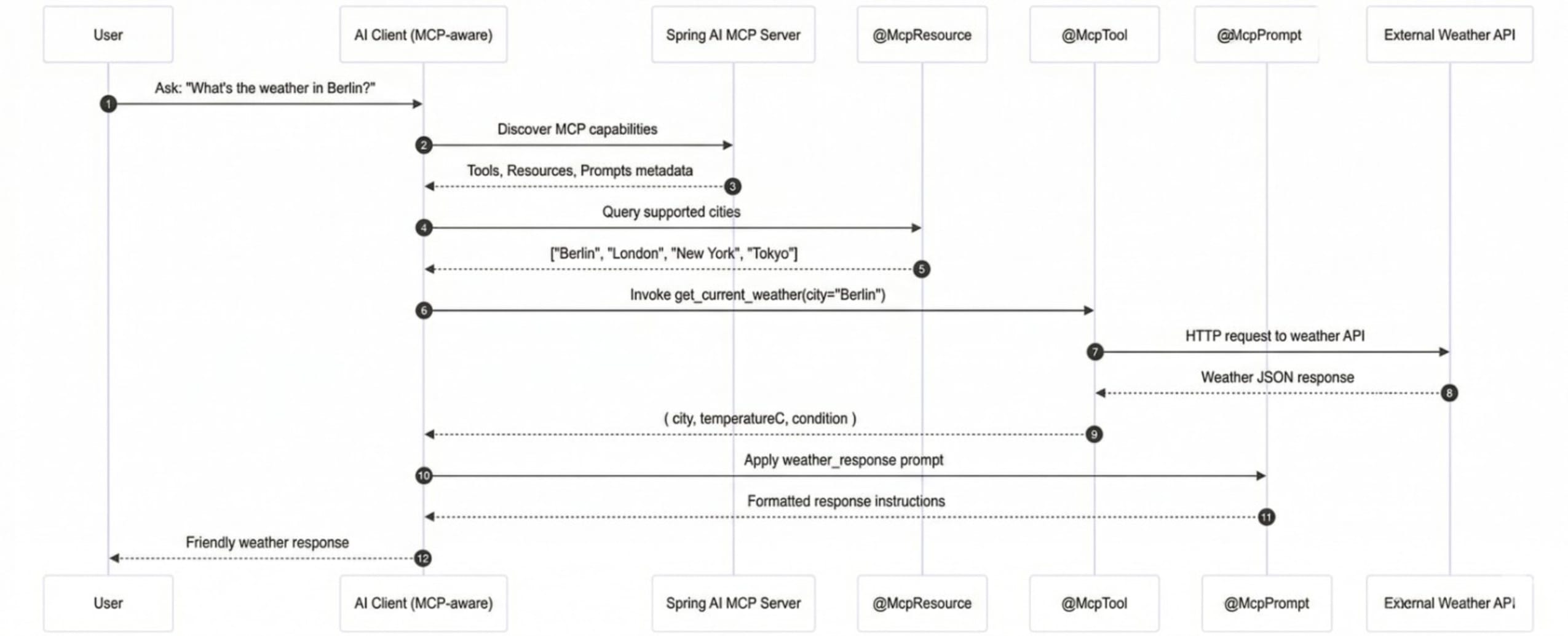
When a user asks for the current weather in a supported city, the AI client first discovers the available tools and resources via MCP, optionally queries the supported cities resource, invokes the get_current_weather tool with the selected city, and then formats the result using the weather_response prompt. The final output is a short, friendly, human-readable response that includes the city name, temperature in Celsius, and current weather condition.
# POST request
curl -X POST http://localhost:8080/mcp/tools/get_current_weather \
  -H "Content-Type: application/json" \
  -d '{
    "city": "Berlin"
  }'

# Response
{
  "city": "Berlin",
  "temperatureC": 18.5,
  "condition": "clear sky"
}
This end-to-end flow demonstrates how Spring AI MCP annotations enable seamless discovery, invocation, and response formatting without requiring custom glue code, allowing AI clients and Spring Boot applications to interact in a standardized and predictable manner.
3. Conclusion
This example demonstrates how MCP annotations move beyond theory into real API-backed workflows, turning Spring Boot into an AI-ready backend where resources provide contextual data, tools execute real business logic, and prompts control response quality and consistency, a pattern that scales naturally to domains such as payments, inventory, monitoring, analytics, and any system where AI requires controlled and observable access to real data.





