
The Neuroscience of Debugging: What Brain Scans Reveal About Problem-Solving in Code

Every developer knows the feeling: you’ve been staring at the same bug for hours, getting nowhere. Then you take a walk, grab coffee, or even sleep on it—and suddenly the solution appears, obvious in hindsight. This isn’t magic. It’s neuroscience.
For decades, we’ve treated programming as a purely logical discipline, something that happens between the keyboard and the screen. But recent brain imaging research reveals that coding is far more complex neurologically than we imagined. Understanding what happens in your brain when you debug can make you a better programmer.
1. Your Brain on Code
When researchers at MIT and Johns Hopkins put programmers in fMRI scanners and asked them to read code, they made a surprising discovery. Reading code doesn’t primarily activate the language centers of the brain, as many had assumed. Instead, it lights up something called the multiple demand network—the same system your brain uses for complex problem-solving tasks like chess, crossword puzzles, and mathematical reasoning.
This network spans both hemispheres of your brain, though it favors the left side slightly. Interestingly, the specific programming language matters less than you’d think. Whether someone is reading Python or looking at visual programming blocks, the same brain regions activate. Your brain treats code as a logic puzzle, not as language in the traditional sense.
1.1 The Pattern Recognition Machine
When you’re debugging, your brain isn’t just executing instructions sequentially. It’s pattern matching at incredible speed. Experienced programmers develop what neuroscientists call “schemas”—mental templates stored in long-term memory that help recognize familiar patterns instantly.
This is why a senior developer can glance at a stack trace and immediately say “that’s a null pointer exception in the database layer” while a junior developer stares in confusion. The senior’s brain has seen that pattern dozens of times before. The schema is already built, indexed, and ready to access. Recognition feels instant because, neurologically, it nearly is.
2. The Working Memory Bottleneck
Here’s the hard truth: your working memory—the part of your brain that actively holds information you’re currently thinking about—is shockingly limited. Classic research suggested we could hold “seven plus or minus two” items. Modern neuroscience puts that number even lower: around four to five chunks of information.
Think about debugging a complex issue: You need to hold in mind the current variable values, the expected behavior, the actual behavior, the method call stack, any relevant database state, the framework’s lifecycle, and your hypothesis about what’s wrong. That’s already way more than five things.
This is why debugging feels mentally exhausting. You’re not just thinking hard—you’re constantly bumping against the physical limits of your brain’s processing capacity. When you get interrupted, all that carefully loaded context evaporates, and you have to rebuild it from scratch. The famous “it takes 15 minutes to get back into flow” isn’t about motivation. It’s about the time your brain needs to reload all those items back into working memory.
2.1 Cognitive Load Theory in Practice
Cognitive load theory, developed by educational psychologist John Sweller, identifies three types of mental load. In debugging, all three come into play:
Intrinsic load is the inherent complexity of the problem. A race condition in a multi-threaded system is just harder than a typo. There’s no avoiding this.
Extraneous load is unnecessary complexity added by poor design, confusing variable names, or disorganized code. This is the cognitive equivalent of friction—wasted mental energy that doesn’t help solve the problem.
Germane load is the useful mental work of building understanding, creating those schemas that make you faster next time. This is the “learning” part of debugging.
The best debugging environments minimize extraneous load. Clear error messages, good tooling, and well-structured code all reduce the mental overhead, leaving more working memory available for actually solving the problem.
3. Why Stepping Away Actually Works
The most counterintuitive finding from neuroscience research is this: sometimes the best thing you can do for a difficult bug is to stop working on it. This phenomenon, known as the incubation effect, has been studied since the 1920s, but modern brain imaging is finally revealing why it works.
3.1 Unconscious Problem-Solving
When you step away from a problem, your conscious mind disengages, but your unconscious keeps working. Brain imaging shows that during these “breaks,” the default mode network—a set of brain regions that activate when you’re not focused on external tasks—becomes more active. This network is crucial for creative problem-solving and making unexpected connections.
Mathematical proofs, scientific breakthroughs, and yes, bug fixes, often come during these unfocused periods. The mathematician Poincaré famously described how the solution to a complex problem came to him while stepping onto a bus, completely unrelated to his mathematical work. His unconscious had been processing the problem all along.
3.2 Breaking Mental Fixation
There’s another reason stepping away helps: it lets your brain forget your wrong approaches. When you’re stuck on a bug, you often develop what psychologists call “fixation”—you become locked into one way of thinking about the problem, and it’s hard to see alternatives.
Time away allows these fixations to decay. When you return, you approach the problem with what researchers call a “fresh look.” Your brain hasn’t forgotten the problem entirely, but it has forgotten your unproductive assumptions about it. Often, the bug was obvious all along—you just couldn’t see it through your fixation.
3.3 Optimal Incubation Strategies
Not all breaks are equal. Research shows that the best incubation happens when you’re doing something moderately engaging but unrelated to the problem. A walk, a shower, working on a different task—these allow your mind to wander without completely disengaging.
Sleep is particularly powerful. During sleep, especially during REM stages, your brain consolidates memories and strengthens connections between ideas. Studies show that people are significantly more likely to solve problems after sleeping on them. That 2 AM bug fix attempt might feel productive, but sleeping and trying again in the morning is often neurologically superior.
4. The Expert Brain
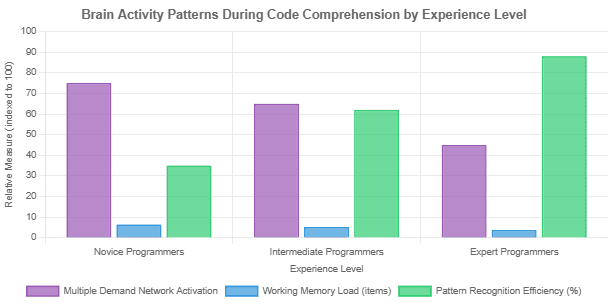
What makes an expert debugger different from a novice? Brain scans reveal fascinating differences. Expert programmers show less overall brain activation when reading code—not because they’re working less hard, but because their brains work more efficiently.
Novices show high activation across many brain regions, indicating heavy cognitive load. They’re processing everything consciously, step by step. Experts show focused activation in specific regions. They’ve automated much of the process, freeing up cognitive resources for higher-level reasoning.
A 2023 study on programming learning found that as novices gain experience, activity in the right inferior frontal gyrus increases. This region is associated with insight and pattern matching—exactly what experts are doing when they “just know” where a bug is.
5. Practical Applications
Understanding the neuroscience of debugging isn’t just academically interesting—it has practical implications for how we work.
5.1 Design for Limited Working Memory
Keep functions short and focused. Each function should do one thing clearly, so you can hold its complete behavior in working memory. Deeply nested logic or functions that do five different things force your brain to juggle too many items at once.
Use meaningful names that carry information. A variable called userAuthenticationTokenExpirationTimestamp is long, but it stores information externally, reducing what you need to remember. Reading t forces you to load and hold “what is t?” in working memory every time you encounter it.
5.2 Reduce Extraneous Cognitive Load
Consistent code style isn’t about aesthetics—it’s about cognitive load. When every file follows the same patterns, your brain processes structure automatically, leaving more capacity for understanding logic. Inconsistent style forces your brain to consciously process irrelevant details.
Good tooling matters tremendously. A debugger that clearly visualizes program state, IDE features that show type information and documentation inline, error messages that explain not just what went wrong but why—all these reduce extraneous load.
5.3 Work With Your Brain’s Rhythms
Schedule complex debugging for when your cognitive resources are highest—for most people, that’s morning. Save routine tasks for afternoon slumps. Take actual breaks. The research is clear: breaks improve problem-solving performance.
When you’re truly stuck, don’t force it. Go for a walk. Work on something else. Sleep on it. Trust that your unconscious is working on the problem. It might feel like you’re being lazy, but you’re actually leveraging your brain’s natural problem-solving mechanisms.
5.4 Build Your Schemas Deliberately
Reading code is how you build pattern recognition. Experienced developers don’t just code—they read lots of code, especially good code. Each pattern you encounter and understand becomes part of your mental library. The more patterns you know, the faster you recognize what you’re looking at when debugging.
This is also why code reviews are neurologically valuable. Explaining code to someone else, or having to understand someone else’s explanation, forces you to process it more deeply, building stronger schemas.
6. What We’ve Learned
The neuroscience of debugging reveals that programming is fundamentally a cognitive task, limited by the physical constraints of working memory and enhanced by pattern recognition developed through experience. Your brain treats code as logic puzzles, not language, activating the multiple demand network across both hemispheres.
Working memory can only hold about four to five items simultaneously, which explains why debugging complex issues feels overwhelming and why interruptions are so costly. The three types of cognitive load—intrinsic, extraneous, and germane—all factor into debugging difficulty, but only extraneous load can be minimized through better tools and code organization.
The incubation effect isn’t procrastination—it’s a legitimate problem-solving strategy backed by neuroscience. Stepping away allows unconscious processing, breaks mental fixation, and often leads to breakthrough solutions. Expert debuggers show more efficient brain activity patterns, processing familiar patterns automatically while focusing conscious attention on novel problems.
Understanding these principles can make you not just a better debugger, but a better programmer overall. Write code that respects working memory limits. Create environments that minimize cognitive friction. And when you’re stuck, remember that sometimes the most productive thing you can do is take a walk. Your brain is still working on it—you just can’t see it happening.