
Project Reactor implements the Reactive Streams specification, which is a standard for asynchronously processing a stream of data while respecting the processing capabilities of a consumer.
At a very broad level, there are two entities involved, a Producer that produces the stream of data and a Consumer that consumes data. If the rate at which a Consumer consumes data is less than the rate at which a Producer produces data (referred to as a Fast Producer/Slow Consumer), then signals from the consumer can constrain the rate of production, this is referred to as Backpressure and in this post, I will be demonstrating a few backpressure examples using Project Reactor.
Producer
Flux in Project Reactor represents an asynchronous stream of 0..N data, where N can potentially be infinite.
Consider a simple example, generating a sequence of numbers. There are built-in ways in Flux to do this, but for the example, I will be using an operator called Flux.generate. Sample code looks like this:
01 02 03 04 05 06 07 08 09 10 11 12 13 14 15 16 17 18 19 | fun produce(targetRate: Int, upto: Long): Flux<Long> { val delayBetweenEmits: Long = 1000L / targetRate return Flux.generate( { 1L }, { state: Long, sink: SynchronousSink<Long> -> sleep(delayBetweenEmits) val nextState: Long = state + 1 if (state > upto) { sink.complete() nextState } else { LOGGER.info("Emitted {}", state) sink.next(state) nextState } } )} |
Here “targetRate” is the rate per second at which the Producer is expected to produce a sequence of numbers and “upto” represents the range for which the sequence is to be generated. “Thread.sleep” is used for introducing the delay between emissions.
Consumer
A consumer for this stream of data just consumes the sequence of numbers and to simulate processing while consuming the data, delays are again introduced just before reading the information, along these lines:
1 2 3 4 5 6 | val delayBetweenConsumes: Long = 1000L / consumerRateproducer.produce(producerRate, count) .subscribe { value: Long -> sleep(delayBetweenConsumes) logger.info("Consumed {}", value) } |
Just like with rate at the Producer side, there is a rate of consuming on the consumer side which drives the delay before consuming the data.
Scenario 1: Fast Producer, Slow Consumer without Threading
Now that I have a stream of data for which I can control the rate of production and rate of consumption, the first test that I ran was with the producer and the consumer chained together.
The Producer produces at the rate of 100 requests a second and the consumer consuming it at 3 per second.
If there were no backpressure mechanisms in place you would expect that Producer would merrily go along and produce all the records at its own pace of 100 per second and Consumer would slowly catch up at the rate of 3 per second. This is NOT what happens though.
The reason is not that intuitive I feel, it is not really backpressure coming into play either. The Producer is constrained to 10 requests per second merely because the entire flow from the Producer to the Consumer is synchronous by default and since the production and the consumption are happening on the same thread, the behavior is automatically constrained to what the Consumer is comfortable in consuming.
Here is a graph which simply plots the rate of production and consumption over time and captures clearly the exact same rate of Production and Consumption throughout:
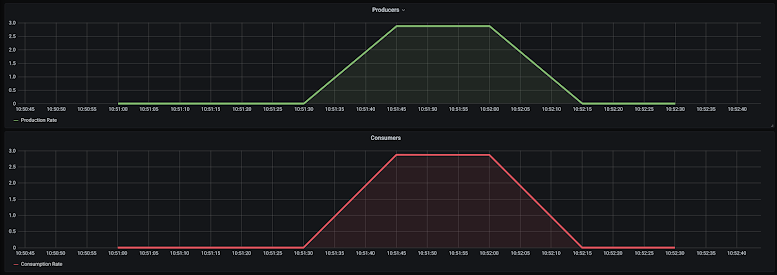
This behavior is borne out from the logs also, which show that the consumer and producer remain in sync:
01 02 03 04 05 06 07 08 09 10 11 12 13 14 15 16 17 18 19 20 21 22 23 24 25 26 27 | 2020-07-26 17:51:58.712 INFO 1 --- [pool-1-thread-1] sample.meter.Producer : Emitted 842020-07-26 17:51:59.048 INFO 1 --- [pool-1-thread-1] sample.meter.Consumer : Consumed 842020-07-26 17:51:59.059 INFO 1 --- [pool-1-thread-1] sample.meter.Producer : Emitted 852020-07-26 17:51:59.393 INFO 1 --- [pool-1-thread-1] sample.meter.Consumer : Consumed 852020-07-26 17:51:59.404 INFO 1 --- [pool-1-thread-1] sample.meter.Producer : Emitted 862020-07-26 17:51:59.740 INFO 1 --- [pool-1-thread-1] sample.meter.Consumer : Consumed 862020-07-26 17:51:59.751 INFO 1 --- [pool-1-thread-1] sample.meter.Producer : Emitted 872020-07-26 17:52:00.084 INFO 1 --- [pool-1-thread-1] sample.meter.Consumer : Consumed 872020-07-26 17:52:00.095 INFO 1 --- [pool-1-thread-1] sample.meter.Producer : Emitted 882020-07-26 17:52:00.430 INFO 1 --- [pool-1-thread-1] sample.meter.Consumer : Consumed 882020-07-26 17:52:00.441 INFO 1 --- [pool-1-thread-1] sample.meter.Producer : Emitted 892020-07-26 17:52:00.777 INFO 1 --- [pool-1-thread-1] sample.meter.Consumer : Consumed 892020-07-26 17:52:00.788 INFO 1 --- [pool-1-thread-1] sample.meter.Producer : Emitted 902020-07-26 17:52:01.087 INFO 1 --- [pool-1-thread-1] sample.meter.Consumer : Consumed 902020-07-26 17:52:01.097 INFO 1 --- [pool-1-thread-1] sample.meter.Producer : Emitted 912020-07-26 17:52:01.432 INFO 1 --- [pool-1-thread-1] sample.meter.Consumer : Consumed 912020-07-26 17:52:01.442 INFO 1 --- [pool-1-thread-1] sample.meter.Producer : Emitted 922020-07-26 17:52:01.777 INFO 1 --- [pool-1-thread-1] sample.meter.Consumer : Consumed 922020-07-26 17:52:01.788 INFO 1 --- [pool-1-thread-1] sample.meter.Producer : Emitted 932020-07-26 17:52:02.123 INFO 1 --- [pool-1-thread-1] sample.meter.Consumer : Consumed 932020-07-26 17:52:02.133 INFO 1 --- [pool-1-thread-1] sample.meter.Producer : Emitted 942020-07-26 17:52:02.467 INFO 1 --- [pool-1-thread-1] sample.meter.Consumer : Consumed 942020-07-26 17:52:02.478 INFO 1 --- [pool-1-thread-1] sample.meter.Producer : Emitted 952020-07-26 17:52:02.813 INFO 1 --- [pool-1-thread-1] sample.meter.Consumer : Consumed 952020-07-26 17:52:02.824 INFO 1 --- [pool-1-thread-1] sample.meter.Producer : Emitted 962020-07-26 17:52:03.157 INFO 1 --- [pool-1-thread-1] sample.meter.Consumer : Consumed 962020-07-26 17:52:03.168 INFO 1 --- [pool-1-thread-1] sample.meter.Producer : Emitted 97 |
Scenario 2: Fast Producer, Slow Consumer with Threading
The second scenario that I considered was with the Producer and the Consumer being produced independently in different threads.
Project reactor makes this possible through two operators subscribeOn() which changes the thread where in my case the Producer produces the sequence and a publishOn() which shifts the consumption to a different thread.
With these in place, the code looks like this:
1 2 3 4 5 6 7 | producer.produce(producerRate, count) .subscribeOn(subscribeOnScheduler) .publishOn(publishOnScheduler) .subscribe { value: Long -> sleep(delayBetweenConsumes) logger.info("Consumed {}", value) } |
The results were a little surprising, this is what I saw in the logs:
01 02 03 04 05 06 07 08 09 10 11 12 13 14 15 16 17 18 19 20 21 | ...2020-07-26 18:42:41.774 INFO 1 --- [ subscribe-3] sample.meter.Producer : Emitted 2522020-07-26 18:42:41.786 INFO 1 --- [ subscribe-3] sample.meter.Producer : Emitted 2532020-07-26 18:42:41.797 INFO 1 --- [ subscribe-3] sample.meter.Producer : Emitted 2542020-07-26 18:42:41.809 INFO 1 --- [ subscribe-3] sample.meter.Producer : Emitted 2552020-07-26 18:42:41.819 INFO 1 --- [ subscribe-3] sample.meter.Producer : Emitted 2562020-07-26 18:42:42.019 INFO 1 --- [ publish-2] sample.meter.Consumer : Consumed 92020-07-26 18:42:42.354 INFO 1 --- [ publish-2] sample.meter.Consumer : Consumed 102020-07-26 18:42:42.689 INFO 1 --- [ publish-2] sample.meter.Consumer : Consumed 112020-07-26 18:42:43.024 INFO 1 --- [ publish-2] sample.meter.Consumer : Consumed 122020-07-26 18:42:43.358 INFO 1 --- [ publish-2] sample.meter.Consumer : Consumed 132020-07-26 18:42:43.691 INFO 1 --- [ publish-2] sample.meter.Consumer : Consumed 142020-07-26 18:42:44.027 INFO 1 --- [ publish-2] sample.meter.Consumer : Consumed 152020-07-26 18:42:44.363 INFO 1 --- [ publish-2] sample.meter.Consumer : Consumed 16.....2020-07-26 18:43:43.724 INFO 1 --- [ subscribe-3] sample.meter.Producer : Emitted 2992020-07-26 18:43:43.735 INFO 1 --- [ subscribe-3] sample.meter.Producer : Emitted 3002020-07-26 18:43:43.913 INFO 1 --- [ publish-2] sample.meter.Consumer : Consumed 1942020-07-26 18:43:44.248 INFO 1 --- [ publish-2] sample.meter.Consumer : Consumed 1952020-07-26 18:43:44.581 INFO 1 --- [ publish-2] sample.meter.Consumer : Consumed 196... |
A sequence of numbers upto 256 was produced immediately and then the Producer waited for the Consumer to catch up, once the consumer caught up, the remaining emissions happened. This is how the graph for this looks:
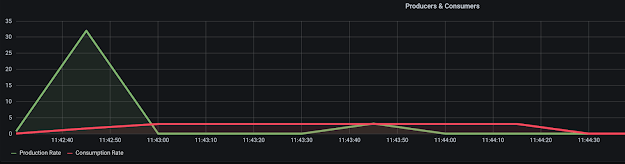
Clearly, backpressure is acting on this stream of data. The surprising aspect for me was the backpressure appeared to be triggering at a large value of 256 records from upstream.
Analyzing this is a little, the reason I realized is that an intermediate operation is buffering the requests. The intermediate operation in this instance happens to be the “publishOn()” operator that I am using, a variant of “publishOn()” which additionally takes in a prefetch parameter fixes the size of the buffer.
In my case setting it to 10 felt reasonable, the code looks like this now:
1 2 3 4 5 6 7 | producer.produce(producerRate, count) .subscribeOn(subscribeOnScheduler) .publishOn(publishOnScheduler, 10) .subscribe { value: Long -> sleep(delayBetweenConsumes) logger.info("Consumed {}", value) } |
and the graph with the Producer and Consumer remains closely in sync:

Scenario 3: Fast Producer, Multi-threaded Consumer
If you look closely at the name of the threads in logs from the first two scenarios then you would notice that the names of the thread at the point of production and at the point of consumption are always the same. The operators “publishOn()” and “subscribeOn()” don’t parallelize the operation, they only switch the execution context of the operations. To really parallelize the operations, two approaches can be taken:
- Using the parallel operator
- Using flatMap flavors with their own “subscribeOn” operators
For the 3rd scenario, I went for the second option of using flatMap and it looks something like this:
01 02 03 04 05 06 07 08 09 10 11 | producer.produce(producerRate, count) .subscribeOn(subscribeOnScheduler) .publishOn(publishOnScheduler, 10) .flatMap({ value: Long -> Mono.fromSupplier { sleep(delayBetweenConsumes) logger.info("Consumed {}", value) null }.subscribeOn(flatMapScheduler) }, concurrency) .subscribe() |
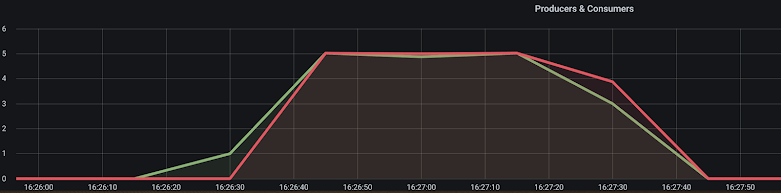
The work of consuming the produced sequence of numbers is being done inside the flatMap operation, the number of concurrent consumption is set to 5 by default. Running this scenario produces the following logs, the consumers are now running 5 at a time on multiple threads:
01 02 03 04 05 06 07 08 09 10 11 | 2020-07-26 23:26:27.212 INFO 1 --- [ subscribe-3] sample.meter.Producer : Emitted 12020-07-26 23:26:27.321 INFO 1 --- [ subscribe-3] sample.meter.Producer : Emitted 22020-07-26 23:26:27.423 INFO 1 --- [ subscribe-3] sample.meter.Producer : Emitted 3...2020-07-26 23:26:28.040 INFO 1 --- [ subscribe-3] sample.meter.Producer : Emitted 92020-07-26 23:26:28.143 INFO 1 --- [ subscribe-3] sample.meter.Producer : Emitted 102020-07-26 23:26:28.222 INFO 1 --- [ flatMap-4] sample.meter.Consumer : Consumed 12020-07-26 23:26:28.328 INFO 1 --- [ flatMap-5] sample.meter.Consumer : Consumed 22020-07-26 23:26:28.428 INFO 1 --- [ flatMap-6] sample.meter.Consumer : Consumed 32020-07-26 23:26:28.527 INFO 1 --- [ flatMap-7] sample.meter.Consumer : Consumed 4... |
The rate of production lines up with the rate of consumption
Conclusion
These are different scenarios that I was able to run to simulate backpressure scenarios with Project Reactor and should be true for most Reactive Streams based libraries.
They have sane defaults in managing the backpressure needs of a Consumer and provide ways to override the defaults.
In all scenarios that I have run in this post, the Producer throttled the production at a rate that the Consumer was comfortable consuming.
If you are interested in exploring the scenarios further, my codebase along with the grafana/prometheus set up for graphing the output is available in my github repository here https://github.com/bijukunjummen/backpressure-demo
Published on Java Code Geeks with permission by Biju Kunjummen, partner at our JCG program. See the original article here: Backpressure in Project Reactor Opinions expressed by Java Code Geeks contributors are their own. |






