Most dev teams manage project data across three or four overlapping systems: a spreadsheet for resource tracking, a Jira board for tasks, a Confluence page for decisions, and a slide deck someone emails around at the end of the quarter. None of these is a database. None enforces referential integrity. None can answer a cross-cutting query in under a minute. This article makes the case for why that matters — and what a structured project management database actually gives you that nothing else does.
The fragmentation problem every team recognises but nobody fixes
There is a pattern that plays out in almost every engineering organisation above a certain size. The team starts small and manages everything in a shared spreadsheet. That works fine until two people edit it at the same time, one of them saves over the other’s work, and nobody is sure which version is current. Someone adds Jira. Now tasks live in Jira, but resource allocation still lives in the spreadsheet, decisions live in Confluence, and the mapping between them exists only in the project manager’s head.
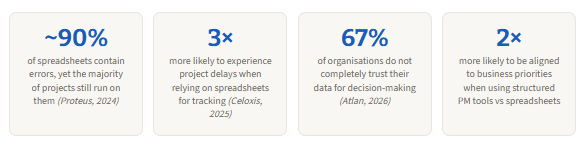
According to a 2025 airfocus analysis of product teams, this fragmented approach forces PMs to manually collect and centralise scattered information that should be connected automatically. The downstream cost is not just PM overhead — it is the data quality problem that follows. Research compiled across multiple project management surveys found that nearly 90% of spreadsheets contain errors, and that teams using structured project management tools are twice as likely to stay aligned with business priorities. Furthermore, 70% of teams still use spreadsheets for project tracking despite being three times more likely to experience delays as a result.
The irony is that engineering teams — people who build databases for a living — are often the last to apply database thinking to their own project data. The same team that enforces foreign key constraints, normalises schemas, and runs migration scripts on their production database will track sprint velocity in a Google Sheet with no validation and three conflicting definitions of “done.”
What a project management database actually is
A project management database is not a specific product. It is an architectural commitment: project data — tasks, milestones, team members, dependencies, status changes, decisions — lives in a normalised relational store with enforced constraints, defined relationships, and a stable query interface. It might be PostgreSQL, MySQL, SQLite, or an embedded H2 instance behind a lightweight admin tool. The technology is secondary. What matters is the set of guarantees that only a real database provides.
Those guarantees are worth naming precisely because they are so easy to underestimate until they are missing. A database enforces that a task cannot reference a project that does not exist. It ensures that two concurrent updates to the same milestone are serialised, not lost. It records a timestamped history of every status change without anyone having to remember to log it. And it answers arbitrary cross-cutting queries — “show me every overdue task across all projects assigned to engineers who are also marked as on leave this week” — in milliseconds, without anyone exporting CSVs and doing a VLOOKUP.
“In most modern businesses, sales teams have CRMs, engineers have Git — these are single sources of truth that ensure efficiency, alignment, and data integrity. Yet many teams are still patching together their workflows with spreadsheets.”
Where Jira exports fall short as a data source
Jira is a capable issue tracker. It is not a data platform. The distinction matters most when teams try to build reporting or analytics on top of Jira data, because Jira’s native export capabilities have hard structural limitations that become impossible to work around at scale.
The most concrete example is the 1,000-issue export cap in Jira’s native CSV export. Jira’s REST API returns a maximum of 1,000 issues per request, and the Issue Navigator applies the same limit. This is a deliberate design decision to avoid OutOfMemoryException on the server side, but for any team with a mature backlog, it means a native export is never a complete dataset. Teams that need full history have to paginate through the API manually, stitch the results together, and deduplicate — which is exactly the kind of ETL work that should live in a database pipeline, not in someone’s local Python script.
Beyond the volume cap, Jira’s data model is also inherently flat when exported. Jira organises data as hierarchical issue trees — epics containing stories containing subtasks — but native exports flatten this into a list of issues with parent references. Reconstructing the hierarchy for reporting requires joining on those references, which is a SQL operation, not a spreadsheet operation. Teams that try to do it in Excel typically end up with pivot tables that need to be rebuilt every sprint.
The “export to SQL” workaround is just building the database you should have hadThe most common advanced Jira reporting pattern — exporting to PostgreSQL, BigQuery, or Amazon Redshift for SQL-based analysis — is an acknowledgment that Jira’s native data layer is insufficient for serious cross-project analytics. If your team has reached this point, you have effectively built a project management database. The question is whether you are maintaining it intentionally or reactively.
Where project data quality breaks down without a structured database
The five things a structured database gives you that nothing else does
1. Referential integrity across entities
In a spreadsheet, nothing stops someone from deleting a project row that tasks in another tab still reference. In a database, a foreign key constraint does. This sounds trivial until a team member leaves mid-project, their assignments are deleted from the resource sheet, and three weeks later nobody can explain why those tasks show no owner. Referential integrity is not a performance feature — it is a correctness guarantee. It makes the data mean something even when the people who created it are no longer around to interpret it.
2. A queryable, complete audit trail
A project management database with an event log table records every status transition, every reassignment, every deadline change — with a timestamp and a user identifier. This is not primarily for compliance, though compliance frameworks from HIPAA to SOX increasingly mandate it. It is primarily for operational learning. When a post-mortem asks “why did this milestone slip by three weeks,” the answer should come from a SQL query, not from reading through old chat logs or asking people to reconstruct events from memory.
Without a structured audit trail, post-mortems rely on whoever was present and whoever remembers. With one, they rely on data. Those two things produce very different conclusions and very different improvements.
3. Cross-project reporting in a single query
The most valuable project management questions are cross-cutting: which engineer has the highest task load across all active projects right now? Which project type has the worst on-time delivery rate historically? Which milestone dependencies appear most often in delayed projects? None of these are answerable from a single Jira board or a single spreadsheet. They require a join across multiple datasets that share a common schema. That is what a relational database exists to do.
4. Concurrent writes without conflicts
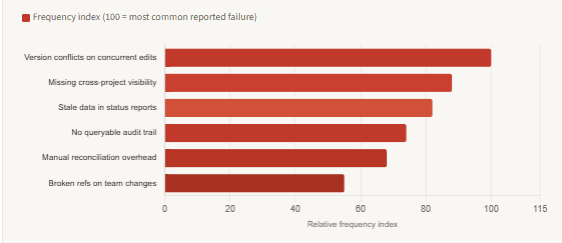
The version conflict problem — two people edit the file, one saves over the other — is so familiar that most teams have just accepted it as a cost of doing business. It is not. It is a direct consequence of treating a file-based system as a database. A real database handles concurrent writes through transactions and row-level locking. Two people updating different fields of the same task simultaneously both succeed, correctly, without either overwriting the other’s change. This is table stakes for any system that multiple people interact with in real time.
5. Automation and integration without fragile scripts
When project data lives in a structured database, automation becomes straightforward: trigger a notification when a task transitions to a blocked state, generate a weekly velocity report by querying the last seven days of status changes, alert when a milestone’s planned date exceeds its originally committed date. These are SQL queries and simple event hooks, not brittle spreadsheet formulas that break when someone adds a column. Furthermore, integrating project data with other systems — CI/CD pipelines, incident trackers, cost management tools — is a database connection, not a CSV export and re-import cycle.
Spreadsheets / Jira exports
- Version conflicts on concurrent edits
- No foreign key enforcement — orphaned references silently accumulate
- 1,000-issue cap on Jira exports
- Flat export loses hierarchy — requires manual reconstruction
- No built-in audit trail — history requires manual logging
- Cross-project queries require VLOOKUP or manual joins
- Automation requires fragile formula chains or ad-hoc scripts
- ~90% of spreadsheets contain at least one data error
Structured PM database
- Transactions + row-level locking — concurrent writes are safe
- Foreign keys prevent orphaned records at the storage layer
- No export cap — query the full history in a single statement
- Relational schema preserves hierarchy natively
- Event log table records every change with timestamp + actor
- Cross-project queries are standard SQL joins
- Automation is event-driven queries and triggers
- Schema constraints prevent structurally invalid data at insert time
What a minimal project management schema looks like
A project management database does not need to be large or complex to deliver most of the benefits above. The following schema covers the core entities — projects, milestones, tasks, team members, assignments, and a status change event log — in six tables. It enforces referential integrity throughout and includes the audit trail as a first-class table, not an afterthought. The SQL is standard and runs on PostgreSQL, MySQL, or SQLite without modification.
-- Core entities with enforced foreign keys throughout

CREATE TABLE projects (
    id          SERIAL       PRIMARY KEY,
    name        VARCHAR(255) NOT NULL,
    status      VARCHAR(32)  NOT NULL DEFAULT 'active', -- active | paused | completed | cancelled
    owner_id    INT          REFERENCES team_members(id) ON DELETE SET NULL,
    created_at  TIMESTAMPTZ  NOT NULL DEFAULT NOW(),
    due_date    DATE
);

CREATE TABLE team_members (
    id          SERIAL       PRIMARY KEY,
    name        VARCHAR(255) NOT NULL,
    email       VARCHAR(255) NOT NULL UNIQUE,
    role        VARCHAR(64),
    active      BOOLEAN      NOT NULL DEFAULT true
);

CREATE TABLE milestones (
    id          SERIAL       PRIMARY KEY,
    project_id  INT          NOT NULL REFERENCES projects(id) ON DELETE CASCADE,
    name        VARCHAR(255) NOT NULL,
    due_date    DATE         NOT NULL,
    status      VARCHAR(32)  NOT NULL DEFAULT 'pending'
);

CREATE TABLE tasks (
    id           SERIAL       PRIMARY KEY,
    project_id   INT          NOT NULL REFERENCES projects(id) ON DELETE CASCADE,
    milestone_id INT          REFERENCES milestones(id) ON DELETE SET NULL,
    title        VARCHAR(512) NOT NULL,
    status       VARCHAR(32)  NOT NULL DEFAULT 'todo',  -- todo | in_progress | blocked | done
    assignee_id  INT          REFERENCES team_members(id) ON DELETE SET NULL,
    due_date     DATE,
    created_at   TIMESTAMPTZ  NOT NULL DEFAULT NOW()
);

-- Audit trail: every status change recorded automatically via trigger or application layer
CREATE TABLE task_events (
    id           SERIAL       PRIMARY KEY,
    task_id      INT          NOT NULL REFERENCES tasks(id) ON DELETE CASCADE,
    actor_id     INT          REFERENCES team_members(id) ON DELETE SET NULL,
    event_type   VARCHAR(64)  NOT NULL,   -- status_changed | reassigned | due_date_updated
    old_value    TEXT,
    new_value    TEXT,
    recorded_at  TIMESTAMPTZ  NOT NULL DEFAULT NOW()
);

-- Example cross-project query: overdue tasks by assignee across all active projects
SELECT
    tm.name         AS assignee,
    p.name          AS project,
    t.title         AS task,
    t.due_date,
    t.status
FROM  tasks t
JOIN  projects    p  ON p.id  = t.project_id
JOIN  team_members tm ON tm.id = t.assignee_id
WHERE p.status    = 'active'
  AND t.status    != 'done'
  AND t.due_date  < CURRENT_DATE
ORDER BY t.due_date ASC;
This schema is genuinely minimal — it is not trying to replace Jira. It is trying to give your team one place where project data is structured, queryable, and correct. The task_events table is worth calling out specifically: it makes the audit trail a first-class concern rather than something bolted on later. Every time a task changes status, an application-layer write or a database trigger inserts a row here. The full history of every task is always available without any additional tooling.
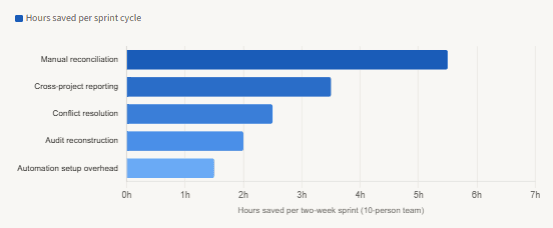
Time saved per sprint cycle: structured database vs spreadsheet-based PM tracking
The practical path: you do not need to boil the ocean
The most common objection to building a project management database is that it sounds like a big project on top of all the other big projects. In practice, the minimum viable version is much smaller than it appears. Most teams do not need to migrate everything at once — they need to identify the one data flow that is currently most broken (usually cross-project status reporting or resource allocation), model that as a table, and start writing to it.
A lightweight approach that works well in practice is to keep Jira or your existing tool as the write surface for individual tasks — the interface people actually use — while using the database as the read surface for reporting and analytics. A simple background process or webhook that syncs Jira events into the task_events table above gives you a complete, queryable audit log without asking anyone to change how they work. From there, adding the cross-project query capability is additive, not disruptive.
| Migration step | What it solves | Complexity | Recommended timing |
|---|---|---|---|
Add a task_events table and start logging status changes | Audit trail, post-mortem data, compliance foundation | Low | Week 1 — highest ROI, minimal disruption |
| Sync Jira/tool data into a read-only reporting schema | Cross-project visibility, velocity reporting, load balancing | Medium | Weeks 2–4 — after audit trail is stable |
| Add foreign key constraints on project and member references | Referential integrity, prevents orphaned records on team changes | Low | Alongside reporting schema |
| Migrate resource allocation out of spreadsheets into the DB | Eliminates version conflicts, enables concurrent editing | Medium | Month 2 — after team is comfortable querying the DB |
| Add automation triggers (blocked task alerts, overdue notifications) | Removes manual monitoring overhead from PM | Medium | Month 2–3 — after data is trusted |
The right starting point for most teamsIf your team currently has no structured PM database, the highest-ROI first step is a single event log table that records every task status change with a timestamp, actor, old value, and new value. This alone eliminates the most common post-mortem failure mode — “we don’t know when or why this slipped” — and gives you the foundation for everything else. It takes an afternoon to implement, requires no process changes, and starts delivering value immediately.
What we learned
The reason most dev teams do not have a project management database is not that they lack the skills — they build databases professionally. It is that the problem accumulates gradually enough that the inflection point is never obvious. The spreadsheet works until it does not. Jira works for individual tasks but falls apart for cross-project reporting, especially once the native 1,000-issue export cap and flat data model become binding constraints. The result is a set of workarounds — CSV exports, Python scripts, manual reconciliation — that collectively cost more effort than building the structured store would have.
A project management database does not need to replace existing tools. It needs to provide what those tools cannot: referential integrity that prevents orphaned records, a queryable audit trail that makes post-mortems data-driven rather than memory-driven, cross-project SQL queries that no spreadsheet can answer, concurrent write safety that eliminates version conflicts, and an integration foundation that makes automation straightforward. A minimal schema of six tables delivers all five of these. The right migration strategy is incremental — start with the event log, add the reporting schema, then migrate the high-conflict data surfaces like resource allocation. Each step delivers immediate value without requiring a big-bang migration that disrupts the team.