If you have spent any meaningful time writing JavaScript, you have almost certainly seen it — the dreaded TypeError: undefined is not a function. It shows up in the browser console, it stops your code dead in its tracks, and it tends to appear at the worst possible moment. The good news is that, once you understand what is really going on, it is entirely fixable and, better yet, entirely preventable.
In this article we are going to walk through what this error actually means, why JavaScript throws it, and the most common situations where it tends to surface. Along the way we will look at practical fixes and a few habits that will stop the error from coming back. Let’s dive in.
What Does the Error Actually Mean?
At its simplest, TypeError: undefined is not a function means exactly what it says: JavaScript tried to call something as if it were a function, but when it looked at the value, it found undefined instead. JavaScript is a loosely typed language, which means types are not checked at compile time. The engine only discovers the problem when it actually tries to execute the call. At that point, it throws a TypeError.
There are a handful of situations that trigger this. They are all different on the surface, but they all share the same root: something that should be a function is not. Understanding each one helps you pinpoint the real source of the bug, rather than guessing.
Most common root causes of “undefined is not a function”
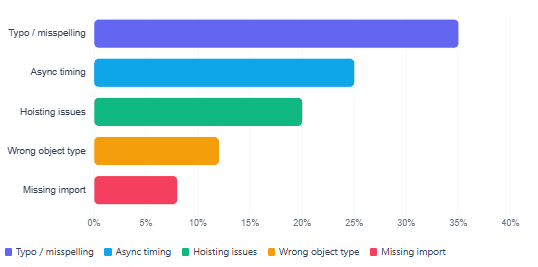
Cause 1: The Typo You Did Not Notice
This is the single most common trigger, and it also happens to be the easiest to fix once you spot it. JavaScript is case-sensitive, so fetchData() and FetchData() are two completely different things. Similarly, even a transposed letter like calcluateSum() instead of calculateSum() is enough to cause the error.
For example, the following code will fail because the function name is misspelled at the call site:
function calculateSum(a, b) {
  return a + b;
}

// ❌ Typo — 'calcluate' instead of 'calculate'
calcluateSum(5, 10); // TypeError: calcluateSum is not a function


// ✅ Correct spelling
calculateSum(5, 10); // 15
The fix is straightforward: double-check spelling at both the declaration and every call site. A good IDE like VS Code will underline unrecognised identifiers, which makes this class of bug much easier to catch before you even run the code.
Cause 2: Hoisting and the Function Expression Trap
JavaScript hoists declarations to the top of their scope before execution begins. However, hoisting behaves differently depending on how you define your function, and this is where a lot of developers get caught out.
A classic function declaration is fully hoisted — meaning you can call it before it appears in the file. A function expression (where you assign an anonymous function to a variable) is a different story. If you use var, the variable itself is hoisted but its value stays undefined until the assignment line is reached. The result is predictable: calling it early throws our familiar error.
// ✅ Function declaration — hoisting works, call before definition is fine
greet(); // "Hello!"

function greet() {
  console.log("Hello!");
}

// ❌ Function expression with var — var is hoisted as undefined
sayHi(); // TypeError: sayHi is not a function

var sayHi = function() {
  console.log("Hi!");
};

// ✅ Move the call after the assignment
var sayHi = function() {
  console.log("Hi!");
};
sayHi(); // "Hi!"
Quick rule of thumb: If you use
constorletfor function expressions (which is the modern, recommended approach), JavaScript will throw a ReferenceError rather than a TypeError if you call too early — becauseletandconstare not initialised during hoisting. Either way, the lesson is the same: define before you call.
Hoisting behaviour at a glance
| Declaration style | Hoisted? | Value before assignment | Call before definition |
|---|---|---|---|
function foo() {} | Yes (fully) | The function itself | Works |
var foo = function() {} | Partially | undefined | TypeError |
let / const foo = function() {} | Partially (TDZ) | Not initialised | ReferenceError |
const foo = () => {} | Partially (TDZ) | Not initialised | ReferenceError |
Cause 3: Calling a Method on the Wrong Type
This one catches developers frequently, especially when data comes from an API or another source that does not always return what you expect. For instance, .map(), .filter(), and .forEach() are Array methods. If the variable turns out to be null, undefined, or even a plain object, calling those methods will immediately throw.
// Imagine this came back from an API that returned null on error
const users = null;

//  null has no .map() method
users.map(u => u.name); // TypeError: Cannot read properties of null


//  Guard with a default value or an explicit check
const safeUsers = users ?? [];
safeUsers.map(u => u.name); // [] — safe and predictable
Similarly, accidentally calling a string method on a number, or an array method on an object, produces the same family of errors. The best defence is to validate your data before operating on it, and to use defensive defaults (?? [], ?? {}) at the point where external data enters your code.
Watch for typos in method names too.
.forEachand.forEachhlook almost identical at a glance. JavaScript will look up the property and findundefined, then try to call it — resulting in exactly our TypeError.
Cause 4: Async Timing Issues
Asynchronous code is another frequent source of this error, particularly for developers who are still getting comfortable with how JavaScript handles timing. The problem typically goes like this: a function is fetched or loaded asynchronously, and somewhere else in the code it gets called before the async operation has finished. At the point of the call, the variable still holds undefined.
//  Calling the result of a Promise before it resolves
let processData;

fetch("/api/processor")
  .then(res => res.json())
  .then(data => {
    processData = data.handler;
  });

// This runs immediately — processData is still undefined here
processData(); // TypeError: undefined is not a function


//  Keep the call inside the .then() block, or use async/await
async function run() {
  const res = await fetch("/api/processor");
  const data = await res.json();
  const processData = data.handler;

processData(); // Runs only after data is ready

}

run();
The async/await pattern is generally the clearest way to handle this. It makes the order of operations obvious and, as a result, makes these timing bugs far less likely to slip through.
Cause 5: Scope Problems
JavaScript’s scoping rules mean that a function defined inside one block is not necessarily available in another. In addition, if you accidentally reassign a variable that was holding a function reference, you lose the function entirely and replace it with whatever the new value is.
// ❌ Function defined inside a block — not accessible outside
if (true) {
  function helper() {
    return "I help!";
  }
}
// In strict mode or modules, helper() here may be undefined

// ❌ Overwriting a function reference
let doWork = function() { console.log("working"); };
doWork = "oops"; // now it's a string
doWork(); // TypeError: doWork is not a function


// ✅ Use const to prevent accidental reassignment
const doWork = function() { console.log("working"); };

// Reassigning const throws a TypeError at assignment time — caught early
Preferring const for function expressions is a small but effective habit. It closes off one entire category of bugs by making accidental reassignment a runtime error at the point of reassignment, rather than a mysterious failure somewhere else later.
Cause 6: Import and Export Mismatches
As codebases grow and modules come into play, import/export mistakes become a regular source of this error. The two most common culprits are mixing up default and named exports, and getting the file path wrong.
// utils.js — named export
export function calculateTax(amount) { return amount * 0.2; }


// main.js — ❌ Wrong: importing as default
import calculateTax from "./utils.js"; // undefined!

calculateTax(100); // TypeError: calculateTax is not a function

// main.js — ✅ Correct: use curly braces for a named export
import { calculateTax } from "./utils.js";

calculateTax(100); // 20
As a rule: default exports are imported without curly braces, named exports require them. When something is undefined despite being imported, this distinction is usually the first thing worth checking. The MDN guide on ES Modules has a clear breakdown if you need a refresher.
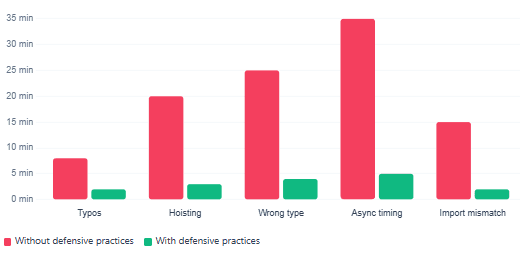
Time spent debugging vs. prevention — a developer experience comparison
How to Debug It When You Are Not Sure Which Cause You Are Dealing With
Sometimes the stack trace makes the problem obvious. Other times — particularly in larger applications — you end up staring at a line number that points to a call site, not the root cause. In those situations a methodical approach saves a lot of time.
Start by printing the value before you call it. Add console.log(typeof myValue, myValue) immediately before the line that fails. If typeof returns "undefined", the variable was never assigned. If it returns "string" or "object", you have a type mismatch. That single check usually narrows things down to one of the causes above.
typeof result | What it means | Where to look |
|---|---|---|
"undefined" | Variable was never assigned | Typo, hoisting, async timing, missing import |
"string", "number" | Variable holds the wrong type | Scope overwrite, API returned unexpected shape |
"object" | It is an object, not a function | Default vs. named import confusion, wrong property access |
"function" | It actually is a function | Error may be in the arguments, not the call itself |
Beyond typeof, modern browser DevTools let you set a breakpoint directly on the line that throws. From there you can hover over any variable and inspect its current value without adding a single console statement. The Chrome DevTools documentation is a great reference if you are not yet fully comfortable with breakpoints.
Prevention: A Few Habits That Make a Real Difference
Fixing a bug once is satisfying. Not seeing it again is even better. Fortunately, a small set of consistent habits covers the vast majority of cases that cause this particular error.
First, lean toward const for every function expression. It makes accidental overwriting impossible and signals clearly that this value should not change. Second, validate external data at entry points — whether that is an API response, a user input, or a module export. Third, prefer async/await over deeply nested .then() chains; the linear structure makes execution order much easier to reason about. Finally, use a linter. ESLint with the no-use-before-define rule catches hoisting mistakes automatically, before they ever reach the browser.
If your project allows it, TypeScript takes prevention a step further. By assigning types to your variables and function signatures, the compiler flags mismatches at build time — so a string being called as a function becomes a compile error rather than a runtime surprise.
| Habit | What it prevents |
|---|---|
Use const for function expressions | Accidental overwrite of function references |
Validate and default external data (?? []) | Wrong-type errors on API responses |
Use async/await over nested .then() | Async timing bugs |
ESLint no-use-before-define | Hoisting-related undefined errors |
| Consistent named vs. default export discipline | Import/export mismatches |
| TypeScript (where applicable) | All of the above, caught at compile time |
What We Learned
The TypeError: undefined is not a function error is one of JavaScript’s most common runtime failures, but it is always traceable to a concrete root cause. We covered the six main triggers: typos and case-sensitivity mistakes, the hoisting gap between function declarations and function expressions, calling methods on the wrong data type, async timing where a function is called before an async operation resolves, scope and accidental overwrite issues, and import/export mismatches in modular code. We also walked through a systematic debugging approach — using typeof and browser DevTools breakpoints — to narrow down the cause quickly. Finally, we saw how a handful of consistent habits, from preferring const and async/await to adding ESLint and, where possible, TypeScript, can prevent most occurrences of this error before they ever reach production.