AI-Assisted Coding in 2026: How GitHub Copilot, Cursor, and Amazon Q Are Reshaping Developer Workflows

The promise was seductive: AI coding assistants that would 10x developer productivity, eliminate bugs, and transform junior developers into senior architects overnight. The reality in 2026 is more nuanced—and more interesting. Companies like Microsoft and Accenture found 26% average productivity gains from AI coding tools, primarily among teams large enough to have varied skill levels but small enough for rapid adoption.
The real story isn’t about raw speed. It’s about how GitHub Copilot, Cursor, and Amazon Q Developer are fundamentally changing what developers optimize for, which workflows survive contact with AI, and why team size matters more than anyone anticipated.
1. The State of AI Coding in 2026
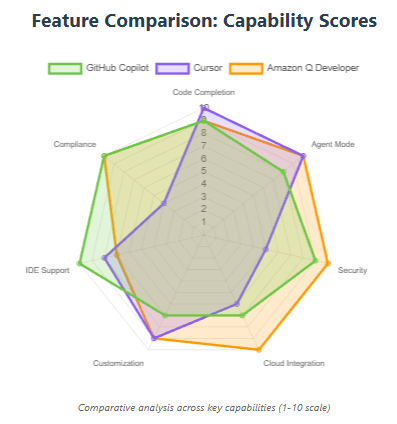
Three platforms have emerged as clear leaders, each serving distinct needs. GitHub Copilot dominates through platform integration. Cursor attracts developers wanting an AI-first environment. Amazon Q Developer captures teams already invested in AWS infrastructure.
GitHub Copilot now includes agent mode capabilities for implementing changes across multiple files, next edit suggestions to automatically predict and execute the next logical edit, and the ability to store and share tailored instructions for Copilot directly in the editor. The evolution from autocomplete to autonomous coding agents represents a fundamental shift in how these tools operate.
Cursor released version 2.0 with a new coding model and agent interface, improved plan mode, AI code review in editor, and instant grep capabilities. The platform’s integration of multiple frontier models from OpenAI, Anthropic, Gemini, and xAI gives developers unprecedented flexibility.
Amazon Q Developer agentic capabilities have achieved the highest scores on the SWE-Bench Leaderboard, with features for implementing code across multiple files, generating tests, documentation, and code reviews.
2. GitHub Copilot: The Platform Play
2.1 What Makes It Different
GitHub announced multi-model GitHub Copilot with models from Anthropic’s Claude 3.5 Sonnet, Google’s Gemini 1.5 Pro, and OpenAI’s GPT-4o, o1-preview and o1-mini, giving developers agency to select from industry-leading models.
The killer feature isn’t the AI—it’s the integration. The Copilot coding agent operates within GitHub’s native control layer, built in the flow of the software development life cycle, pushing commits to draft pull requests with agent session logs for tracking every step.
2.2 Real-World Performance
GitHub’s internal data shows developers accepting 37-50% of suggested code completions, depending on context and language. But acceptance rates tell only part of the story. Copilot code review now blends LLM detections with deterministic tools like ESLint and CodeQL, delivering smarter reviews with agentic tool calling to actively gather full project context.
2.3 Best For
- Teams already using GitHub for version control and code reviews
- Organizations needing enterprise SSO and audit capabilities
- Developers working across multiple repositories
- Mobile development with the GitHub Mobile app integration
2.4 Pricing Reality
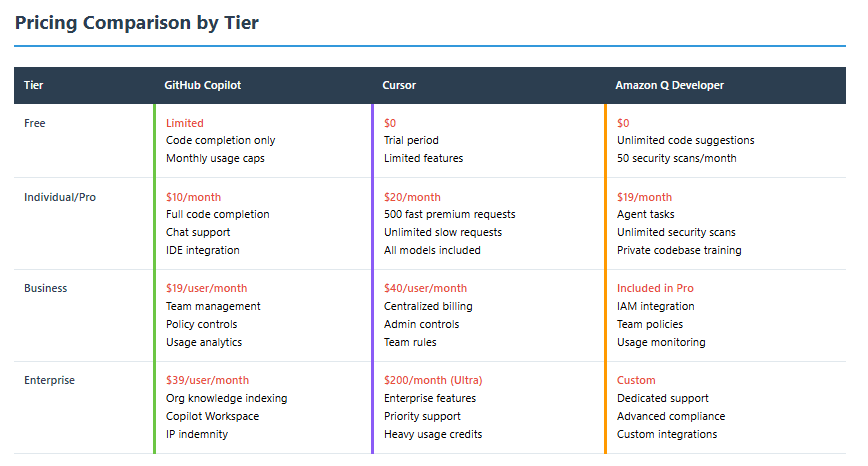
GitHub Copilot Business at $19/user/month provides team management and policy controls. GitHub Copilot Enterprise at $39/user/month adds organization-specific knowledge indexing and Copilot Workspace access. The free tier exists but with significant usage limitations.
3. Cursor: The AI-Native Disrutor
3.1 The Fundamentally Different Approach
Cursor isn’t a plugin—it’s a complete IDE forked from VS Code with AI woven into every interaction. Cursor’s agent mode can run up to eight agents in parallel on a single prompt using git worktrees or remote machines to prevent file conflicts, with each agent operating in its own isolated copy of the codebase.
The platform introduced its first agentic coding model specifically designed for multi-file editing and complex refactoring tasks. Cursor’s codebase embedding model gives Agent deep understanding and recall, with the ability to choose freely between frontier models from OpenAI, Anthropic, Gemini, and xAI.
3.2 The Tab Prediction Advantage
Traditional autocomplete predicts the next token. Cursor Tab predicts your next action. The new Tab model makes 21% fewer suggestions while having 28% higher accept rate. This isn’t just autocomplete—it’s predicting cursor position, understanding multi-line intent, and suggesting entire structural changes.
3.3 Advanced Features
Cursor’s plan mode allows agents to write detailed plans before starting complex tasks, enabling agents to run for significantly longer with browser controls that can be embedded in-editor. The platform’s sandboxed terminals run agent commands securely with read/write access to workspaces but no internet access by default.
3.4 Best For
- Individual developers and small teams prioritizing AI-first workflows
- Projects requiring aggressive iteration and rapid prototyping
- Developers comfortable with beta features and regular updates
- Teams willing to invest time learning agentic workflows
3.5 The Cost Consideration
Cursor Pro costs $20/month with 500 fast premium requests and unlimited slow requests. The Business plan at $40/user/month adds centralized billing and admin controls. The Ultra plan at $200/month may be prohibitive for individual developers, though heavy usage can quickly deplete credit pools.
4. Amazon Q Developer: The AWS Integration Story
4.1 Built for Cloud-Native Development
Amazon Q Developer expanded its customization capabilities to include C#, C++, Dart, Go, Kotlin, PHP, Ruby, Rust, Scala, Bash, PowerShell, CloudFormation, and Terraform support, enabling developers to tailor AI suggestions based on their company’s proprietary codebase.
The deep AWS integration changes the value proposition. Q Developer can answer account-level questions, generate CLI commands for AWS services, and understand infrastructure-as-code in ways competitors can’t match.

4.2 Agent Capabilities
Amazon Q Developer can autonomously perform a range of tasks—everything from implementing features, documenting, and refactoring code to performing software upgrades—with agents for unit testing, documentation, and code reviews.
The addition of model context protocol (MCP) support in the Amazon Q Developer CLI standardizes how applications provide context to Large Language Models, allowing developers to seamlessly integrate additional tools and data sources.
4.3 Enterprise Security
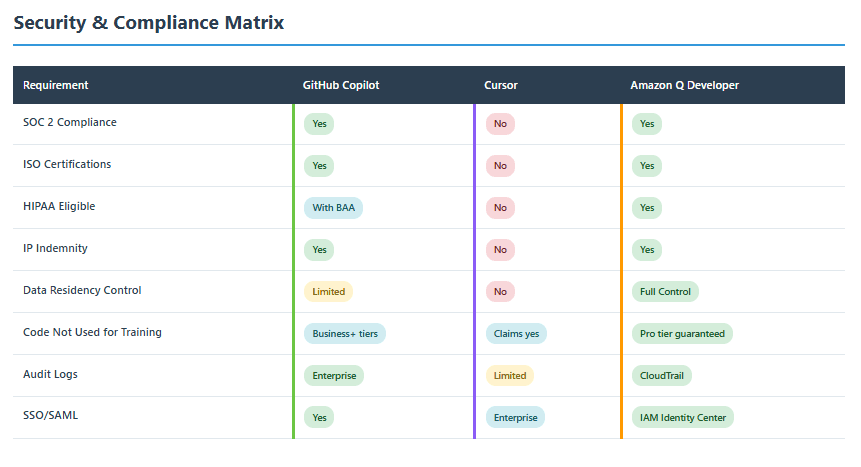
For regulated environments, Q Developer offers advantages competitors struggle to match. Q Developer is eligible for use in regulated environments with SOC, ISO, HIPAA, and PCI compliance, with Pro tier customers’ proprietary content not used for service improvement.
4.4 Best For
- Organizations with significant AWS infrastructure investment
- Teams requiring strict compliance and data residency controls
- Projects involving legacy modernization or cloud migration
- Developers working heavily with AWS services and infrastructure
4.5 Pricing Structure
Amazon Q Developer Free provides unlimited code suggestions and 50 security scans monthly. Amazon Q Developer Pro at $19/user/month adds agent tasks for feature implementation, unlimited security scans, and customization on private codebases.
5. Team Size: The Hidden Variable
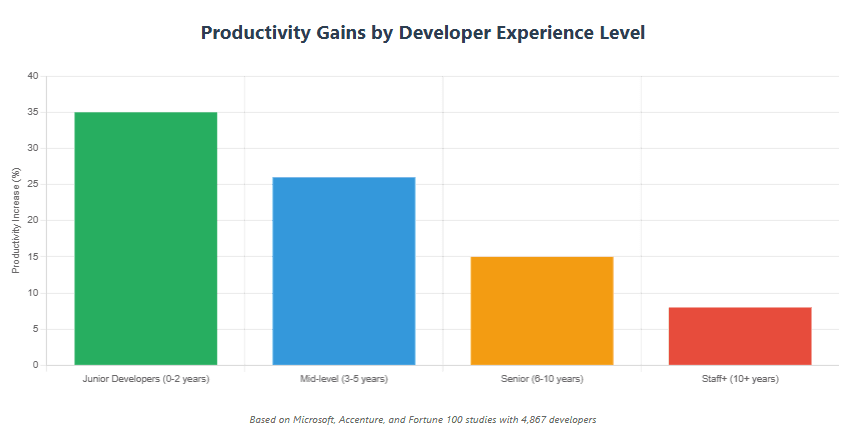
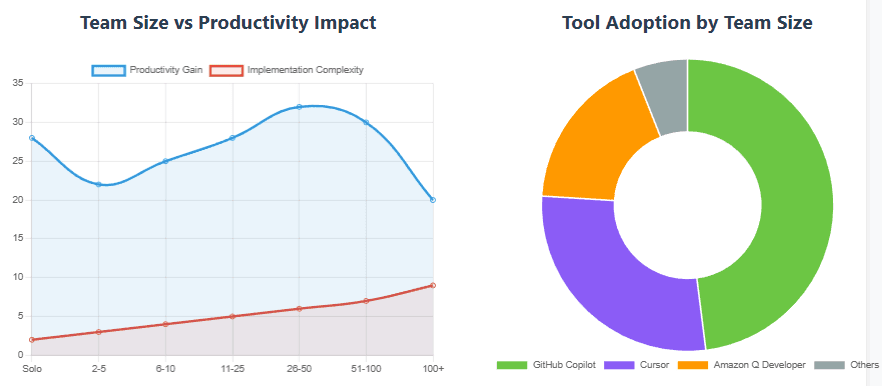
The productivity paradox reveals itself when examining team dynamics. Experienced developers using AI tools actually work 19% slower on complex tasks, despite believing the tools make them faster, while junior developers see 26-39% productivity gains.

5.1 Solo Developers (1 Person)
GitHub Copilot works well for individuals comfortable with standard GitHub workflows. The free tier provides reasonable usage for side projects.
Cursor shines brightest here. Solo developers can fully embrace agentic workflows without coordination overhead. The Pro tier at $20/month delivers exceptional value for individual power users.
Amazon Q Developer makes sense primarily if you’re building on AWS. Otherwise, the overhead isn’t justified for solo work.
5.2 Small Teams (2-10 Developers)
Faros AI analyzed telemetry from over 10,000 developers across 1,255 teams, finding that teams with high AI adoption interacted with 9% more tasks and 47% more pull requests per day, with developers juggling more parallel workstreams because AI could scaffold multiple tasks at once.
GitHub Copilot Business becomes compelling at this scale. The $19/user/month investment buys unified team policies, centralized billing, and seamless GitHub integration.
Cursor requires team coordination around agentic workflows. Success depends on establishing clear conventions for when to use agent mode versus manual coding.
Amazon Q Developer Pro works if the team is AWS-native. The CLI integration and infrastructure awareness create real velocity gains for cloud-focused development.
5.3 Mid-Market Teams (10-100 Developers)
This segment sees the highest productivity gains from AI tools. Mid-market teams benefit most because they’re large enough to have varied skill levels but small enough for rapid adoption.
GitHub Copilot Enterprise at $39/user/month delivers value through organization-wide knowledge indexing. Teams can index internal documentation, style guides, and architectural patterns.
Cursor Business at $40/user/month provides centralized management without enterprise complexity. The challenge: ensuring consistent usage patterns across developers with different skill levels.
Amazon Q Developer Pro with customization enables teams to train suggestions on proprietary codebases. C# and C++ customization allows for more accurate inline suggestions and contextual code understanding across projects.
5.4 Enterprise (100+ Developers)
Large organizations face unique challenges. Up to 45% of AI-generated code contains security flaws, with some studies showing Java applications having security failure rates exceeding 70%, making security-first AI tools essential, not optional.
GitHub Copilot Enterprise provides the control layer enterprises need. SSO integration, usage analytics, and IP indemnity address procurement and legal requirements.
Cursor faces adoption challenges at enterprise scale. The lack of centralized policy enforcement and audit capabilities creates governance gaps.
Amazon Q Developer Pro with IAM Identity Center integration provides enterprise-grade access controls. Amazon Q Developer integrates with IAM Identity Center for SSO, includes policy controls like blocking certain license types, offers usage analytics, and comes with IP indemnity.
6. The Productivity Paradox: What Actually Improves
The hype promised 10x gains. Reality delivers something different—and arguably more valuable.
6.1 What Gets Faster
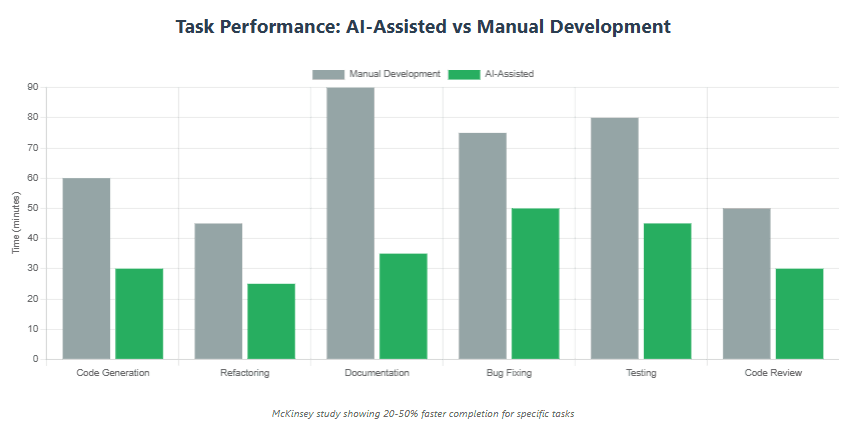
Code Generation: A McKinsey study showed developers using AI tools performed coding tasks like code generation, refactoring, and documentation 20%-50% faster on average compared to those not using AI tools.
Onboarding: Getting used to a new code base can take months of digging through code and finding documentation—Amazon Q Developer speeds up onboarding and minimizes trial and error by answering questions about your code base.
Boilerplate Elimination: All three tools excel at generating repetitive code structures, API integrations, and standard patterns.
6.2 What Doesn’t Get Faster
Architectural Decisions: AI can suggest patterns but can’t make strategic technical choices about system design.
Complex Debugging: Developers spend more time orchestrating and validating AI contributions across streams, with extra juggling canceling out much of the speed-up in typing.
Code Review: While AI can flag issues, human judgment remains essential for approving significant changes.
6.3 The Hidden Costs
According to Stack Overflow’s 2024 Developer Survey, 63% of Professional Developers use AI in their development process, with 36,894 developers picking “Increased productivity” as the most important benefit, viewing AI as a means to write more code, faster.
But more code isn’t always better. GitClear’s 2025 research found a 4x growth in code clones, suggesting developers are copying AI-generated patterns without sufficient customization. The long-term maintainability implications remain unclear.
7. Security and Compliance Realities
7.1 GitHub Copilot’s Approach
GitHub implements code scanning, secret detection, and dependency vulnerability analysis. Copilot code review integrates CodeQL and leading linters starting with ESLint to combine semantic analysis and classic rule-based checks for security and quality.
Gap: Public code training raises IP concerns for some enterprises. GitHub provides IP indemnity but not complete control over training data sources.
7.2 Cursor’s Privacy Model
Cursor offers better latency and seamless integration with AWS services, though it lags behind Claude and OpenAI in code completion and general Q&A performance.
Gap: In July 2025, Google’s Gemini CLI shipped with a bug that let attackers trigger arbitrary code execution on a dev machine—the tool that was supposed to speed up coding workflows basically turned into a local RCE vector. The AI tooling ecosystem introduces new attack surfaces.
7.3 Amazon Q Developer’s Compliance Edge
Amazon Q Developer has strong focus on data security backed by Amazon’s Ring 1 certification, providing high level of trust and assurance especially while handling sensitive and regulated PII data.
AWS’s compliance certifications extend to Q Developer, making it the safest choice for highly regulated industries like healthcare and finance.
8. Migration Strategies That Actually Work
8.1 From Manual to AI-Assisted
Phase 1 – Pilot (Month 1-2) Select 3-5 developers across experience levels. Provide each platform for side-by-side comparison. Measure acceptance rates, perceived productivity, and developer satisfaction.
Phase 2 – Expanded Pilot (Month 3-4) Expand successful tool to 20% of team. Establish usage guidelines, code review processes for AI-generated code, and training materials.
Phase 3 – Rollout (Month 5-6) Full team deployment with ongoing measurement. Track metrics: code commit velocity, pull request cycle time, defect rates, and developer satisfaction scores.
8.2 Platform Migration
From Copilot to Cursor: Expect 2-3 weeks adjustment period. Cursor’s agentic workflows require learning new interaction patterns. Productivity may initially decrease before improving.
From Copilot to Q Developer: Straightforward for AWS-centric teams. The transition was intentionally low-friction—you could migrate your existing setup to Q Developer directly from the AWS Console or IDE plugin.
From Cursor to Copilot: The switch feels regressive to developers accustomed to Cursor’s agent mode. Plan for resistance and clearly communicate platform choice rationale.
8.3 Success Factors
- Set Realistic Expectations: Productivity gains of 15-26%, not 50-100%
- Invest in Training: Tools require learning curves—budget time accordingly
- Establish Guard Rails: Define when AI suggestions require human review
- Monitor Quality: Track code churn, duplicate code rates, and test coverage
- Celebrate Wins: Share success stories to build momentum
9. Common Pitfalls and How to Avoid Them
9.1 Pitfall 1: Treating All Developers Equally
Senior developers, especially those already familiar with the codebase and stack, saw little or no measurable speed-up, while junior and newer hires adopted the tools more readily and showed the largest productivity boost.
Solution: Tailor usage guidelines by experience level. Junior developers benefit from aggressive AI usage. Senior developers should focus AI on unfamiliar domains or rapid prototyping.
9.2 Pitfall 2: Ignoring Code Quality Metrics
Raw velocity increases mask quality degradation. Through the lens of “does more code get written?” common sense and research agree: resounding yes. But to retain high project velocity over years, research suggests that a DRY approach to building is essential.
Solution: Implement automated quality gates. Track cyclomatic complexity, code duplication rates, and test coverage alongside velocity metrics.
9.3 Pitfall 3: Security Blind Spots
Stanford research from 2023 found that developers using assistants shipped more vulnerabilities because they trusted the output too much, and Apiiro’s 2024 research shows this remains alarming.
Solution: Mandate human review for authentication, authorization, cryptography, and data handling code. Never auto-accept AI suggestions in security-sensitive contexts.
9.4 Pitfall 4: Data Exfiltration Risks
If code, credentials, or production data leave your environment through an AI assistant, you cannot guarantee deletion or control over where that data ends up—for organizations under SOC2, ISO, GDPR, or HIPAA, that can mean stepping outside policy or outright violations.
Solution: Use enterprise tiers with data residency guarantees. For highly sensitive codebases, consider self-hosted or air-gapped AI solutions.
9.5 Pitfall 5: Over-Reliance on Autocomplete
AI handles boilerplate brilliantly but struggles with novel problems. Teams that lean too heavily on AI lose problem-solving muscle.
Solution: Reserve complex architectural decisions and novel algorithm implementations for human-first development. Use AI for acceleration, not replacement.

10. The 2026 Recommendation Matrix
10.1 Choose GitHub Copilot If…
- Your team already lives in GitHub
- You need proven enterprise controls and IP indemnity
- Mobile development support matters
- Platform stability outweighs cutting-edge features
10. 2 Choose Cursor If…
- Speed of iteration trumps all other concerns
- Your team is comfortable with beta features
- Individual productivity matters more than team coordination
- You want the absolute latest in AI coding technology
10.3 Choose Amazon Q Developer If…
- AWS infrastructure is central to your stack
- Compliance and data residency are critical
- You need the highest SWE-Bench benchmark scores
- Legacy modernization is on your roadmap
11. Looking Forward: The Agentic Future
GitHub’s Project Padawan represents a future where developers can assign issues to Copilot, let the AI complete the task autonomously, and come back to review its work. We’re moving from AI that suggests code to AI that implements features.
Cursor already supports parallel agent execution with up to eight agents working simultaneously on different aspects of a task. The bottleneck isn’t AI capability—it’s human ability to review and validate autonomous work at scale.
Amazon Q Developer’s MCP integration points toward a future of specialized AI agents working together, each optimized for specific tasks within the development lifecycle.
12. What We’ve Seen
AI coding assistants in 2026 aren’t delivering the 10x productivity miracle promised in 2023. Instead, they’re delivering something more practical: 20-30% productivity gains concentrated in specific workflows, with benefits varying dramatically by developer experience and team size.
GitHub Copilot wins on platform integration and enterprise readiness. Cursor delivers the most aggressive AI-first experience for developers willing to embrace new workflows. Amazon Q Developer provides unmatched AWS integration and compliance posture.
The real insight isn’t about which tool is “best”—it’s that team size, existing infrastructure, and security requirements matter more than raw AI capabilities. Junior developers see massive gains. Senior developers see marginal improvements. Mid-market teams (10-100 developers) capture the most value because they balance skill diversity with adoption agility.
Security remains the critical gap. Code quality monitoring isn’t optional—it’s essential to prevent AI-generated technical debt from accumulating. Teams with high AI adoption interact with 47% more pull requests per day, with developers spending more time orchestrating and validating AI contributions.
The future isn’t about AI replacing developers. It’s about fundamentally restructuring developer work: less time typing, more time orchestrating. Less time on boilerplate, more time on architectural decisions. Less time reading documentation, more time validating AI-generated implementations.
Choose your tool based on your constraints, not the hype. Measure relentlessly. And remember: AI makes good developers more productive, but it can’t make bad architecture good.