
- Getting started with JavaFX 2 in Eclipse IDE
- JavaFX 2: HBox
- JavaFX 2: GridPane
- JavaFX 2: Styling Buttons
- JavaFX 2: Working with Text and Text Effects
Username: JavaFX2 Password: password
You can enter this information above and click on Login button. It will tell you with a little message that login is successful, but if you enter wrong information, it will tell you with a little message that login isn’t successful.
The final output screenshot of this tutorial will be like below image.
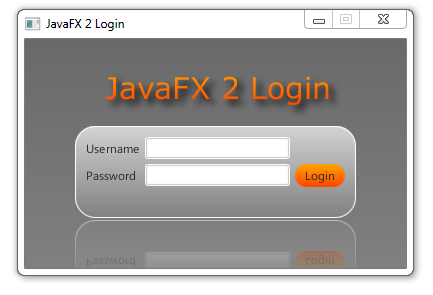 |
| JavaFX 2 Login Form |
Here is Java code of our example:
import javafx.application.Application;
import javafx.event.ActionEvent;
import javafx.event.EventHandler;
import javafx.geometry.Insets;
import javafx.scene.Scene;
import javafx.scene.control.Button;
import javafx.scene.control.Label;
import javafx.scene.control.PasswordField;
import javafx.scene.control.TextField;
import javafx.scene.effect.DropShadow;
import javafx.scene.effect.Reflection;
import javafx.scene.layout.BorderPane;
import javafx.scene.layout.GridPane;
import javafx.scene.layout.HBox;
import javafx.scene.paint.Color;
import javafx.scene.text.Font;
import javafx.scene.text.FontWeight;
import javafx.scene.text.Text;
import javafx.stage.Stage;

/**
 *
 * @web http://zoranpavlovic.blogspot.com/
 */
public class Login extends Application {

 String user = "JavaFX2";
 String pw = "password";
 String checkUser, checkPw;

    public static void main(String[] args) {
        launch(args);
    }

    @Override
    public void start(Stage primaryStage) {
        primaryStage.setTitle("JavaFX 2 Login");

        BorderPane bp = new BorderPane();
        bp.setPadding(new Insets(10,50,50,50));

        //Adding HBox
        HBox hb = new HBox();
        hb.setPadding(new Insets(20,20,20,30));

        //Adding GridPane
        GridPane gridPane = new GridPane();
        gridPane.setPadding(new Insets(20,20,20,20));
        gridPane.setHgap(5);
        gridPane.setVgap(5);

       //Implementing Nodes for GridPane
        Label lblUserName = new Label("Username");
        final TextField txtUserName = new TextField();
        Label lblPassword = new Label("Password");
        final PasswordField pf = new PasswordField();
        Button btnLogin = new Button("Login");
        final Label lblMessage = new Label();

        //Adding Nodes to GridPane layout
        gridPane.add(lblUserName, 0, 0);
        gridPane.add(txtUserName, 1, 0);
        gridPane.add(lblPassword, 0, 1);
        gridPane.add(pf, 1, 1);
        gridPane.add(btnLogin, 2, 1);
        gridPane.add(lblMessage, 1, 2);


        //Reflection for gridPane
        Reflection r = new Reflection();
        r.setFraction(0.7f);
        gridPane.setEffect(r);

        //DropShadow effect
        DropShadow dropShadow = new DropShadow();
        dropShadow.setOffsetX(5);
        dropShadow.setOffsetY(5);

        //Adding text and DropShadow effect to it
        Text text = new Text("JavaFX 2 Login");
        text.setFont(Font.font("Courier New", FontWeight.BOLD, 28));
        text.setEffect(dropShadow);

        //Adding text to HBox
        hb.getChildren().add(text);

        //Add ID's to Nodes
        bp.setId("bp");
        gridPane.setId("root");
        btnLogin.setId("btnLogin");
        text.setId("text");

        //Action for btnLogin
        btnLogin.setOnAction(new EventHandler() {
         public void handle(ActionEvent event) {
          checkUser = txtUserName.getText().toString();
          checkPw = pf.getText().toString();
          if(checkUser.equals(user) && checkPw.equals(pw)){
           lblMessage.setText("Congratulations!");
           lblMessage.setTextFill(Color.GREEN);
          }
          else{
           lblMessage.setText("Incorrect user or pw.");
           lblMessage.setTextFill(Color.RED);
          }
          txtUserName.setText("");
          pf.setText("");
         }
         });

        //Add HBox and GridPane layout to BorderPane Layout
        bp.setTop(hb);
        bp.setCenter(gridPane);

        //Adding BorderPane to the scene and loading CSS
     Scene scene = new Scene(bp);
     scene.getStylesheets().add(getClass().getClassLoader().getResource("login.css").toExternalForm());
     primaryStage.setScene(scene);
       primaryStage.titleProperty().bind(
                 scene.widthProperty().asString().
                 concat(" : ").
                 concat(scene.heightProperty().asString()));
     //primaryStage.setResizable(false);
     primaryStage.show();
    }
}
In order to style this application properly you’ll need to create login.css file in /src folder of your project. If you dont know how to do that, please check out JavaFX 2: Styling Buttons tutorial.
Here is CSS code of our example:
#root {
 -fx-background-color:  linear-gradient(lightgray, gray);
 -fx-border-color: white;
 -fx-border-radius: 20;
 -fx-padding: 10 10 10 10;
 -fx-background-radius: 20;

}

#bp {
 -fx-background-color:  linear-gradient(gray,DimGrey );

}

#btnLogin {
    -fx-background-radius: 30, 30, 29, 28;
    -fx-padding: 3px 10px 3px 10px;
    -fx-background-color: linear-gradient(orange, orangered );
}

#text {
 -fx-fill:  linear-gradient(orange , orangered);
}
Thats’all folks for this tutorial, if you have any comments or problems, feel free to comment. If you like this tutorial, you can check out more JavFX 2 tutorials on this blog.
You might want to take a look at these tutorials below:
Reference: JavaFX 2: Create Nice Login Form from our JCG partner Zoran Pavlovic at the Zoran Pavlovic blog blog.








How to navigate to another window with this login form?
Which procedure do I use if I want to copy a folder to /usr/local/
Nice post, the code solve my doubt. Thanks for sharing.
SoftMAS.
I get exception everytime i run ur code Exception in Application start method java.lang.reflect.InvocationTargetException at sun.reflect.NativeMethodAccessorImpl.invoke0(Native Method) at sun.reflect.NativeMethodAccessorImpl.invoke(Unknown Source) at sun.reflect.DelegatingMethodAccessorImpl.invoke(Unknown Source) at java.lang.reflect.Method.invoke(Unknown Source) at com.sun.javafx.application.LauncherImpl.launchApplicationWithArgs(Unknown Source) at com.sun.javafx.application.LauncherImpl.launchApplication(Unknown Source) at sun.reflect.NativeMethodAccessorImpl.invoke0(Native Method) at sun.reflect.NativeMethodAccessorImpl.invoke(Unknown Source) at sun.reflect.DelegatingMethodAccessorImpl.invoke(Unknown Source) at java.lang.reflect.Method.invoke(Unknown Source) at sun.launcher.LauncherHelper$FXHelper.main(Unknown Source) Caused by: java.lang.RuntimeException: Exception in Application start method at com.sun.javafx.application.LauncherImpl.launchApplication1(Unknown Source) at com.sun.javafx.application.LauncherImpl.lambda$launchApplication$152(Unknown Source) at com.sun.javafx.application.LauncherImpl$$Lambda$50/1323468230.run(Unknown Source) at java.lang.Thread.run(Unknown Source) Caused by: java.lang.NullPointerException at application.Login.start(Login.java:126) at com.sun.javafx.application.LauncherImpl.lambda$launchApplication1$159(Unknown Source) at com.sun.javafx.application.LauncherImpl$$Lambda$53/1358210147.run(Unknown Source) at com.sun.javafx.application.PlatformImpl.lambda$runAndWait$172(Unknown Source) at com.sun.javafx.application.PlatformImpl$$Lambda$45/186276003.run(Unknown Source) at com.sun.javafx.application.PlatformImpl.lambda$null$170(Unknown Source) at com.sun.javafx.application.PlatformImpl$$Lambda$48/506591222.run(Unknown Source) at java.security.AccessController.doPrivileged(Native Method) at com.sun.javafx.application.PlatformImpl.lambda$runLater$171(Unknown Source) at com.sun.javafx.application.PlatformImpl$$Lambda$46/237061348.run(Unknown Source) at… Read more »
At first i also got same error.
try to make login.css file under src.
how to import a csv file and store the data in a database.