
Dependency Confusion Attacks in Maven: How They Work and Why Your settings.xml Makes You Vulnerable

In 2021, a security researcher breached Apple, Microsoft, PayPal, and 32 other organisations without writing a single exploit. He just uploaded a package. This article explains exactly how that attack works against Maven builds — and which settings.xml configurations actually protect you.
What Actually Happened in 2021
In February 2021, security researcher Alex Birsan published a paper describing how he had gained code execution inside the internal build systems of over 35 major organisations — including Apple, Microsoft, PayPal, Shopify, Netflix, Tesla, and Uber. He did not exploit a vulnerability. He did not use social engineering. He simply uploaded packages to public registries.
The attack worked because all of these organisations had internal packages — things like internal-payments-utils or acme-auth-core — that were hosted on their private repositories. Birsan found the names of these internal packages by inspecting public GitHub repositories, error logs accidentally committed to code, and npm package manifests left visible in public repos. He then uploaded packages with identical names to public registries, but at a much higher version number — 9.9.9, rather than the 1.x.x that the internal packages used.
When those companies ran their builds, their package managers looked for the dependency by name. They found a version in the public registry that was higher than the internal one. They downloaded the public package instead. Birsan’s payload ran inside their build pipelines, and he received a DNS callback confirming execution. No exploit required. No phishing required. Just a name collision and a higher version number.
The attack hit npm and PyPI most visibly, because both allow publishing any package name to the public registry without ownership verification. Maven’s groupId namespace gives it partial protection because Maven Central requires domain verification for group identifiers — publishing to com.example requires you to demonstrate control of example.com. However, as we will see shortly, that namespace protection only works if your build configuration enforces it correctly. Thousands of Maven builds do not.
Maven is not immune. The namespace verification that Maven Central performs is a friction mechanism on the publish side, not a guarantee on the consume side. If your
settings.xmlorpom.xmlallows Maven to query a public repository for artifacts with your internal groupId — even briefly — the attack succeeds. And many common configurations do exactly that.
How Maven Resolves Dependencies Across Repositories
To understand exactly where the vulnerability lies, you need a clear picture of how Maven decides where to fetch a dependency from. The resolution process has several stages, and each one is a potential entry point for a confusion attack if misconfigured.
The resolution order
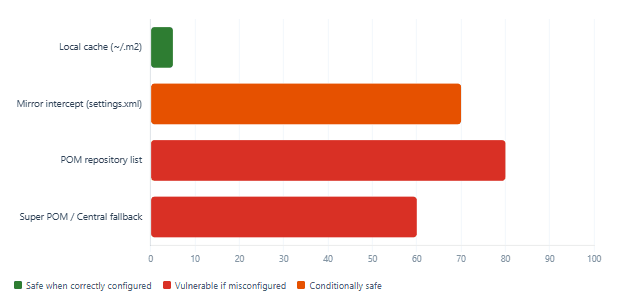
When Maven needs to resolve an artifact it has not already downloaded, it consults repositories in a specific sequence. First, it checks the local repository cache at ~/.m2/repository. If the artifact is not cached there, it queries the configured remote repositories in declaration order. The order is determined by: the <mirrors> section in settings.xml, then the <repositories> sections in the effective POM (merged from the project POM, any parent POMs, and the Maven super POM), and finally any repositories injected by active profiles.
Critically, when no mirror intercepts the request, Maven queries each repository in turn and takes the first one that returns a successful response for the requested coordinates. It does not compare versions across repositories to find the highest one — at least not for release artifacts. It resolves from the first repository that claims to have the artifact. This means that repository declaration order in your POM matters enormously for security.
The role of mirrors
A mirror in Maven’s terminology is a repository that substitutes for another. When a <mirror> element in settings.xml specifies <mirrorOf>*</mirrorOf>, it intercepts all repository requests and redirects them to the mirror URL instead. This is the most common Nexus/Artifactory configuration pattern, and when implemented correctly it is the foundation of the right defence. However, as we will examine in detail below, the devil is entirely in what happens inside that mirror.
Maven dependency resolution flow: where confusion can be injected
The Attack Path: Step by Step in a Maven Context
Here is the specific sequence of events in a Maven-targeted dependency confusion attack. Understanding each step helps you identify the exact configuration lines that need to change.

Step 1: Discovering internal artifact names
Internal Maven artifact coordinates leak more easily than teams realise. Common sources include public GitHub repositories containing a pom.xml with internal dependencies left uncommitted, Nexus or Artifactory error pages that echo back artifact coordinates in stack traces, job listings mentioning internal frameworks by name, and CI build logs accidentally made public. Once an attacker has a groupId:artifactId pair that is not present on Maven Central, they have everything they need.
Step 2: Publishing to Maven Central
For groupIds that the attacker does not control, publishing to Maven Central requires passing the domain verification step. Sonatype’s Nexus namespace verification is designed to make this difficult — an attacker cannot publish under com.yourcompany without controlling yourcompany.com. However, many organisations use flat, non-domain-based groupIds like internal, company-utils, or single-word identifiers that are either unverified or actually available for registration. These are the primary Maven attack targets. Additionally, some organisations use legitimate domain-based groupIds but have let the domain lapse — a former employee’s personal domain used as the groupId is a real risk.
Step 3: The build resolution failure
The triggering condition is simple: Maven queries a repository that is either directly set to Maven Central, or a proxy that includes Maven Central in its group, and the public repository returns a positive match for the internal artifact at a higher version. If the build configuration does not enforce that internal artifacts can only come from the internal repository, the public version wins. The malicious JAR lands in ~/.m2/repository, is placed on the classpath, and its code runs.
What makes this especially dangerous in Maven specifically is that JAR manifests can contain code that executes during the build — not only at runtime. Maven plugins, in particular, run with full access to the build machine’s environment, including environment variables, credentials, and network access. A malicious payload in a library can exfiltrate CI secrets before a single test runs.
<!-- A pom.xml that looks innocent but is dangerously configured -->
<repositories>
    <!-- Internal repository declared first -- seems safe... -->
    <repository>
        <id>internal</id>
        <url>https://nexus.internal.example.com/repository/releases/</url>
    </repository>

    <!-- But Maven Central is also listed -- attacker targets this second entry -->
    <repository>
        <id>central</id>
        <url>https://repo.maven.apache.org/maven2</url>
    </repository>
</repositories>

<!-- If 'internal-artifact' is not found on the internal repo (e.g. network blip,
     version not yet published, typo), Maven falls through to Central.
     An attacker who registered the same groupId:artifactId on Central wins. -->
How settings.xml Determines Your Exposure
Your ~/.m2/settings.xml — or the one distributed to your CI agents — is the single most important configuration file in your Maven supply chain security posture. It controls the mirror layer that sits above everything else. The three most common configurations each have very different security implications.
Configuration 1: No mirror, repositories in pom.xml only
This is the default state for many developer machines. There is no <mirrors> section in settings.xml, and repositories are declared in the project’s pom.xml. Maven queries them in declaration order, with Central as the final fallback. Any internal artifact not found in the first declared repository will cause Maven to query Central — which is exactly the gap the attack exploits.
<!-- settings.xml: NO mirror configured -- highly vulnerable -->
<settings>
    <!-- No <mirrors> section at all -->
    <!-- Maven will query every repo in pom.xml, then fall through to Central -->
</settings>
Configuration 2: mirrorOf=”*” routing everything through a proxy
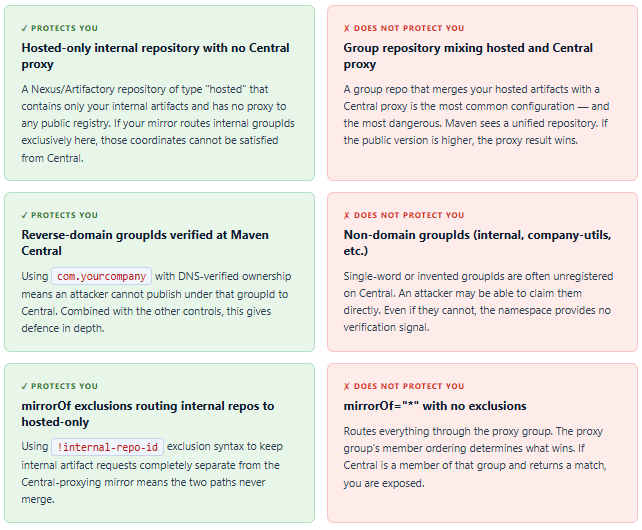
The standard Nexus/Artifactory configuration routes all repository traffic through the internal proxy using a wildcard mirror. This is the correct starting point — but it is only safe if the proxy is configured to block or exclude public-repository results for your internal groupIds. The mirrorOf="*" pattern alone does not prevent confusion; it only centralises where the confusion happens. If your proxy group repository includes Maven Central alongside your internal hosted repository, it will happily return a Central result for an internal artifact coordinate.
<!-- settings.xml: wildcard mirror -- safe ONLY if the proxy excludes Central
     for internal group IDs. On its own, this does NOT prevent confusion. -->
<settings>
    <mirrors>
        <mirror>
            <id>nexus-all</id>
            <mirrorOf>*</mirrorOf>
            <url>https://nexus.example.com/repository/maven-public/</url>
        </mirror>
    </mirrors>
</settings>
<!-- maven-public is a GROUP repo that includes both:
     - maven-releases  (internal hosted)
     - maven-central   (proxy of Maven Central)    <-- RISK
     The proxy will serve a Central result for internal artifact names. -->
Configuration 3: Separate mirrors for internal and external, with exclusion
The safe configuration explicitly separates internal and external artifact routing. Internal group repositories use a dedicated hosted-only mirror that has no proxy to Central. External artifacts go through a separate mirror. The key is the ! exclusion syntax in mirrorOf, which tells Maven to exclude specific repository IDs from the wildcard match:
<!-- settings.xml: secure configuration with explicit separation -->
<settings>
    <mirrors>

        <!-- Internal artifacts: routes to hosted-only repo, NO Central proxy -->
        <mirror>
            <id>internal-only</id>
            <mirrorOf>internal-releases,internal-snapshots</mirrorOf>
            <url>https://nexus.example.com/repository/internal-hosted/</url>
        </mirror>

        <!-- External artifacts: routes to Central proxy, EXCLUDING internal repos -->
        <mirror>
            <id>external-proxy</id>
            <mirrorOf>*,!internal-releases,!internal-snapshots</mirrorOf>
            <url>https://nexus.example.com/repository/maven-central-proxy/</url>
        </mirror>

    </mirrors>
</settings>
Per Apache’s official mirror documentation, whitespace around identifiers in comma-separated
mirrorOflists matters.!repo1, *(space after comma) will not mirror anything, while!repo1,*(no space) will mirror everything exceptrepo1. This is a silent misconfiguration that is extremely easy to introduce when editing XML by hand.
What Actually Protects You — and What Does Not
The pom.xml repository problem: Even with a correctly configured
settings.xmlon developer machines, repositories declared directly in apom.xml— especially in third-party dependency POMs fetched transitively — can introduce additional resolution paths. CVE-2021-26291 addressed exactly this attack surface: Maven before 3.8.1 would follow repository declarations in a dependency’s own POM, potentially routing artifact resolution through attacker-controlled URLs. Upgrade to Maven 3.8.1 or later, which blocks HTTP (non-TLS) repository references by default.
Nexus and Artifactory: Your Proxy Is Not Automatically Safe
Most enterprise Java teams route builds through a Nexus or Artifactory instance, which gives them the impression that supply chain risk is managed. Unfortunately, the standard setup of both tools is not safe against dependency confusion by default — it is simply a more centralised place for the confusion to happen.
The group repository problem
Both Nexus and Artifactory support “group” or “virtual” repositories that aggregate multiple member repositories into a single URL. The standard out-of-the-box configuration creates a group called maven-public (Nexus) or libs-release (Artifactory) that includes both your hosted internal repository and a proxy to Maven Central. When Maven queries this group URL for an artifact, the repository manager searches its members and returns whichever result satisfies the request — and the result can come from Central.
The member order within the group determines priority. If your hosted internal repository is listed first and it contains the artifact, it wins. But if the internal artifact is temporarily unavailable, not yet published, or misspelled in the request, the group falls through to Central. An attacker who has published a matching name on Central with a higher version will have that version returned instead of an error.
The correct Nexus configuration
The secure pattern is to maintain separate group repositories for internal and external traffic, and never add a Central proxy to the group that serves internal artifacts:
Nexus repository structure for confusion-resistant builds:

maven-internal-hosted  (type: hosted)     ? internal artifacts only
maven-central-proxy    (type: proxy)      ? proxies repo.maven.apache.org

Group repos:
maven-internal-group   (members: maven-internal-hosted ONLY)
maven-public-group     (members: maven-central-proxy ONLY)

settings.xml mirrors:
  internal-only ? <mirrorOf>internal-*</mirrorOf> ? maven-internal-group URL
  central-proxy  ? <mirrorOf>*,!internal-*</mirrorOf> ? maven-public-group URL

Result: internal artifact coordinates can NEVER be satisfied from Central.
Route Policy / Inclusion Rules (Artifactory)
Artifactory provides a complementary control: Inclusion and Exclusion rules on a remote repository proxy that restrict which artifact paths the proxy will serve. Configuring the Central proxy to exclude your internal groupId paths (e.g., excluding com/yourcompany/**) means Artifactory will return a 404 for those paths rather than fetching from Central, even if a matching public artifact exists. This is a defence-in-depth measure at the proxy layer, independent of mirror routing.
Detecting Whether You Are Exposed Right Now
Before hardening, you should establish your current exposure. Three techniques are useful here, and you can run all of them without modifying any production configuration.
1. Print the effective settings and POM
Maven’s help plugin can show you the merged settings and effective POM that will actually govern a build — including all active mirrors, repositories, and profiles. Run both commands from your project root and look carefully at the repository list and mirror mappings:
# Show the merged settings.xml as Maven sees it
mvn help:effective-settings

# Show the merged POM including parent chain and profile activations
mvn help:effective-pom

# In the output, look for:
# 1. Any <repository> whose URL points directly to repo.maven.apache.org
#    or any other public registry
# 2. Any mirror whose mirrorOf="*" with no exclusions
# 3. Any profile that adds a repository not controlled by your organisation
2. Check for unregistered groupIds on Maven Central
For each internal groupId your organisation uses, verify whether it is claimed on Maven Central. A groupId that returns a 404 from Central today is not necessarily safe — an attacker can register it at any point. However, verifying this gives you a current baseline:
# Check whether a groupId path exists on Maven Central
# Replace dots with slashes in the groupId
curl -I https://repo.maven.apache.org/maven2/com/yourcompany/

# HTTP 404 = not registered on Central (attacker could claim it)
# HTTP 200 = registered -- verify you control it

# For groupIds that are unregistered and you're unable to claim them,
# the proxy exclusion rule (Nexus/Artifactory) becomes critical
3. Test repository fallthrough with a canary artifact
The most reliable detection method is to publish a test artifact to Central under one of your internal coordinates (with benign content) and then observe whether your build resolves it. This is only practical during a controlled security audit rather than routine checks, and requires a groupId where you actually have Central publish rights. The alternative is to use a dedicated tool:
# confused — a supply chain scanner for Maven, npm, PyPI
# https://github.com/visma-prodsec/confused

# After downloading the binary, point it at your pom.xml
confused -l mvn -f pom.xml

# It will list every dependency that:
# a) is declared in your POM, AND
# b) does not exist on any public registry
# These are your internal-only artifacts -- the ones an attacker
# could squash by registering the name on Central
Automated scanning in CI: The
confusedtool by Visma runs a dependency name existence check against public registries and reports gaps. Running it as a CI step gives you continuous visibility into which internal artifact names are unregistered on public registries — the population that is most exposed to squatting.
Hardening Checklist
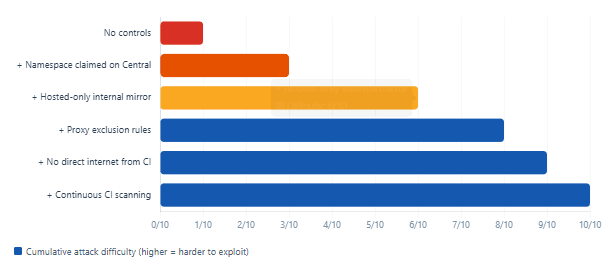
The following controls should be applied in layers — each one independently reduces exposure, and together they make a confusion attack practically infeasible even if one layer is misconfigured.
settings.xml & Repository Configuration
- All
settings.xmlfiles — developer machines, CI agents, Docker build images — are managed from a single source-controlled template. No developer should be writing their own mirror configuration. - Internal artifact repositories are mirrored to a hosted-only Nexus/Artifactory repository with no proxy to Central. The
mirrorOfvalue explicitly names internal repository IDs rather than using the wildcard. - The
mirrorOf="*"wildcard mirror, if used, uses exclusion syntax (!internal-repo-id) to route internal repositories separately. - No
<repository>element in any projectpom.xmlpoints directly torepo.maven.apache.orgor any other public registry. Repository declarations belong insettings.xmlor the proxy configuration, not individual project POMs. - Maven version is 3.8.1 or later. This version blocks HTTP (non-TLS) repository references in dependency POMs by default, closing the CVE-2021-26291 attack surface.
GroupId and Namespace Controls
- All internal groupIds use a reverse-domain format matching a domain the organisation controls (e.g.,
com.yourcompanyif you ownyourcompany.com). Non-domain groupIds are a high-risk surface. - Internal groupIds are claimed on Maven Central even if you never publish to Central. Claiming a namespace costs nothing and prevents an attacker from registering it. Request namespace ownership via Sonatype Central’s namespace claim process.
- If domains used as groupIds have expired or been transferred, they are identified and either reclaimed or the groupId is migrated.
Proxy and CI Controls
- Nexus/Artifactory inclusion/exclusion rules are configured on the Central proxy to return 404 for your internal groupId paths, providing a defence-in-depth backstop independent of mirror routing.
- Build agents run with no direct internet access for package resolution. All traffic is forced through the internal proxy. Even correctly configured mirrors can be bypassed if the build agent can reach Central directly.
- Dependency scanning (e.g.,
confused, Sonatype IQ, JFrog Xray) runs in CI and fails the build if any declared dependency coordinate is unregistered on the relevant public registry. - The
mvn dependency:treeoutput is captured and archived as a build artifact, enabling post-hoc analysis if a confusion event is suspected.
Defence depth: relative attack difficulty by control layer
What We Have Learned
Dependency confusion is not a theoretical attack. Alex Birsan’s 2021 research demonstrated it against 35 real organisations, including companies that had sophisticated security programmes, and he did it without exploiting a single vulnerability. He exploited a design assumption: that package managers trust public registries to be authoritative for any name not found internally.
Maven has a partial structural advantage over npm and PyPI because Maven Central uses domain-based namespace verification, making it harder to publish under a legitimate organisational groupId. That advantage evaporates entirely if your groupIds are non-domain identifiers, if the domain has lapsed, or — most commonly — if your settings.xml and proxy configuration allow Maven to query Central for coordinates that should only resolve internally.
The key configuration mistakes to fix are: using mirrorOf="*" without exclusions routing internal artifacts through a proxy that includes Central; having a Nexus or Artifactory group repository that merges internal hosted artifacts with a Central proxy; and allowing project-level pom.xml files to declare public registry URLs directly. Together, these three patterns create the fallthrough path that an attacker needs.
The correct defence is layered: claim your namespaces on Central even if you never publish there; route internal artifact IDs to a hosted-only repository that has no connection to Central; apply proxy exclusion rules as a backstop; run Maven 3.8.1 or later; and integrate a confusion scanner into CI so new internal artifacts are caught before they go unregistered. Each layer independently raises the cost of the attack. Together, they close the vector entirely.