
JetBrains ends the 16-year Community vs. Ultimate divide. Here’s what that really means for your day-to-day development — and your wallet.
For sixteen years, Java developers faced the same quiet friction: which IntelliJ IDEA do I download? Community Edition was free and open-source, covering the basics well. Ultimate had everything else — Spring tooling, database integration, JavaScript support, profiling — but at a subscription price that not everyone could or wanted to justify. On December 8, 2025, JetBrains closed that chapter. Starting with IntelliJ IDEA 2025.3, there is one product, one installer, and one update stream.
The decision was announced in July 2025 and landed in December alongside a genuinely impressive release. But the mechanics of the change — what’s now free, what still requires a subscription, how licensing works when a subscription lapses — deserve a careful look before you update or onboard a new team member.
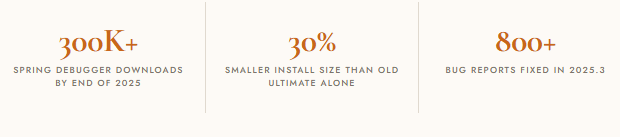
| Metric | Figure | Context |
|---|---|---|
| Spring Debugger downloads | 300,000+ | Unique downloads by end of 2025 — most popular recent addition to the IDE |
| Install size reduction | 30% smaller | Unified build is 30% lighter than the old Ultimate package on its own |
| Bug fixes in 2025.3 | 800+ | Bug reports addressed in the unified release alongside feature work |
1. Why JetBrains Made This Move
The motivation is as much engineering as it is commercial. JetBrains explained in July that maintaining two parallel editions meant doubled testing, doubled QA pipelines, doubled packaging — and inevitably, subtle inconsistencies between them. Every new feature had to be evaluated, built, and validated in two contexts. By unifying, the team can focus all of that effort on a single product, iterate faster, and ship more reliably.
The numbers bear that out. Despite the unification, JetBrains managed to make the distribution 30% smaller than IntelliJ IDEA Ultimate was on its own. That’s a meaningful signal: merging the editions didn’t mean bloating the product. It meant smarter bundling and a leaner shared foundation.
“This is more than just a change in distribution — it’s a step forward for our entire community. By unifying IntelliJ IDEA, we can focus our energy on improving the quality of a single product.”
JetBrains
There’s also a business logic to this. A unified product with a built-in 30-day Ultimate trial is a much smoother conversion funnel than asking a Community Edition user to download an entirely different application. JetBrains gets more developers experiencing the full product. Developers get a lower-friction way to try things they might previously have never bothered with.
2. How the Transition Unfolded
| Date | Milestone | What happened |
|---|---|---|
| December 2009 | Community Edition born | IntelliJ IDEA 9 introduced the free, open-source Community Edition under the Apache 2.0 license — giving Java developers a no-cost path to the IDE for the first time. |
| July 2025 | Unification announced | JetBrains publishes the full transition plan: one installer to replace both editions, open-source builds pushed to GitHub Releases, and a cleaner licensing experience for Ultimate users. |
| September 2025 | EAP opens, Community EAP ends | The 2025.3 Early Access Program opens with a unified build. Separate Community Edition EAP builds are discontinued from this point. The Islands theme debuts as the new default visual design. |
| December 8, 2025 | Unified IntelliJ IDEA 2025.3 ships | The historic merge is complete. One product. Existing Community Edition users auto-update to the unified distribution. Ultimate subscribers keep everything. New free features added for everyone. |
| February 2026+ | All future updates unified | 2025.3 is the only edition receiving updates going forward. IntelliJ IDEA 2026.1 EAP builds are already underway, all under the single unified product. |
3. What’s Free, What’s Not — The Full Picture
This is the question everyone actually wants answered. All the functionality of the Community Edition remains free for non-commercial and commercial use. No authorizations or activations are required. On top of that, several features that were previously Ultimate-only have moved into the free tier. Here’s the complete breakdown:
| Feature | Category | Tier | New in 2025.3? |
|---|---|---|---|
| Full Java & Kotlin development | Core Language | ✓ Free | — |
| Basic Spring, Jakarta EE & Thymeleaf syntax highlighting | Spring / Web | ✓ Free | NEW |
| Spring Boot project wizard | Spring / Web | ✓ Free | NEW |
| Database connections & schema viewer | Database | ✓ Free | NEW |
| Full SQL language support & schema-aware completion | Database | ✓ Free | NEW |
| Ktor framework support | Kotlin / Web | ✓ Free | NEW |
| LSP API for extended language support | Extensibility | ✓ Free | NEW |
| HELM / YAML schema support | DevOps / Cloud | ✓ Free | NEW |
| 30-day Ultimate trial (one-time, on first launch) | Licensing | ✓ Free | NEW |
| Free for students, teachers & open-source projects | Licensing | ✓ Free | — |
| Codebase remains open-source on GitHub | Open Source | ✓ Free | — |
| ★ Ultimate Subscription — $199 / yr · $159 renewal | |||
| Advanced Spring Boot tooling (full debugger, bean graphs) | Spring / Web | ★ Ultimate | — |
| Full database & data tools (DataGrip-class features) | Database | ★ Ultimate | — |
| IntelliJ Profiler | Performance | ★ Ultimate | — |
| HTTP Client | API / Testing | ★ Ultimate | — |
| JavaScript, TypeScript, HTML, CSS support | Web / Frontend | ★ Ultimate | — |
| AI Assistant (JetBrains AI / Bring Your Own Key) | AI | ★ Ultimate | — |
| Kubernetes advanced deployment tooling | DevOps / Cloud | ★ Ultimate | — |
| Microservices diagram & tracing | Architecture | ★ Ultimate | — |
| Remote development (JetBrains Gateway) | Remote / Cloud | ★ Ultimate | — |
| Qodana code quality (CI integration) | Quality / CI | ★ Ultimate | — |
| Code With Me (real-time collaborative editing) | Collaboration | ★ Ultimate | — |
Fallback license still works: If your Ultimate subscription lapses, you keep access to the last major version available when your last uninterrupted year began. You can also stay on the IDE using its free feature set — you are never locked out entirely.
4. What’s New in 2025.3 Beyond the Merge
The unification was the headline, but the 2025.3 release arrived with a meaningful set of new features as well. These aren’t marketing bullet points — several of them represent genuine quality-of-life improvements for everyday Java work.
4.1 Command Completion
IntelliJ IDEA 2025.3 adds command completion — a new way to access context-aware actions directly from code completion. You can type a period (.) to see code completion and postfix completion suggestions along with available actions, or type two periods (..) to only see actions. It’s a small change with a large ergonomic payoff, eliminating the need to remember shortcut keys for common refactoring and generation actions.
4.2 Spring Debugger Improvements
The Spring Debugger, first released in May 2025, had already become one of the most popular recent additions to the ecosystem. By the end of 2025 it had reached more than 300,000 unique downloads. In 2025.3, the team focused on performance: context collection is now ten times faster using the debugger API and does not affect startup time on projects with thousands of beans.
4.3 AI Integration — With Your Own Keys
The AI story in 2025.3 is notably more open than before. Following similar upgrades in VS Code, you can now use AI features in IntelliJ IDEA with your own API keys and OpenAI-compatible local models. You can connect Anthropic Claude or use a local model through an OpenAI-compatible endpoint. This “Bring Your Own Key” capability means teams with existing AI provider agreements can use them directly, without paying for a separate JetBrains AI subscription.
4.4 Java 25, Spring Boot 4 & Spring Framework 7
The update adds day-one support for Spring Boot 4, Spring Framework 7, Java 25, Spring Data JDBC improvements, and Vitest 4. For teams evaluating these upcoming major releases, having IDE support land alongside the framework releases themselves is a significant productivity win.
4.5 The Islands Theme
New defaults matter more than developers often admit. The Islands theme is now the default look across JetBrains IDEs starting with version 2025.3 — a softer, balanced environment designed to support focus and comfort throughout long coding sessions. It ships enabled by default, though switching back to any prior theme takes one click.
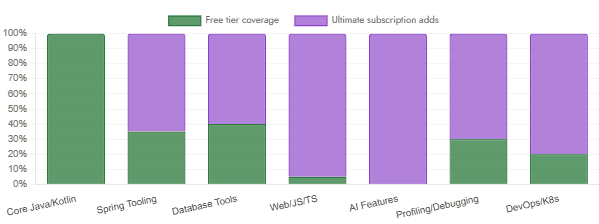
IntelliJ IDEA Feature Distribution — Free vs. Ultimate (2025.3)
Illustrative breakdown of IDE capability areas by tier
5. What This Means for Your Team
| Your situation | What changes | Action needed? |
|---|---|---|
| Community Edition user | Auto-upgraded to unified IntelliJ IDEA on next update. Gains new free features, gets 30-day Ultimate trial. | None — just update |
| Ultimate subscriber | Existing license converts to Ultimate subscription. Full feature access unchanged. Subscription billing cycle unchanged. | None — automatic |
| One-time Ultimate purchase | Perpetual fallback license still valid for the last major version at purchase. Can use newer versions with free feature set. | None — still works |
| Student or teacher | Free Ultimate subscription through JetBrains education program continues unchanged. No action needed. | None — unchanged |
| Open-source developer | Open-source builds continue to be maintained and published to GitHub Releases with core functionality intact. | None — unchanged |
| New developer | Single download, no edition decision needed. 30-day full Ultimate trial included automatically. | Just download and try |
| Team / org admin | Licensing management simplified. One product ID. One update stream for all team members regardless of tier. | Review license count |
6. The Open-Source Question
The moment the announcement dropped, community forums lit up with concerns: does a unified product mean a less open one? JetBrains addressed this directly and, to their credit, followed through. The company committed to keeping IntelliJ IDEA’s codebase on GitHub up to date and accessible for everyone, publishing open-source builds directly to GitHub Releases with ready-to-use CI/CD pipelines powered by GitHub Actions so that anyone can fork the project and produce a working build from the source.
For plugin developers: Community plugins remain fully supported, reliable, and compatible within the unified distribution. The JetBrains Marketplace is unchanged, and paid plugins continue to work as before. If you maintain or depend on a community plugin, there’s nothing to do.
7. Honest Concerns Worth Naming
Not everything about this change is without friction. A few things deserve honest acknowledgment.
First, the install footprint grew. IntelliJ IDEA now requires approximately 3.5 GB of disk space (SSD recommended) — more than the old Community Edition needed, because more features are bundled. On constrained machines, this is a real consideration.
Second, the 30-day trial creates a mild onboarding pressure for new users who start with the full feature set and then must decide whether to subscribe when it expires. JetBrains’s intent is generous — more developers getting to experience more of the product — but the trial clock does start automatically, which is worth being aware of when setting up development environments for students or new hires.
Third, developers in highly regulated environments or air-gapped networks should verify that their license management workflows have been updated to reflect the new single-product model. For customers planning renewals or managing existing Ultimate subscriptions, this update is important to understand at the organizational level.
8. What We Have Learned
In this article we covered one of the most significant changes to the JetBrains ecosystem in over a decade. Starting with IntelliJ IDEA 2025.3, released on December 8, 2025, JetBrains retired the 16-year-old Community Edition / Ultimate split in favor of a single unified product.
We traced the full timeline from the 2009 birth of Community Edition through the July 2025 announcement to the December 2025 release. We examined exactly which features moved into the free tier — including Spring Boot project wizards, database schema viewing, SQL language support, and Ktor framework support — and which remain behind the Ultimate subscription.
We reviewed the new 2025.3 features shipping alongside the merge: command completion, a dramatically faster Spring Debugger (10× faster context collection), Bring Your Own Key AI integration, Java 25 and Spring Boot 4 support, and the new Islands default theme.
We clarified what the change means for every user type — from Community Edition users who auto-upgrade seamlessly to teams managing organizational licenses. And we addressed the open-source concern head-on: IntelliJ IDEA’s GitHub repository remains maintained, with open-source builds published directly to GitHub Releases for anyone who wants to build from source.



