
Choosing the right IDE can significantly impact your productivity as a Java developer. While IntelliJ IDEA has long been the gold standard for Java development, Visual Studio Code has emerged as a lightweight alternative with powerful extensions. This comprehensive comparison will help you decide which tool best fits your needs.
1. Understanding the Contenders
1.1 IntelliJ IDEA: The Java Powerhouse
IntelliJ IDEA, developed by JetBrains, has been purpose-built for Java development since 2001. Available in two editions—Community (free and open-source) and Ultimate (paid)—it offers deep language understanding and intelligent code assistance. The IDE is built on the principle that a tool should understand your code context to provide meaningful suggestions.
Key Philosophy: IntelliJ embraces an “everything included” approach, providing comprehensive features out of the box without requiring extensive configuration.
Learn more: IntelliJ IDEA Official Website
1.2 Visual Studio Code: The Versatile Challenger
VS Code, Microsoft’s free and open-source editor released in 2015, started as a lightweight text editor but has evolved into a powerful development environment through its extension ecosystem. For Java development, it relies primarily on the Extension Pack for Java, which bundles essential tools.
Key Philosophy: VS Code follows a “start small, extend as needed” philosophy, allowing developers to customize their environment precisely to their requirements.
Learn more: VS Code Official Website
2. Feature Comparison
2.1 Code Intelligence and Auto-Completion
IntelliJ IDEA excels with its proprietary code analysis engine that provides context-aware suggestions. The IDE understands your entire project structure, dependencies, and frameworks, offering completions that feel almost prescient. Its refactoring capabilities are industry-leading, with over 50 automated refactoring options.
VS Code leverages the Language Support for Java by Red Hat extension, which uses the Eclipse JDT Language Server. While capable, the suggestions can feel less contextual compared to IntelliJ. However, for straightforward Java projects, the difference is minimal.
Winner: IntelliJ IDEA—for superior code intelligence and refactoring tools.
2.2 Performance and Resource Usage
VS Code is notably lighter on system resources. It starts up in seconds and maintains a small memory footprint, making it ideal for developers working on less powerful machines or those who frequently switch between projects.
IntelliJ IDEA requires more RAM (minimum 8GB recommended, 16GB+ for larger projects) and has a longer startup time as it indexes your project. However, this upfront investment pays off with faster code navigation and analysis during development.
Winner: VS Code—for resource efficiency and startup speed.
2.3 Debugging Capabilities
IntelliJ IDEA provides a sophisticated debugger with features like advanced breakpoints (conditional, exception, method), inline variable inspection, and the ability to evaluate expressions during debugging. The “Evaluate Expression” window is particularly powerful for testing code snippets on the fly.
VS Code offers solid debugging through the Debugger for Java extension, covering all essential debugging needs. While it lacks some of IntelliJ’s advanced features, it handles standard debugging workflows effectively.
Winner: IntelliJ IDEA—for advanced debugging features.
2.4 Build Tool Integration
| Feature | IntelliJ IDEA | VS Code |
|---|---|---|
| Maven Support | Excellent (built-in) | Good (via extension) |
| Gradle Support | Excellent (built-in) | Good (via extension) |
| Dependency Management | Visual interface + auto-download | Extension-based |
| Build Configuration | GUI + file editing | Primarily file editing |
| Multi-module Projects | Excellent support | Good support |
Both IDEs handle Maven and Gradle well, but IntelliJ provides a more integrated experience with visual tools for dependency management.
Winner: Tie—both handle build tools effectively.
2.5 Framework Support
IntelliJ IDEA Ultimate shines with first-class support for Spring, Jakarta EE, Micronaut, Quarkus, and more. It understands framework-specific configurations, provides specialized code completion, and includes visual editors for configuration files. The Community edition has more limited framework support.
VS Code supports frameworks through extensions like Spring Boot Extension Pack and others. While functional, the integration isn’t as deep or seamless as IntelliJ Ultimate.
Winner: IntelliJ IDEA Ultimate—for comprehensive framework integration.
2.6 Version Control Integration
IntelliJ IDEA offers exceptional Git integration with a visual merge tool, local history, shelving, and the ability to review changes before committing. The “Commit” tool window provides a comprehensive view of all changes.
VS Code has excellent Git support built-in, with GitLens extension adding powerful features like blame annotations, repository insights, and comparison tools. The source control sidebar is intuitive and efficient.
Winner: Tie—both offer excellent version control capabilities.
2.7 Extension Ecosystem
VS Code boasts over 40,000 extensions in its marketplace, providing tools for virtually any language, framework, or workflow. The extension API is well-documented, making it easy for developers to create custom extensions.
IntelliJ IDEA has a smaller but curated plugin ecosystem through the JetBrains Marketplace. Plugins are generally well-maintained and deeply integrated with the IDE.
Winner: VS Code—for sheer variety and customization options.
2.8 Testing Support
| Feature | IntelliJ IDEA | VS Code |
|---|---|---|
| JUnit Support | Excellent | Good |
| TestNG Support | Excellent | Good |
| Test Runner UI | Comprehensive | Functional |
| Code Coverage | Built-in (Ultimate only) | Via extensions |
| Test Generation | Smart generation | Basic support |
| Debugging Tests | Advanced features | Standard features |
Both IDEs support major testing frameworks, but IntelliJ provides more sophisticated test management tools.
Winner: IntelliJ IDEA—for advanced testing features.
3. Cost Comparison
3.1 IntelliJ IDEA Pricing
- Community Edition: Free and open-source
- Ultimate Edition: $169/year for individuals (first year), $135/year (second year), $101/year (third year onwards)
- Ultimate for Organizations: $599/year per user (first year), with discounts for subsequent years
- Free for Students and Open Source Projects
Learn more: IntelliJ IDEA Pricing
3.2 VS Code Pricing
- Completely Free: VS Code is free and open-source with no paid tiers
- All Extensions Free: The Java extension pack and related tools are free
Winner: VS Code—for zero cost across all features.
4. Use Case Recommendations
4.1 Choose IntelliJ IDEA If You:
- Work on large, complex Java enterprise applications
- Develop with Spring Boot, Jakarta EE, or other major frameworks extensively
- Need advanced refactoring and code analysis tools
- Value deep code intelligence over resource efficiency
- Work primarily with Java and Kotlin (not polyglot projects)
- Have adequate system resources (16GB+ RAM)
- Can justify the Ultimate edition cost for professional development
4.2 Choose VS Code If You:
- Work on smaller to medium-sized Java projects
- Develop across multiple languages regularly (polyglot development)
- Have limited system resources
- Prefer a lightweight, fast-starting editor
- Want a highly customizable development environment
- Need a free solution without feature limitations
- Work on microservices or cloud-native applications with diverse tech stacks
5. Performance Metrics Comparison

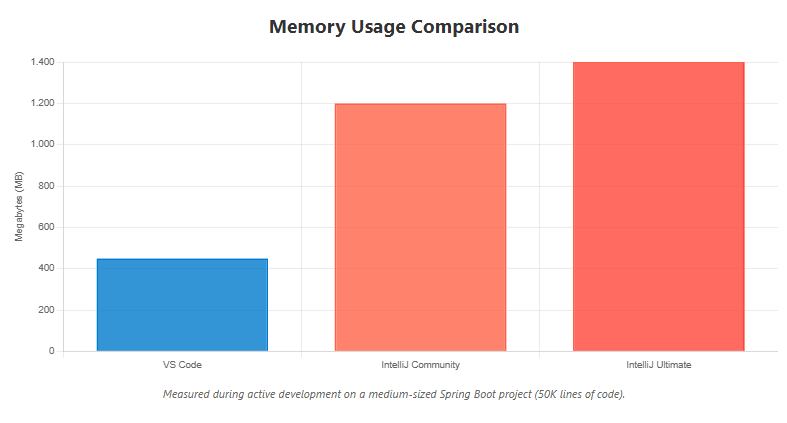
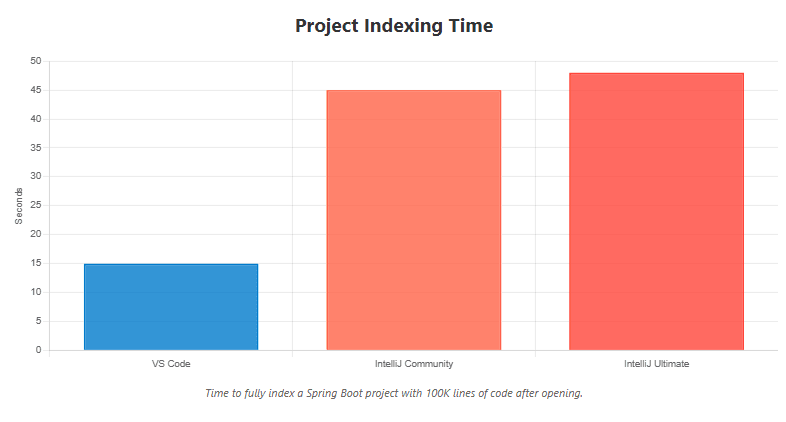
The performance graph compares startup time, memory usage, and indexing speed between the two IDEs. As you can see, VS Code starts significantly faster and uses less memory, while IntelliJ provides faster code analysis after the initial indexing.
6. Real-World Developer Experiences
According to the 2024 Stack Overflow Developer Survey, IntelliJ IDEA is used by approximately 28% of professional developers, while VS Code leads overall with 73% adoption across all languages. For Java specifically, IntelliJ maintains a strong position due to its specialized capabilities.
Community Sentiment: Developers often use both tools—IntelliJ for complex Java projects and VS Code for quick edits, scripting, or polyglot development.
7. Migration Considerations
7.1 Moving from IntelliJ to VS Code
- Install the Extension Pack for Java from Microsoft
- Import your existing Maven/Gradle projects directly
- Configure keyboard shortcuts (IntelliJ keymap extension available)
- Adjust to file-based rather than project-based workflows
- Expect a learning curve for debugging configuration
7.2 Moving from VS Code to IntelliJ
- Open your existing project folder—IntelliJ will detect the build tool
- Allow time for initial project indexing
- Explore IntelliJ’s refactoring shortcuts (they’ll boost your productivity)
- Take advantage of the built-in tools instead of extensions
- Utilize the “Learn IDE Features” in the Help menu
8. What We’ve Learned
Both VS Code and IntelliJ IDEA are excellent choices for Java development, but they serve different needs and preferences. IntelliJ IDEA, particularly the Ultimate edition, provides unmatched depth for Java development with superior code intelligence, advanced refactoring, and comprehensive framework support—making it ideal for professional developers working on complex enterprise applications. VS Code offers a lightweight, free, and highly customizable alternative that performs admirably for smaller to medium projects and excels in polyglot environments where you’re working with multiple languages.
The decision ultimately depends on your project complexity, system resources, budget, and whether you value an all-in-one solution or a customizable toolkit. Many developers find value in having both tools available, using each where it shines brightest. If you’re starting out or working on smaller projects, VS Code provides an excellent foundation without any cost. For serious enterprise Java development with the budget to match, IntelliJ IDEA Ultimate offers capabilities that can significantly boost productivity and code quality.



