
Gradle 9’s Configuration Cache at Scale: Why Your 200-Module Enterprise Build Is Still Slow

You turned it on. You saw the warnings. You read the docs. The cache still misses. Here’s the real taxonomy of what breaks full caching at scale — and the exact fixes for each category.
Gradle 9.0.0 shipped on July 31, 2025. The configuration cache is now the preferred execution mode — not experimental, not opt-in, but the direction of travel. Gradle 9.1.0 followed in September with a read-only CI mode and smarter property-change reuse. Gradle 10, on the horizon, is expected to make configuration cache the only supported mode.
None of that means your 200-module monorepo is going to start getting cache hits just because you upgraded. The documentation tells you what is incompatible. It is considerably less forthcoming about why those things are incompatible in ways that let you reason about your specific build, or about the patterns that create cache invalidation in builds that look clean but still miss. That’s what this piece is for.
Let’s start with a clear mental model, then work through the failure taxonomy that actually matters at enterprise scale.
1. What the Configuration Cache Actually Serializes
Most cache miss diagnoses fail because engineers are thinking about the wrong thing. The configuration cache does not cache your build scripts. It caches the task graph — the complete, serialized snapshot of every task that will run, including all inputs, all outputs, all inter-task dependencies, and all the objects those tasks hold references to. That distinction is load-bearing.
When Gradle serializes the task graph, it walks every object reachable from every task’s fields. Any object in that graph that cannot be serialized causes a problem. Any object in that graph that can be serialized but contains a reference to environment state that might change (a file path, a system property, an environment variable, a timestamp) causes a cache invalidation on every subsequent build where that state differs. These are two completely different problems that produce similar symptoms — both give you cache misses — but require completely different fixes.
The configuration cache doesn’t cache build scripts. It caches the serialized task graph. Every object reachable from every task field must be serializable, and must not encode volatile environment state.— The distinction that explains 80% of enterprise cache miss reports
Furthermore, Gradle detects configuration inputs — system properties, environment variables, file contents read at configuration time — by instrumenting the bytecode of classes on the build classpath using a Java agent. This is why third-party plugins sometimes cause mysterious cache misses even when their source code looks clean: the agent modifies bytecodes, and libraries with self-integrity checks will fail because their checksums no longer match. The fix for those cases is Worker API isolation, not plugin rewriting.
2. The Real Taxonomy of Cache Misses
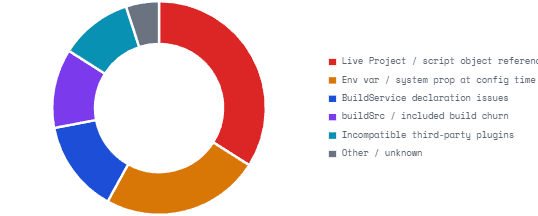
Enterprise build teams consistently report four categories of problems after enabling the configuration cache. The official documentation bundles them under “compatibility problems,” but they require fundamentally different diagnosis and remediation approaches.
2.1 Category 1 — The Live Project Object Problem
This is the single most common invalidation cause in the wild, and it comes in two flavours. The first — and most obvious — is a plugin or custom task that holds a reference to org.gradle.api.Project in one of its fields. Project is explicitly not serializable. The error is clear: cannot serialize object of type 'org.gradle.api.internal.project.DefaultProject'. The fix is to extract the data you need at configuration time and store it in a serializable DTO — a plain object with simple, serializable fields.
The second flavour is subtler and more common in Kotlin DSL builds: tasks that reference top-level methods or variables at execution time. Build scripts written in Kotlin cannot store tasks that reference top-level methods or variables at execution time in the configuration cache at all, because the captured script object references cannot be serialized. A task’s doLast { } block that calls a top-level function defined in the same build script will fail — even if that function has nothing to do with Project. The fix is to move the function into a companion object or a separate class, so the task captures a class reference rather than a script reference.
FAIL: Kotlin DSL — top-level function captured at execution time
build.gradle.kts — BREAKS configuration cache
// Top-level function — script object reference, NOT serializable
fun listSources(dir: File): List<String> =
    dir.walkTopDown().filter { it.extension == "kt" }.map { it.name }.toList()

tasks.register("auditSources") {
    doLast {
        // ❌ Captures 'this$0' — the script object — which is non-serializable
        println(listSources(projectDir))
    }
}
FIX: Move logic to a companion object — no script reference captured
build.gradle.kts — configuration cache compatible
// Move to object — serializable class reference, not a script lambda
object BuildUtils {
    fun listSources(dir: File): List =
        dir.walkTopDown().filter { it.extension == "kt" }.map { it.name }.toList()
}

tasks.register("auditSources") {
    // ✅ val captured at configuration time, not a live project reference
    val sourceDir = layout.projectDirectory.asFile
    doLast {
        println(BuildUtils.listSources(sourceDir))
    }
}
2.2 Category 2 — Configuration-Time Environment Access
The second most common problem in large builds is configuration-time access to environment state that changes across builds. This includes System.getProperty() calls, System.getenv() calls, and direct file reads — all during the configuration phase. When Gradle detects these, it records them as configuration inputs. Every time any recorded input changes, the entire cache entry is invalidated.
In a 200-module build, the cumulative effect is severe. Even if 90% of your build scripts are clean, one plugin somewhere calling System.getenv("CI") during configuration means every build on a CI machine invalidates the cache, because CI is typically set to true on CI but absent on developer machines. One team sets CI=true in their local shell config. Every build is a cache miss. No one can figure out why.
There is an additional subtlety here from Gradle 8.4 onward: all external sources of Gradle properties — including every gradle.properties file and every environment variable — are considered configuration inputs regardless of whether they are actually used. This was tightened in Gradle 8.4 and is now fully enforced. If you have 40 environment variables set in your CI environment, all 40 are considered inputs, even if your build only reads three of them. The practical consequence: standardise your CI environment variables or use the unsafe.ignore escape hatch judiciously.
gradle.properties — taming environment input tracking
# ── Ignore volatile inputs that don't affect task behaviour ──────────────
org.gradle.configuration-cache.inputs.unsafe.ignore.file-system-checks=\
    ~/.gradle/wrapper/locks/*.lock;\
    build/analytics.json;\
    ../../ci-metadata/**

# ── Enable CC with graceful degradation (not hard fail) ──────────────────
org.gradle.configuration-cache=true

# ── Allow warnings during migration (remove once clean) ──────────────────
org.gradle.configuration-cache.problems=warn
org.gradle.configuration-cache.max-problems=50
2.3 Category 3 — The BuildService Serialization Trap
Build services are the recommended pattern for sharing state across tasks in a Gradle build. They are explicitly designed to work with the configuration cache. And yet they are one of the most common sources of cache problems in enterprise builds, for a reason that the documentation buries: only providers returned from BuildServiceRegistry.registerIfAbsent or BuildServiceRegistration.getService are supported as event listener registrations when the configuration cache is used. Starting with Gradle 9, other kinds of providers — including registerIfAbsent(...).map { it } — cause a configuration cache problem. Before Gradle 9 they were silently ignored. Teams upgrading from Gradle 8 discover this pattern strewn through their build logic because it looked fine for years.
Additionally, if a task uses a shared BuildService without explicitly declaring the requirement via Task.usesService(), Gradle emits a deprecation warning — and in warning mode, that deprecation can produce false cache hits that mask incorrect builds. The rule is strict: every task that consumes a BuildService must declare it explicitly, not just hold a reference to it via field injection.
2.4 Category 4 — Composite Build and buildSrc Coupling
This is the category that catches senior build engineers by surprise, because buildSrc and included builds do participate in the configuration cache. The problem is that the contents of buildSrc and all included build logic are themselves configuration cache inputs. Any change to any file in buildSrc — build scripts, sources, intermediate outputs — invalidates the entire configuration cache for the whole build. In a 200-module build with a non-trivial buildSrc that developers actively modify, this means cache hits are essentially impossible during active build tooling work.
The mitigation is to treat buildSrc as a separate project with its own lifecycle. Convention plugins should be published as real artifacts to a local Maven repository and consumed via the version catalog — not compiled fresh from source on every build. This is more overhead to set up, but it’s the only way to avoid buildSrc churn invalidating the cache for the whole organisation.
Configuration Cache Miss Taxonomy — Enterprise Build Surveys
3. The Cache Miss You Can’t See: Single-Entry Cache Semantics
Even when a build is fully configuration-cache compatible, large teams consistently report one frustrating behaviour: the cache only stores the most recent invocation of a given task set. Changing the environment back and forth invalidates the cache each time. For example: run tests, bump a dependency version, rerun tests, decide the new version doesn’t work, roll back. You now have no cache hit, even though you previously ran the identical configuration. The rollback overwrote the previous entry.
This is a known design limitation. Gradle’s roadmap mentions multi-entry cache semantics as future work. Until it ships, the practical implication for enterprise teams is that the cache is most valuable on CI for the common case, not for exploratory development workflows. Gradle 9.1.0’s read-only CI mode is a direct response to this: CI reads the cache but never writes it, protecting the shared cache from being overwritten by in-flight branch builds.
gradle.properties — CI read-only mode (Gradle 9.1+)
# ── In your CI pipeline's gradle.properties overlay ──────────────────────
# Read-only mode: reuse existing entries, never overwrite from this run.
# New entries will be written by a designated seeding job.
org.gradle.configuration-cache.read-only=true

# Separate seeding job — runs on main branch, writes fresh cache entries
# ./gradlew check -Porg.gradle.configuration-cache.read-only=false
4. Diagnosing Your Specific Build — The Right Workflow
The official advice is to run ./gradlew help --configuration-cache and read the HTML report. That’s correct but insufficient at scale. In a 200-module build, the report can contain hundreds of problems, and their reported locations are often attributed to the wrong task because of serialization attribution heuristics. Here is the workflow that actually produces results.
Terminal — methodical CC diagnosis workflow
# Step 1: Enable strict integrity checks to surface serialization errors early
# Add to gradle.properties (temporarily — this slows cache operations):
# org.gradle.configuration-cache.debug.strict-validation=true

# Step 2: Start with the simplest possible task to establish a clean baseline
./gradlew help --configuration-cache
./gradlew tasks --configuration-cache

# Step 3: Enable warn mode with a problem cap — don't try to fix 200 at once
./gradlew :your-module:compileJava \
    --configuration-cache \
    -Dorg.gradle.configuration-cache.problems=warn \
    -Dorg.gradle.configuration-cache.max-problems=25

# Step 4: Use the flamegraph tool to find what's bloating the cache
# (gcc2speedscope — Gradle's official cache-size analysis tool)
./gradlew :your-module:check \
    --configuration-cache \
    -Dorg.gradle.configuration-cache.log-level=debug 2> cc-debug.log
# Then: gcc2speedscope cc-debug.log → open in speedscope.app

# Step 5: Check the HTML report for the root cause — not the first symptom
# The report's "Build configuration inputs" tab is the most useful section
open build/reports/configuration-cache/*/configuration-cache-report.html
Attribution Is Best-Effort, Not Exact
Gradle’s cache serialization attributes problems using byte-pattern matching. This is best-effort and can be confused by certain byte patterns. In a large build, the task reported as the problem source is sometimes a downstream task that simply holds a reference to the object that was actually serialized from an upstream plugin. Follow the full field chain in the report — the real offender is usually several levels up from the reported task.
5. Plugin Compatibility — The Long Tail Problem
In a 200-module build, you likely have between 10 and 40 distinct plugins applied somewhere across the build. The configuration cache requires every plugin to be fully compatible. One incompatible plugin, applied to one module, is enough to break cache hits for every task in that module — and if the plugin is applied via a convention plugin in your root buildSrc, potentially for the entire build.
The good news is that the ecosystem has moved significantly. Gradle 9.0 falls back to non-configuration-cache mode automatically when encountering unsupported features, rather than hard-failing. The HTML report tells you which plugin caused the fallback. The bad news is that “falls back gracefully” means “you got zero cache benefit from this build and the report is the only way to know.” In CI builds where the HTML report isn’t surfaced automatically, these silent fallbacks are invisible for months.
The practical solution is to integrate cache-hit-rate tracking into your Develocity (formerly Gradle Enterprise) dashboards. A build that used to get 80% cache hits dropping to 20% after a plugin upgrade is a regression — treat it as one. The Develocity Reporting & Visualisation Kit exports these metrics. If you’re not on Develocity, the --scan flag produces build scans with cache hit/miss data that can be fed into any monitoring system.
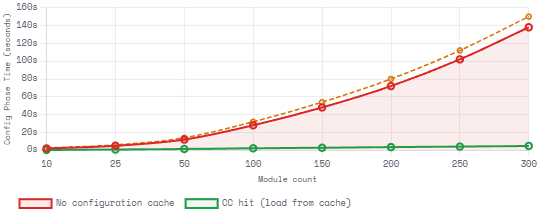
Configuration Time Saved at Scale — With vs Without CC Hit
6. The Correct Migration Path for Enterprise Builds
The Gradle team’s official migration guide is broadly correct but assumes a simpler build than most enterprises have. Here is the adjusted sequence that works at scale.
| Phase | Action | Scope | Expected Duration | Key Metric |
|---|---|---|---|---|
| 1 — Audit | Run help and tasks with CC in warn mode, collect HTML reports | All modules | 1–2 days | Problem count by category |
| 2 — Freeze Plugins | Pin all third-party plugin versions; upgrade to latest known-compatible versions | All applied plugins | 2–5 days | Reduction in plugin-sourced problems |
| 3 — Fix Internal Tasks | Refactor custom tasks: extract DTOs, use Provider API, fix top-level references | buildSrc + convention plugins | 1–3 weeks | Zero problems on buildSrc tasks |
| 4 — Isolate buildSrc | Publish convention plugins as Maven artifacts; consume via version catalog | buildSrc | 1–2 weeks | buildSrc changes → 0 CC invalidations |
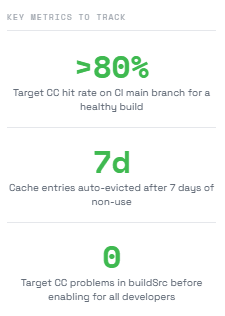
| 5 — Enable on CI | Enable CC on main branch CI; use read-only mode on PR builds (Gradle 9.1+) | CI pipeline | 1 day | CC hit rate >80% on main branch |
| 6 — Propagate to Devs | Enable CC globally in gradle.properties; monitor hit rates per developer machine | All developers | 1–2 weeks | P50 dev build time reduction |
The Isolated Projects Preview
Isolated Projects — Gradle’s next major performance feature, currently in incubation — builds on the configuration cache to enable fully parallel configuration of all projects simultaneously. It requires full configuration cache compatibility as a prerequisite. If you’re doing the migration work now, you’re not just optimising for today’s Gradle — you’re in the queue for a feature that will make 200-module configurations run in seconds rather than minutes.
7. What we’ve Learned
Gradle 9 makes the configuration cache the preferred execution mode, with Gradle 10 expected to make it mandatory. Configuration cache hits deliver 2× faster configuration times and, via parallel task execution and cached dependency resolution, meaningfully reduce total build times at scale. Gradle 9.1’s read-only CI mode solves the cache-overwrite problem on multi-branch pipelines.
Enterprise builds miss the cache for four distinct structural reasons: tasks or plugins holding live Project object references; Kotlin DSL tasks capturing top-level script function references; configuration-time access to volatile environment state (properties, env vars, files); and buildSrc/included-build churn invalidating the whole cache on every build logic change. Each requires a different fix — DTOs and Provider API for the first two, input suppression or ValueSource for the third, and publishing convention plugins as proper Maven artifacts for the fourth.
The most important operational insight: treat cache hit rate as a first-class build metric. Silent graceful degradation in Gradle 9 means you can have a fully incompatible build running without a single error, getting zero cache benefit, with no one knowing until they look at Develocity data. Instrument it. Gate on it. The migration is a multi-week project, but it compounds — every plugin fixed benefits every developer and every CI build that runs those tasks from that day forward.