
- Jquery DataTables is a open source plugin for creating tables in browser.
- It has many features like sorting,server side processing, JQUERY UI theme rolling.
- The download link for this plugin:
- In this demo we have shown integration of data table with java.The Data table will load the data by making an Ajax call to load all the data.
- The response data must contain ‘aaData’ properties.
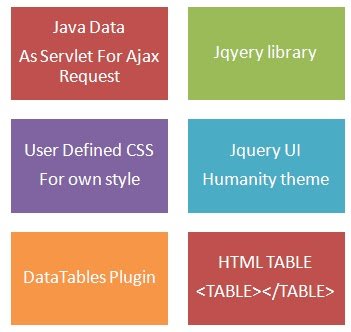
- The main components in this demo are :
- The Static data StudentDataService.java ,
http://www.datatables.net/download/
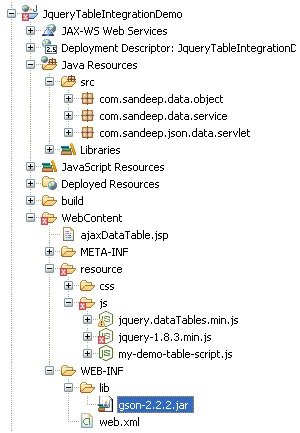
Project Structure:
Integration With Java :
package com.sandeep.data.service;

import java.util.ArrayList;
import java.util.List;
import com.sandeep.data.object.Student;

public class StudentDataService {

 public static List<student> getStudentList() {

  List<student> listOfStudent = new ArrayList<student>();

  Student aStudent = new Student();

  for (int i = 1; i <= 200; i++) {

   aStudent = new Student();

   aStudent.setName('Sandeep' + i);

   aStudent.setMark('20' + i);

   listOfStudent.add(aStudent);
  }

  return listOfStudent;

 }
}
package com.sandeep.data.object;

import java.util.List;

public class DataTableObject {

 int  iTotalRecords;

 int  iTotalDisplayRecords;

 String  sEcho;

 String sColumns;

 List<student> aaData;

 public int getiTotalRecords() {
  return iTotalRecords;
 }

 public void setiTotalRecords(int iTotalRecords) {
  this.iTotalRecords = iTotalRecords;
 }

 public int getiTotalDisplayRecords() {
  return iTotalDisplayRecords;
 }

 public void setiTotalDisplayRecords(int iTotalDisplayRecords) {
  this.iTotalDisplayRecords = iTotalDisplayRecords;
 }

 public String getsEcho() {
  return sEcho;
 }

 public void setsEcho(String sEcho) {
  this.sEcho = sEcho;
 }

 public String getsColumns() {
  return sColumns;
 }

 public void setsColumns(String sColumns) {
  this.sColumns = sColumns;
 }

 public List<student> getAaData() {
  return aaData;
 }

 public void setAaData(List<student> aaData) {
  this.aaData = aaData;
 }


}
package com.sandeep.json.data.servlet;

import java.io.IOException;
import java.io.PrintWriter;
import java.util.List;
import javax.servlet.ServletException;
import javax.servlet.http.HttpServlet;
import javax.servlet.http.HttpServletRequest;
import javax.servlet.http.HttpServletResponse;
import com.google.gson.Gson;
import com.google.gson.GsonBuilder;
import com.sandeep.data.object.DataTableObject;
import com.sandeep.data.object.Student;
import com.sandeep.data.service.StudentDataService;

public class StudentDataServlet extends HttpServlet {

 private static final long serialVersionUID = 1L;

 public StudentDataServlet() {
  super();
 }

 protected void doGet(HttpServletRequest request,
   HttpServletResponse response) throws ServletException, IOException {

  response.setContentType('application/json');
  PrintWriter out = response.getWriter();
  List<Student> lisOfStudent = StudentDataService.getStudentList();

  DataTableObject dataTableObject = new DataTableObject();
  dataTableObject.setAaData(lisOfStudent);

  Gson gson = new GsonBuilder().setPrettyPrinting().create();
  String json = gson.toJson(dataTableObject);
  out.print(json);

 }

 protected void doPost(HttpServletRequest request,
   HttpServletResponse response) throws ServletException, IOException {

  doGet(request, response);
 }

}
<%@ page language='java' contentType='text/html; charset=ISO-8859-1'
    pageEncoding='ISO-8859-1'%>
<!DOCTYPE html PUBLIC '-//W3C//DTD HTML 4.01 Transitional//EN' 'http://www.w3.org/TR/html4/loose.dtd'>
<html>
<head>
<meta http-equiv='Content-Type' content='text/html; charset=ISO-8859-1'>
<title>Ajax Data Response And JQuery data table</title>

<style type='text/css' title='currentStyle'>
   @import './resource/css/demo_table_jui.css';
   @import './resource/css/jquery-ui-1.9.2.custom.min.css';
</style>
<style>
.table-container{
 width:800px;
}
tr.odd{
background: #EDE4D4 !important;
}
tr.odd td.sorting_1{
background: #EDE4D4 !important;
}
tr.even td.sorting_1{
background: #fff !important;
}
</style>

</head>
 <body>
 <div class='table-container'>
    <table  cellpadding='0' cellspacing='0' border='0'  class='display jqueryDataTable'>
   <thead>
    <tr>
       <th>Name</th>
     <th>Mark</th>
    </tr>
   </thead>
   <tbody>
   </tbody>
   </table>
   </div>
   <script src='./resource/js/jquery-1.8.3.min.js'></script>
   <script src='./resource/js/jquery.dataTables.min.js'></script>
   <script src='http://code.jquery.com/ui/1.9.2/jquery-ui.js'></script>
   <script src='./resource/js/my-demo-table-script.js'></script>
 </body>
</html>
$(document).ready(function() {

    $('.jqueryDataTable').dataTable( {
        'bProcessing': false,
        'bServerSide': false,
        'sAjaxSource': './StudentDataServlet',
        'bJQueryUI': true,
        'aoColumns': [
            { 'mData': 'name' },
            { 'mData': 'mark' }

        ]
    } );
} );
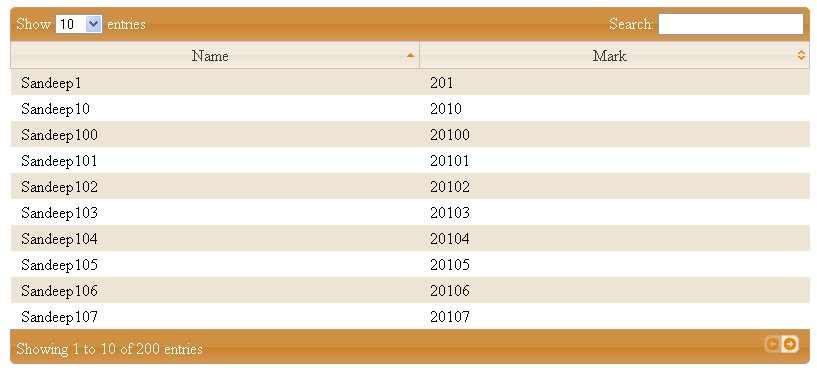
Output:
The output of integrated table will be:
Video:
Download Demo Code:
demo code download link
Reference: JQuery DataTables And Java Integration from our JCG partner Sandeep Kumar Patel at the My Small Tutorials blog.







Holy Crap!!! This actually works!! Thanks!
if the web page loads data from different tables of a database as rows. how could i drag and drop rows from one table to another in web page so that it updates in database also.How i could i do this
non ho capito il problema
What is the need of DataTableObject.java here?
nice concise article. Exactly what I was looking for. Thanks.
Nice article, it is work, and easy understand.
May I know how to enhanced this datatable to have button edit, create & delete for the rows ?