
Tools Used:
- Spring MVC 3.0.3
- JQuery 1.4.2
- Jackson 1.5.3
- How to validate form data using Ajax in Spring MVC with the help of JQuery?
- and how send back list of objects to Ajax call as response ?
package com.raistudies.domain;public class User {

    private String name = null;
    private String education = null;

    public String getName() {
        return name;
    }
    public void setName(String name) {
        this.name = name;
    }
    public String getEducation() {
        return education;
    }
    public void setEducation(String education) {
        this.education = education;
    }
 }
There are two fields in our User domain object name and education.
Ajax response domain class for sending JSON response
Following is the domain object that will we use to send response:
package com.raistudies.domain;

public class JsonResponse {
        private String status = null;
        private Object result = null;
        public String getStatus() {
                return status;
        }
        public void setStatus(String status) {
                this.status = status;
        }
        public Object getResult() {
                return result;
        }
        public void setResult(Object result) {
                this.result = result;
        }

}
It contain two properties, “status” and “result”. “status” field is of type String and will contain “FAIL” or “SUCCESS”. “result” will contain the other data that are to be send back to the browser.
UserController.java
package com.raistudies.controllers;

import java.util.ArrayList;
import java.util.List;

import org.springframework.stereotype.Controller;
import org.springframework.ui.ModelMap;
import org.springframework.validation.BindingResult;
import org.springframework.validation.ValidationUtils;
import org.springframework.web.bind.annotation.ModelAttribute;
import org.springframework.web.bind.annotation.RequestMapping;
import org.springframework.web.bind.annotation.RequestMethod;
import org.springframework.web.bind.annotation.ResponseBody;

import com.raistudies.domain.JsonResponse;
import com.raistudies.domain.User;

@Controller
public class UserController {
        private List<User> userList = new ArrayList<User>();

        @RequestMapping(value="/AddUser.htm",method=RequestMethod.GET)
        public String showForm(){
                return "AddUser";
        }

        @RequestMapping(value="/AddUser.htm",method=RequestMethod.POST)
        public @ResponseBody JsonResponse addUser(@ModelAttribute(value="user") User user, BindingResult result ){
                JsonResponse res = new JsonResponse();
                ValidationUtils.rejectIfEmpty(result, "name", "Name can not be empty.");
                ValidationUtils.rejectIfEmpty(result, "education", "Educatioan not be empty");
                if(!result.hasErrors()){
                        userList.add(user);
                        res.setStatus("SUCCESS");
                        res.setResult(userList);
                }else{
                        res.setStatus("FAIL");
                        res.setResult(result.getAllErrors());
                }

                return res;
        }

}
<%@ page language="java" contentType="text/html; charset=ISO-8859-1"
    pageEncoding="ISO-8859-1"%>
<!DOCTYPE html PUBLIC "-//W3C//DTD HTML 4.01 Transitional//EN" "http://www.w3.org/TR/html4/loose.dtd">
<html>
<head>
<meta http-equiv="Content-Type" content="text/html; charset=ISO-8859-1">
<title>Add Users using ajax</title>
<script src="<%=request.getContextPath() %>/js/jquery.js"></script>
<script type="text/javascript">
        var contexPath = "<%=request.getContextPath() %>";
</script>
<script src="<%=request.getContextPath() %>/js/user.js"></script>
<link rel="stylesheet" type="text/css" href="<%=request.getContextPath() %>/style/app.css">
</head>
<body>
<h1>Add Users using Ajax ........</h1>
        <table>
                <tr><td colspan="2"><div id="error" class="error"></div></td></tr>
                <tr><td>Enter your name : </td><td> <input type="text" id="name"><br/></td></tr>
                <tr><td>Education : </td><td> <input type="text" id="education"><br/></td></tr>
                <tr><td colspan="2"><input type="button" value="Add Users" onclick="doAjaxPost()"><br/></td></tr>
                <tr><td colspan="2"><div id="info" class="success"></div></td></tr>
        </table>
</body>
</html>
The jsp page includes a js file user.js that has been used for holding the definition of the JavaScript method doAjaxPost() which produces the ajax class and also use the response of the Ajax call to dynamically update the page data.
user.js
Following is the code for ajax class and interpreting the response received from Spring MVC controller:
function doAjaxPost() {
    // get the form values
    var name = $('#name').val();
    var education = $('#education').val();

    $.ajax({
        type: "POST",
        url: contexPath + "/AddUser.htm",
        data: "name=" + name + "&education=" + education,
        success: function(response){
            // we have the response
            if(response.status == "SUCCESS"){
                userInfo = "<ol>";
                for(i =0 ; i < response.result.length ; i++){
                    userInfo += "<br><li><b>Name</b> : " + response.result[i].name +
                    ";<b> Education</b> : " + response.result[i].education;
                 }
                 userInfo += "</ol>";
                 $('#info').html("User has been added to the list successfully. " + userInfo);
                 $('#name').val('');
                 $('#education').val('');
                 $('#error').hide('slow');
                 $('#info').show('slow');
             }else{
                 errorInfo = "";
                 for(i =0 ; i < response.result.length ; i++){
                     errorInfo += "<br>" + (i + 1) +". " + response.result[i].code;
                 }
                 $('#error').html("Please correct following errors: " + errorInfo);
                 $('#info').hide('slow');
                 $('#error').show('slow');
             }
         },
         error: function(e){
             alert('Error: ' + e);
         }
    });
}
$.ajax() method of JQuery has been used for making an Ajax call here which sends the form data name and education field values to Spring Controller. On success of the Ajax call, it first checks the status field of the response. Note that, the response object here is the JSON representation of the JsonResponse java object.
If the status field of the response is “SUCCESS” then it iterates through the user list using the notation response.result[i] , note that the list object of java is converted to json array by Jackson library.
If the status is “FAIL” the the result object will contain the validation errors which we can access using the notation response.result[i].code , here the code will return error message added in Spring controller.
While running the example in tomcat 6 server, it will open following form :
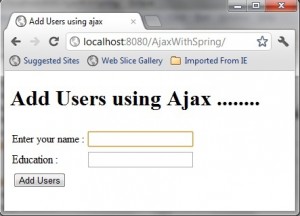 |
| Ajax Validation Form |
Just click on the “Add Users” button without entering any value, it will show errors for the field as shown in the bellow image:
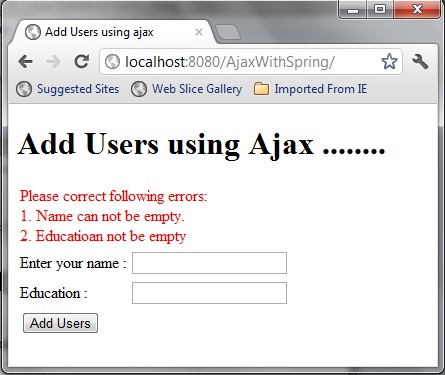 |
| Ajax Validation Show Error in Page |
Now enter any name and education and click on the “Add Users” button. It will add the user detail to list and also show the info of the whole user list on the page :
 |
| Ajax Validation with Spring MVC and JQuery Success Page |
You can also try the example by downloading the example from bellow links:
Source: Download
Source + Lib :Download
Reference: Ajax Form Validation using Spring MVC and JQuery from our JCG partner Rahul Mondal at the Rai Studies blog.







wow this sample is great form
thank you~~!
i like the idea creating JsonResponse class
Very nice sample, thank you…
But i have a question.
The sample worked perfectly on Spring MVC 3.0.3 (With the jars in project) but when i try using Spring MVC 3.2.2, I get the Error 406 “The resource identified by this request is only capable of generating responses with characteristics not acceptable according to the request “accept” headers”.
As i am very new to these concepts, I may be missing something, Could you please explain why it is working in SPRING MVC3.0.3 and not working in SPRING MVC 3.2.2?
Great Post, Thank you..
It works perfectly on Spring 3.0.3, but when i try to use SPRING 3.2.2 , I am getting Error with code 406, “The resource identified by this request is only capable of generating responses with characteristics not acceptable according to the request “accept” headers”
As i am new to these concepts, I may be missing somewhere, Could you please explain a bit why this sample is not working in Spring 3.2.2?
Hello. I have a any question about Jquery. I am using your sample. But it not properly operate when use the various object name defined upper case . So i wanna get the solution about this problem. please refer below example. below sample return “undefined”. but it return valid value when i written lower case in case of “private String status= null;” in JsonResponse. ex) public class JsonResponse { private String STATUS= null; public String getSTATUS() { return STATUS; } public void setSTATUS(String STATUS) { this.STATUS= STATUS; } } ===================================================== function doAjaxPost() { var name = $(‘#name’).val(); var education =… Read more »
I am getting 406 (Not Acceptable) …Please help me out in this..
how spring controller return data to html using ajax, java script and knouckout js
I am retruning modelandview object
is it possible somehow to send the BindingResult directly to spring form via ajax so all the errors would populate automatically?